11
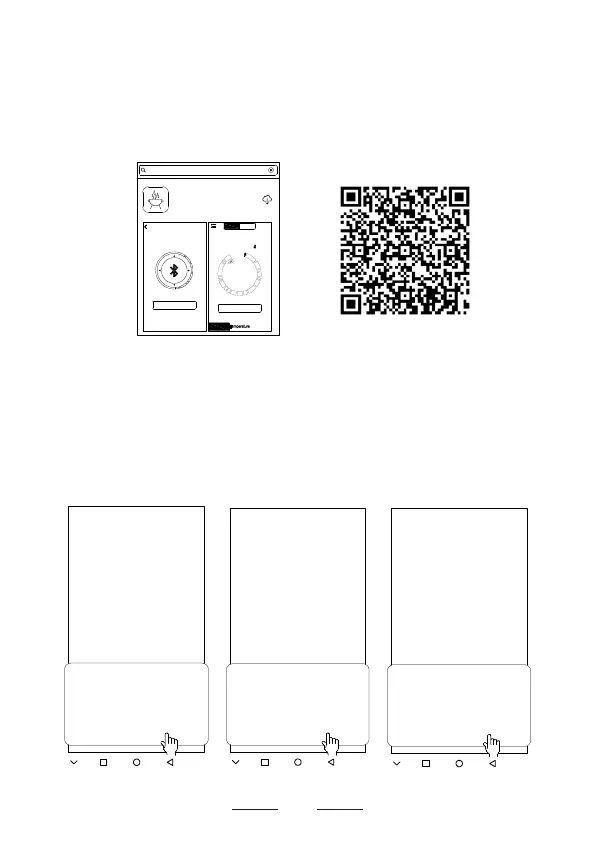
● Go to Google Play Store to search the keyword
"SmartThermo2"
as shown on screen (d), or scan the
following QR Code on screen (e) with your phone to
download the app.
(f)
NOTE:
When you download and open the app for the rst time,
it will show up 3 different question screens as shown
on screen (f). You should click the “ALLOW” for all the
3 permissions, or the thermometer will not pair with the
app successfully.
SmartThermo2 requires the Storage
permission.
Never ask again after denying permission
DENY ALLOW
SmartThermo 2
SmartThermo2 requires the Camera
permission.
Never ask again after denying permission
DENY ALLOW
SmartThermo 2
SmartThermo2 requires the Your location
permission.
Never ask again after denying permission
DENY ALLOW
SmartThermo 2
(d)
(e)
Pair
Search
Start
Channel2
Time: 00m 00s
Timer
Profile
Beef
Well Done
77°C
_ _ _ °C
2
SmartThermo2
Fuzhou Emax Electronic Co.,Ltd
smartthermo2
Channel1
Profile


 To Next Page