4
Function
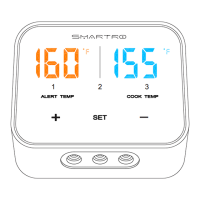
Button
Function Descriptions
<SET>
Short press [SET] button to power on.
Short press [SET] button to enter alarm temperature
setting state.
Short press [SET] button to conrm setting.
Long press the [SET] button to power off.
<+>
Short press [+] button to choose measurement
channels.
After you insert probes into probe sockets and short
press SET button to enter temperature setting state,
short press [+] button to increase the alarm parameters,
long press [+] button to quickly increase alarm
parameters.
< - >
After you insert probes into probe sockets and short
press SET button to enter temperature setting state,
short press [-] button to decrease alarm parameters,
long press [-] button to quickly decrease the alarm
parameters.
°C/°F
Press °C/°F conversion button with a probe to select °C
or °F temperature mode.


 To Next Page