Doc. no. AMX-OMU0058-C
-17-
7. Assembly and replacement procedure
【Nominal No. of the tool】
Body size
Bolt
Auto drain
Lock nut
Nominal
size
Size
Width across
flats
70D 6 M8
24 80D
8 M10
90D
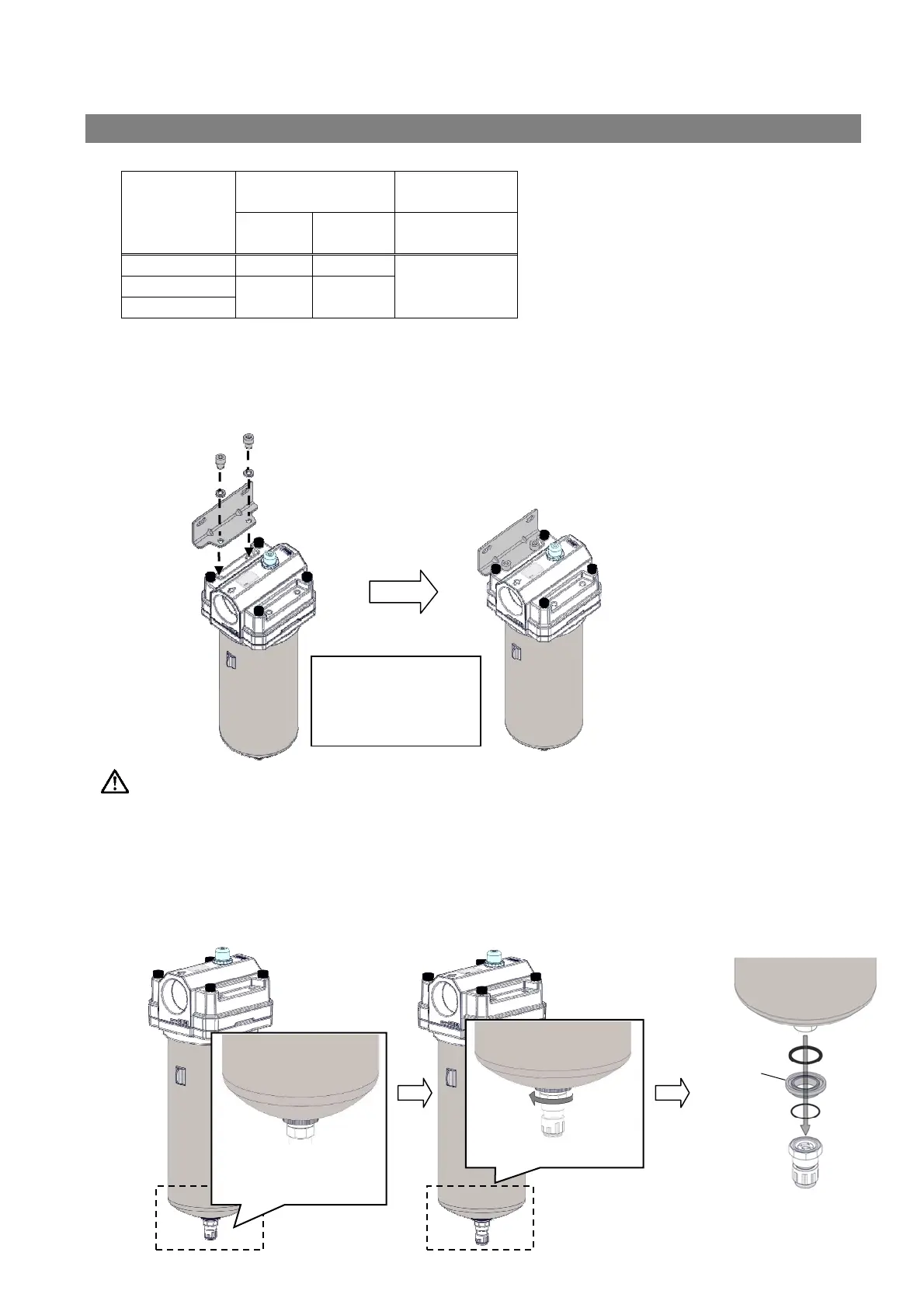
7-1. Bracket assembly
A) Mount the bracket to the product.
B) Mount a washer to the 2 mounting bolts respectively, and hold the bracket to the product.
Tightening torque is 6.2N・m for 70D, and 12.5 N・m for 80D and 90D.
Warning
Be sure to set the pressure to zero before work.
7-2. Auto drain replacement
* Auto drain (MAX.1.6MPa) cannot be replaced.
A) Rotate the drain cock counterclockwise by hand and loosen it until it rotates freely.
B) Apply a spanner or monkey wrench to the lock nut and rotate it counterclockwise. Then remove
the lock and drain port spacer.
【Tightening torque】
70D 6.2N
・
m
80D 12.5N
・m
90D 12.5N
・m
A), B)
Rotate it to “O”
direction by hand.
A)
Rotate the lock nut.
Drain port
spacer
B)


 To Next Page