User instructions
9
CANCELLING THE CURRENT PROGRAM
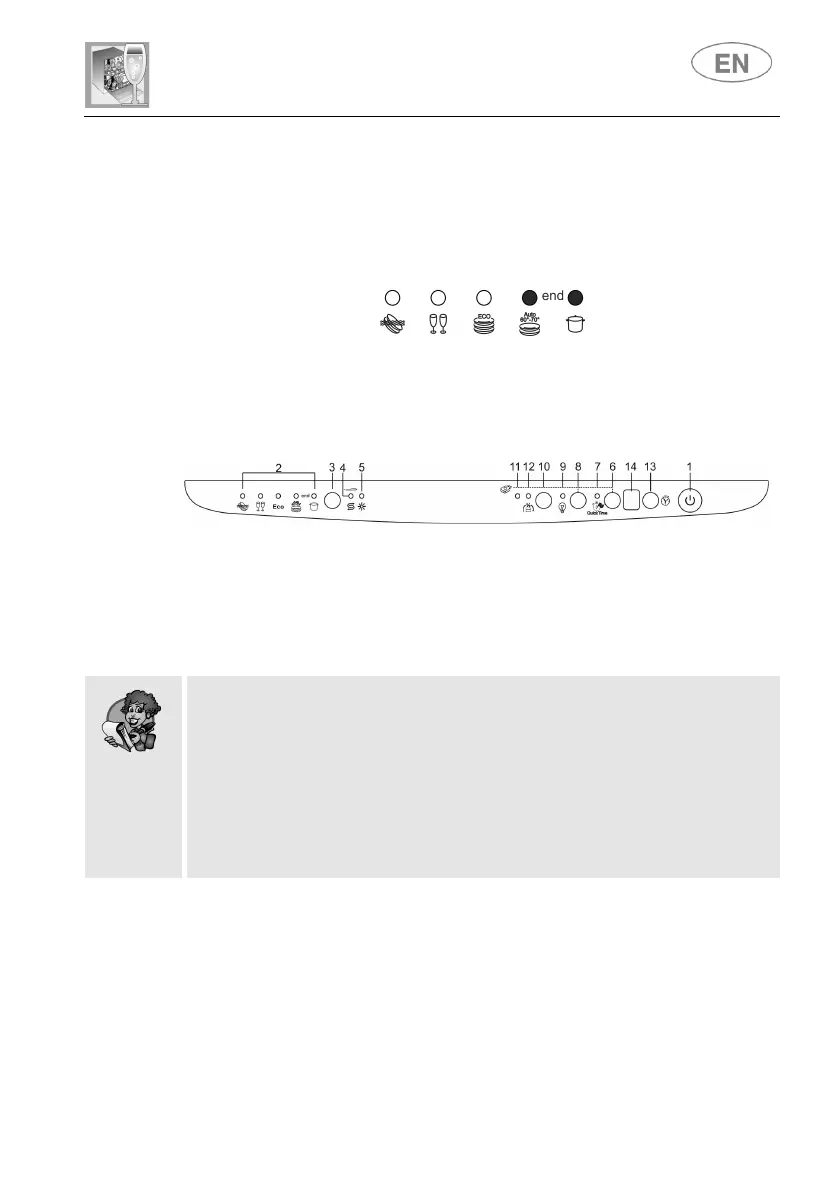
• To cancel the currently selected program, open the door and hold
down the PROGRAM SELECTION (3) button for a few seconds
until the indicator lights for programs 4 and 5 illuminate
simultaneously (the word "end" is displayed on the window).
• Close the door.
• After approximately 1 minute the dishwasher will advance to the end
of cycle.
To change the program in progress, simply open the door and select a
new program. When the door is closed the dishwasher will automatically
select the new program.
TO SAVE ON ENERGY! … AND PROTECT THE ENVIRONMENT
• Always try to run the dishwasher fully loaded.
• Do not wash the dishes in running water.
• Use the washing program that is most appropriate for each type of
load.
• Do not carry out any preliminary rinsing.
• If available, connect the dishwasher to a hot water supply up to 60°C.
• Use the ENERSAVE option.


 To Next Page