Use
31
3.2 First use
1. Plug the appliance into an electrical
outlet.
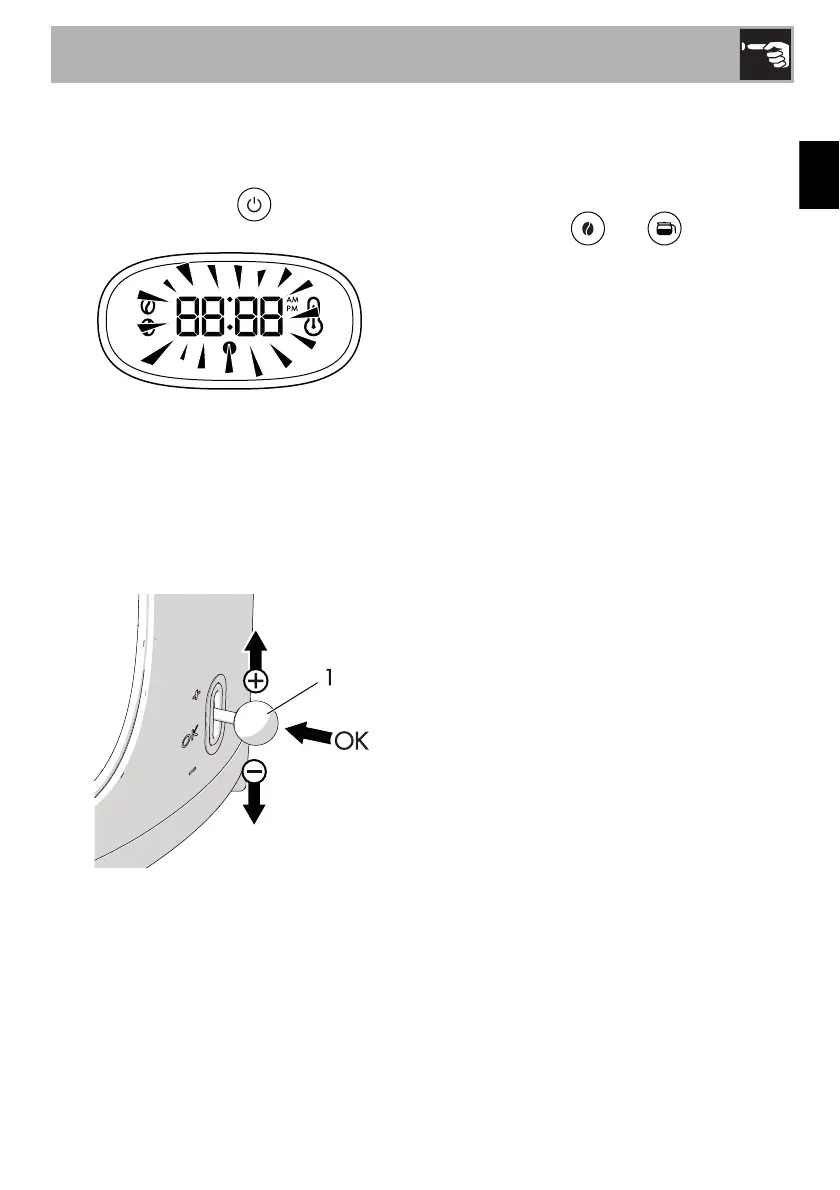
2. Press the ON/OFF button. The
symbols on the display flash.
3. Set the time using the lever (1).
4. Set the hour by moving the lever up (+) to
increase the value or down (-) to
decrease it.
5. Confirm the setting by placing the lever in
the central position and pressing it (OK):
the appliance will emit a beep.
6. Set the minutes following the same
procedure.
7. After confirming the minutes setting, the
appliance emits a beep and activates
the CLOCK mode.
Setting the water hardness
Set the water hardness by selecting one of
the three available levels: HARD, MEDIUM
and SOFT.
1. Keep buttons and pressed
simultaneously for 3 seconds: HA03
appears on the display.
2. Move the lever up (+) or down (-) to set
the level required: HA01 (soft), HA02
(medium) and HA03 (hard).
3. Confirm the setting by placing the lever in
the central position and pressing it (OK):
the appliance will beep to confirm the
required level has been set.


 To Next Page