22 / 68 EN
Dryer / User Manual
Operating the product
5.10 Operating the machine
The preferred Steam program is selected. After filling
the steam tank, amount of steam will be determined
based on amount of laundry. To do that, use the button
to select amount of steam.
Antipiega
Intensità /
Durata
Selecting any Steam program will show the amount
of time maximum amount of steam will be applied on
the screen. If the button is pressed once, the amount of
time for medium level of steam will be shown, and if it is
pressed twice, the amount of time for minimum level of
steam will be shown. If the button pressed once more,
it will redirect you to the amount of time for maximum
level of steam.
Place appropriate amount and type of laundry in the
machine.
Push Start/Pause button to run the machine:
Note: Do not open the door when steam programs are
on. Hot water may be expelled.
C
The steam programs for preparing for
ironing will deliver the laundry wet for
ease of ironing. It is not suitable to wear.
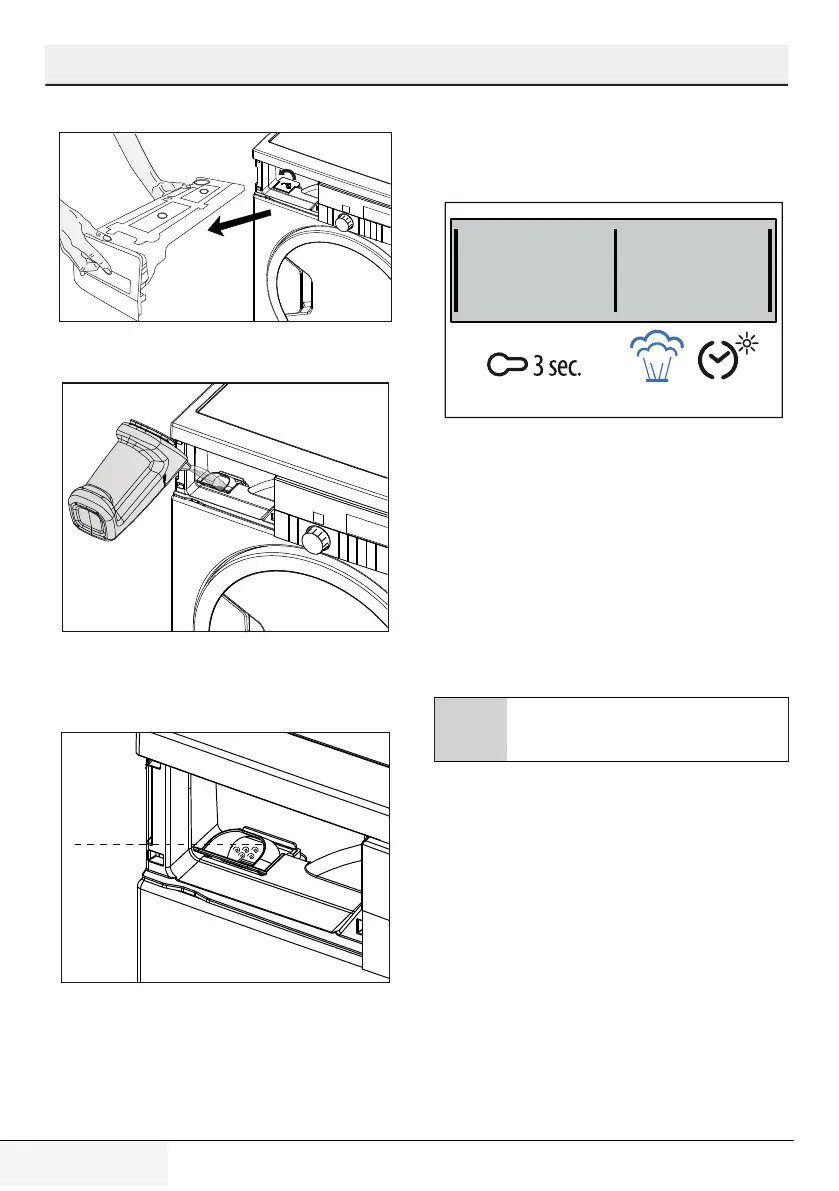
4. Pull the water tank out.
5. Lift the cap of the steam tank as shown.
6.Use the filling vessel filled with distilled water or
condensed water to fill the steam tank.
7.Once enough water is filled, the warning icon on the
screen will go off. In this case, at least one circulation
steam program can be used. You may fill water until
water level rises up to steam tank filling outlet.
Max
8.Close the outlet of the filling outlet of the steam tank
and replace the water tank into the socket.
Note: If the steam tank is empty, then the warning icon
will flash and the program will not run.



 To Next Page