Use
41
EN
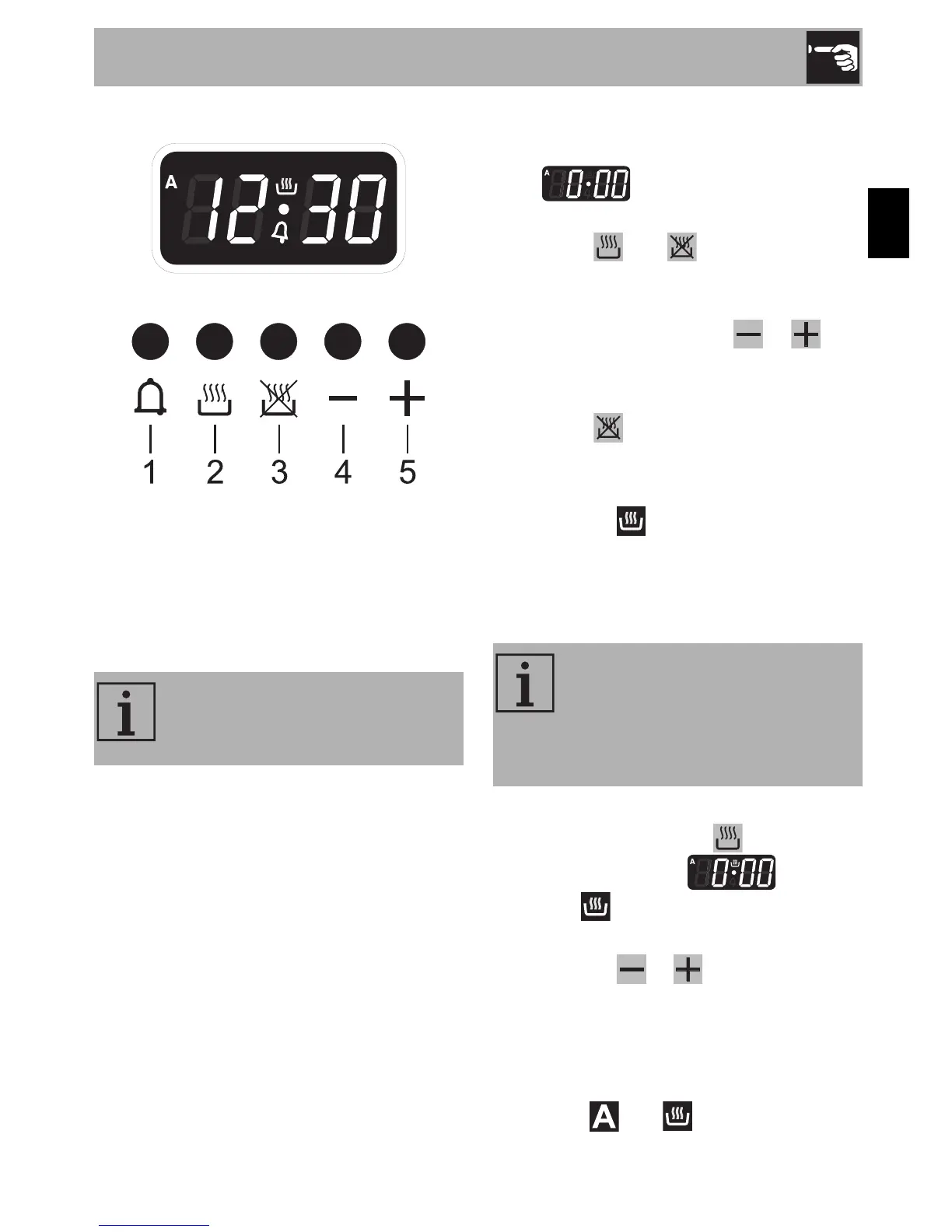
3.6 Programmer clock
1 Minute minder timer key
2 Cooking duration key
3 End of cooking key
4 Value decrease key
5 Value increase key
Setting the time
On the first use, or after a power failure, the
digits will be flashing on the
appliance's display.
1. Press the and keys at the same
time. The dot between the hours and the
minutes flashes.
2. The time can be set using or .
Keep the key pressed in to increase or
decrease rapidly.
3. Press the key or wait 5 seconds. The
dot between the hours and the minutes
stops flashing.
4. The symbol on the display indicates
that the appliance is ready to start
cooking.
Timed cooking
1. After selecting a cooking function and
temperature, press key . The display
will shows the digits and the
symbol displayed between the hours
and the minutes.
2. Use the key or to set the required
minutes.
3. Wait approx. 5 seconds without pressing
any key in order for the function to
activate. The current time and the
symbols and will appear on the
display.
The programmer clock controls
exclusively the main oven and has
not any control on the other ovens.
Timed cooking is the function
which allows a cooking operation
to be started and then ended after
a specific length of time set by the
user.


 To Next Page