183000
CONTROL UNIT II
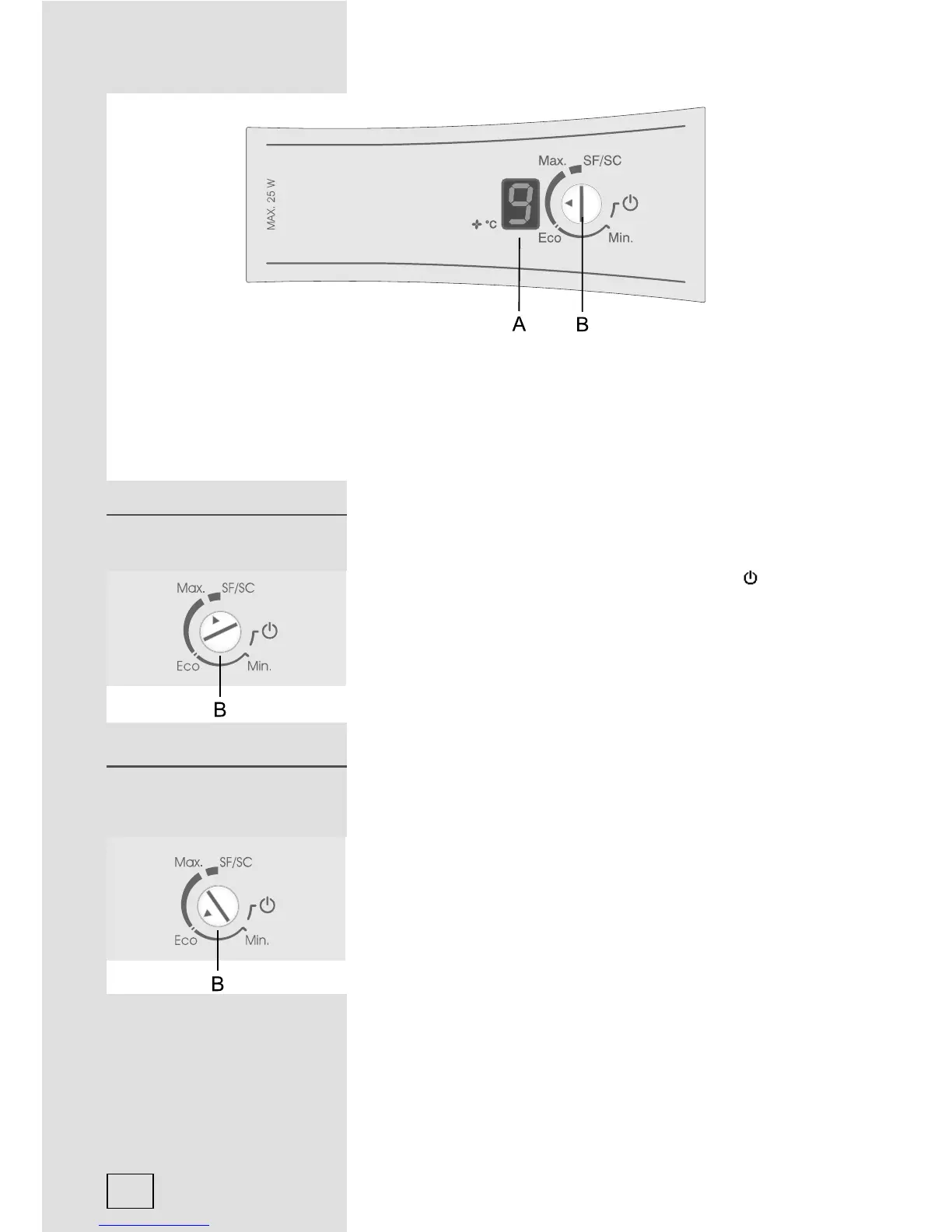
A Digital temperature display (certain models only) of the refrigerator indicates actual
temperatures during the operation from +1°C to +9°C.
B ON/OFF and temperature setting button
C Orange LED: illuminated during fan operation (knob D).
D Fast freeze fan activation knob
The appliance is switched on by turning the button (B) towards
Max, and accordingly switched off when the arrow (small
triangle) on the button points to the ON/OFF mark
(the
appliance, however, is still under mains power).
• Temperature of the appliance is set by turning the button (B) to
the position between the Min and Max span.
• Recommended setting of the thermostat knob is to ECO
position.
• In case of exceptionally higher ambient temperatures it is
recommended to switch the fan operation at high speed by
pressing button (D) – only for models featuring control panel 1.
• SF/SC position
- SF position stands for “Super frost” and indicates fast
freezing (certain models only).
- SC position stands for “Super cool” and indicates fast
cooling (certain models only).
ON/OFF button ON/OFF button
Refrigerator temperature
setting
Refrigerator temperature
setting
8



 To Next Page