Use
16
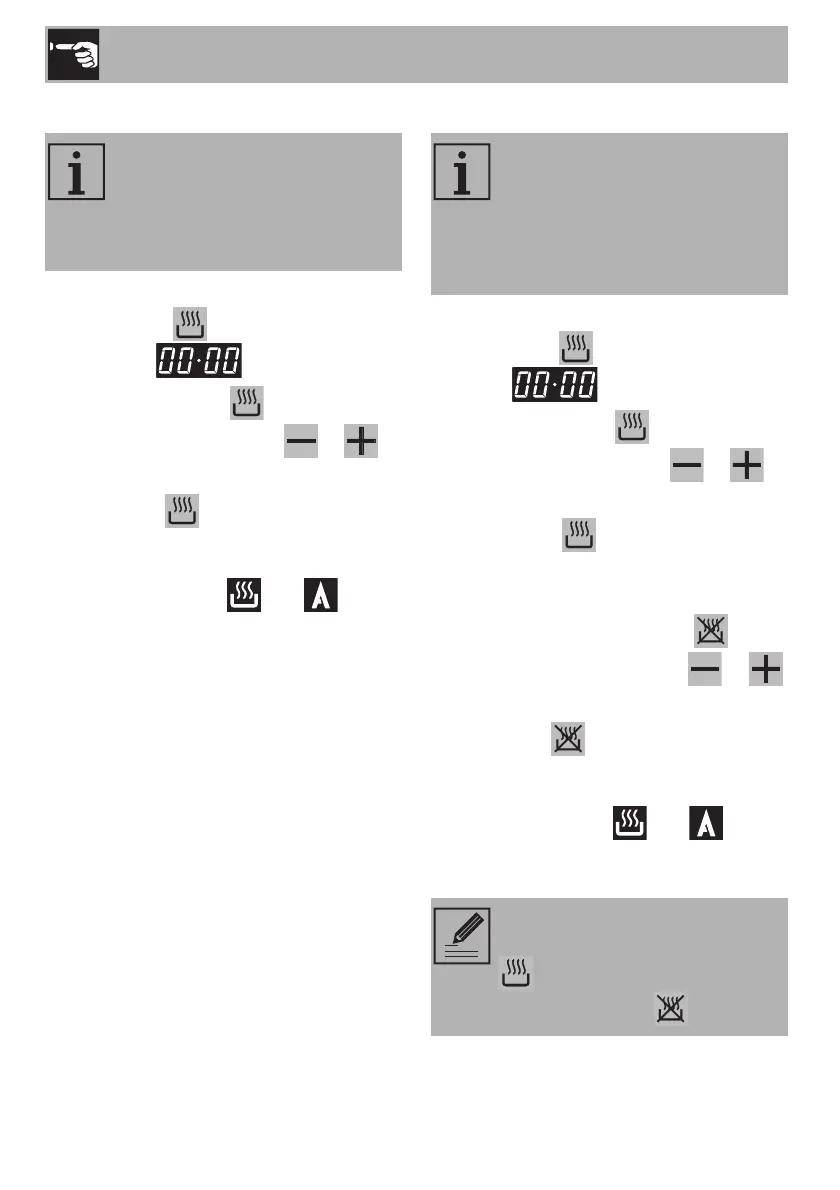
Timed cooking
1. Having selected a function, press and
hold the key . The display will show
the figures .
2. Hold down the key and
simultaneously use the key or to
set the required number of minutes.
When the key is released, the count of
the programmed cooking duration will start
and the display will indicate the current time
together with symbols and (to
indicate that a programmed cooking
operation has been set).
Programmed cooking
1. Having selected a function, press and
hold the key . The display shows the
figures .
2. Hold down the key and
simultaneously use the key or to
set the required number of minutes.
3. Press the key . The sum of the current
time plus the preset cooking duration will
appear on the display.
4. Press and hold down the key and
simultaneously press the key or
to set the cooking end time.
When the key is released, the
programmed cooking process will start and
the display will show the current time
together with symbols and A (to
indicate that a programmed cooking process
has been set).
Timed cooking is the function
which allows a cooking operation
to be started and then ended after
a specific length of time set by the
user.
Programmed cooking is the
function which allows a cooking
operation to be started at a set
time and then ended after a
specific length of time set by the
user.
After the setting, to display the
cooking time left press the key
. To display the end of cooking
time, press the key .


 To Next Page