Use
65
EN
3.6 Settings menu
The settings menu allows you to modify
some of the operating characteristics of the
appliance and allows you to
With the appliance switched on, press the
button to access the settings menu.
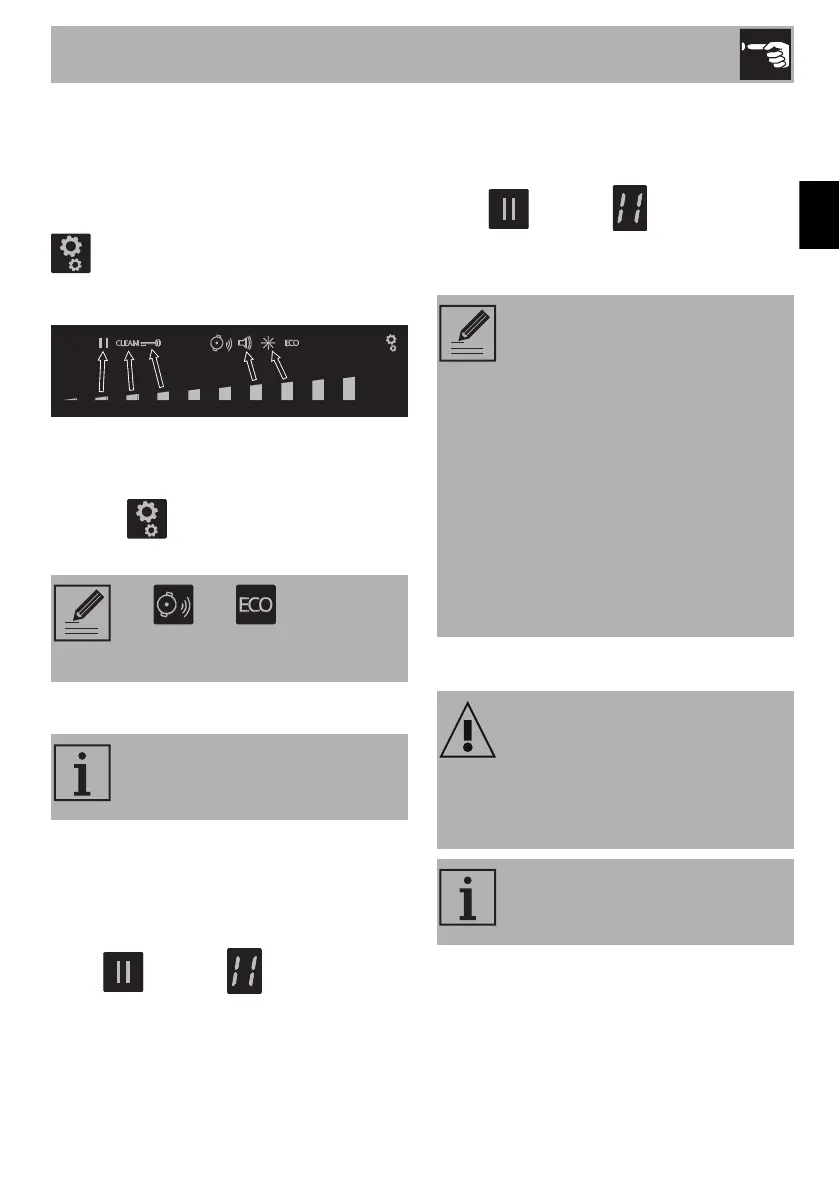
The scroll bar and all the icons of the
settings that can be modified appear:
Individual settings can be selected using the
segment of the scroll bar that is most directly
below it.
Press the button again to exit from the
menu.
Pause function
To activate the Pause function:
1. Switch on at least one cooking zone.
2. Access the settings menu.
3. Press the segment of the scroll bar below
the icon. The symbol appears
on the cooking zone displays.
To deactivate the Pause function:
1. Access the settings menu.
2. Press the segment of the scroll bar below
the icon. The symbols
disappear and the appliance resumes
the previous functions.
Clean Function
The and icons refer to
functions that can only be modified
via the user menu.
This function pauses the operation
of all the cooking zones and the
timer.
• The cooking time limitation, the
residual heat indicators and the
control lock function remain
enabled during the Pause
function.
• The pause function can be
maintained for a maximum of 10
minutes, after which the
appliance switches off.
• When the power comes back
on after a power failure, the
pause function will be
deactivated.
Improper use
Danger of burns
• When this function is active, take extra
care when removing dirt if the glass
surface is hot.
This function pauses the appliance
for 15 seconds, during which it is
possible to remove dirt or stains.



 To Next Page