User instructions
3. Description of the controls
3.1 Upper panel
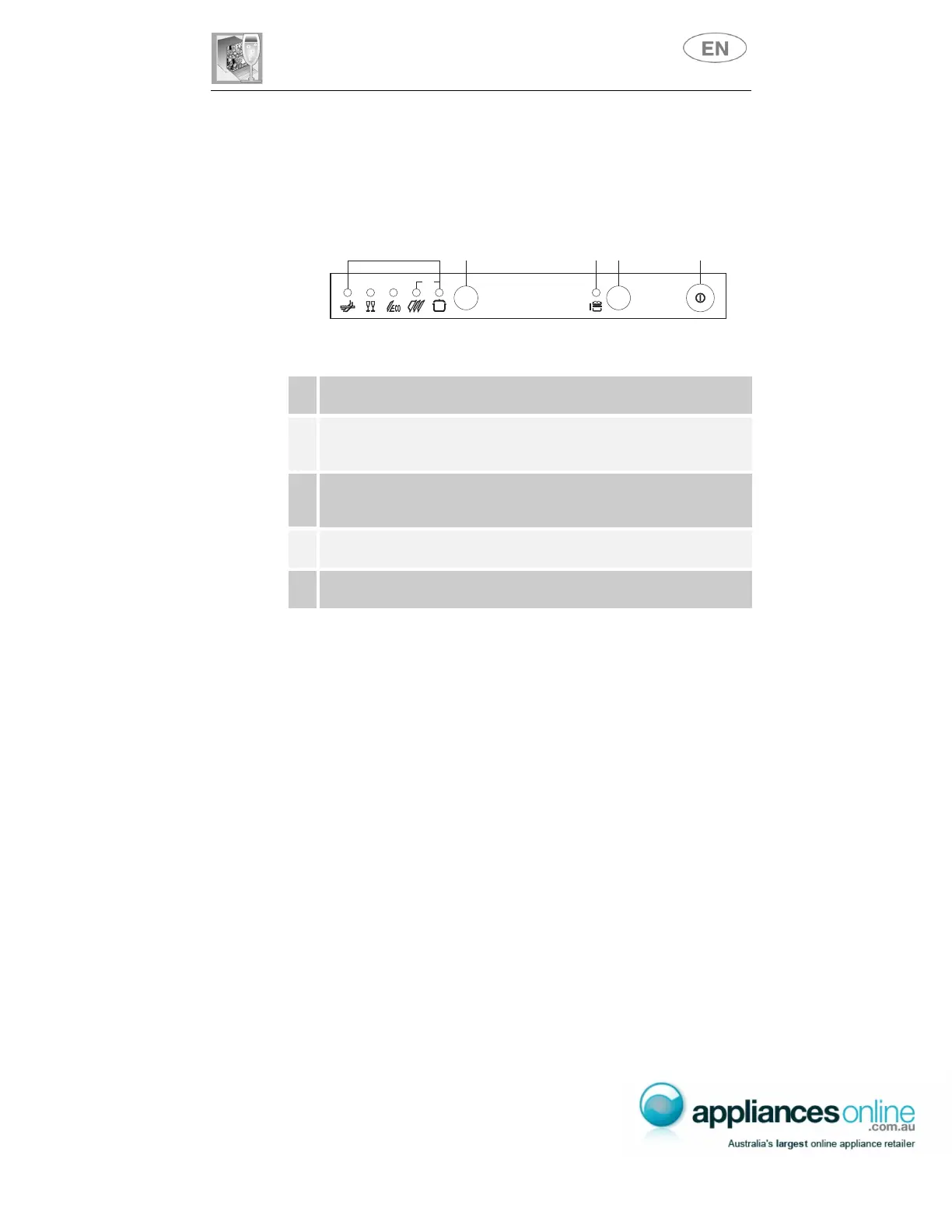
All the dishwasher controls are grouped on the upper panel. Switch-on,
programming, switch-off etc. procedures are only possible when the door
is open.
1
ON/OFF BUTTON
Pressing this button energises the appliance.
2
SELECTED PROGRAM INDICATOR LIGHTS
Illumination of this light denotes the program selected and the occurrence of
a fault (troubleshooting).
3
PROGRAM SELECTION BUTTON
By pressing this button in sequence it is possible to select the desired
program.
4
5
HALF LOAD BUTTON
Pressing this button selects the HALF-LOAD function.
HALF LOAD INDICATOR LIGHT
Illumination of the light indicates selection of the HALF-LOAD function.
SETTING THE WASHING PROGRAM AND SWITCHING ON
To select the most suitable program for the dishes to be washed refer to
the table below, which indicates the most appropriate program according
to dish type and degree of soiling.
end
1/2
14
5
32



 To Next Page