Need help?
Do you have a question about the Smith-Style Saturn and is the answer not in the manual?
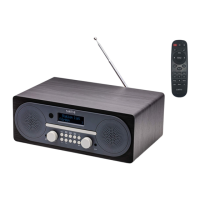
Identifies and describes the physical controls and ports on the radio unit.
Lists and explains the functions of each button on the remote control.
Provides instructions for handling, cleaning, and storing compact discs for optimal performance.
Step-by-step guide to setting the alarm timer, source, and volume.
Instructions on saving and recalling favorite DAB and FM radio stations.
Details on how to adjust the equalizer settings for treble and bass frequencies.
Steps for performing an automatic scan to find available DAB stations.
Instructions for automatically scanning and tuning into FM radio stations.
Guide on how to manually tune into specific DAB channels for better reception.
How to access and display detailed information about the current DAB broadcast.
Explains Dynamic Range Compression and how to remove unavailable DAB stations.
How to view station names, radio text, and other details for FM broadcasts.
Customizing radio scan behavior and audio output (stereo/mono).
Configure time, date, language, and display formats on the radio.
How to restore the radio to its original factory default settings.
Instructions to check the current firmware version of the radio.
How to play CDs, pause, stop, and adjust volume during playback.
Options for repeating tracks, shuffling, and normal playback.
Steps for playing music from a USB drive.
Pairing and connecting a mobile device via Bluetooth.
How to connect external audio devices via the AUX-IN port.
Details on power, frequency coverage, output, and speaker specifications.
Information on the aerial system and laser safety warnings.
Essential safety guidelines for using the apparatus.
Conditions requiring professional servicing and damage prevention.
Warnings against liquid contact and excessive heat exposure.
Information on environmentally responsible disposal of the product and batteries.
Tips for cleaning, storing, and maintaining the product for longevity.
Explains the warranty period, registration, and coverage terms.
Details of the guarantor and a disclaimer regarding damages and specifications.
Explains symbols related to product and battery recycling.
 General
| Brand | Smith-Style |
|---|---|
| Model | Saturn |
| Category | Radio |
| Language | English |

 To Next Page