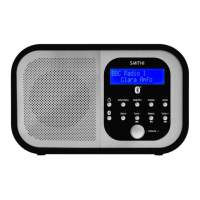
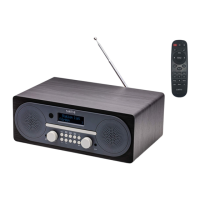
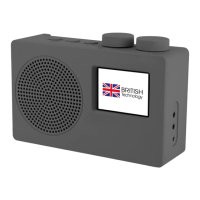
The Smith-Style Coppice DAB Radio is a portable digital and FM radio designed for home use, offering a blend of modern digital radio capabilities with user-friendly features and a classic aesthetic.
Function Description:
The primary function of this device is to provide access to DAB/DAB+ (Digital Audio Broadcasting) and FM (Frequency Modulation) radio stations. It allows users to tune into a wide range of radio programs with clear digital sound quality where available, and traditional FM broadcasts. The radio is designed for ease of use, featuring a clear display and intuitive controls for station selection, volume adjustment, and menu navigation. It supports automatic station scanning for both DAB and FM modes, as well as manual tuning for specific frequencies. The device also includes an alarm function, allowing it to be used as a bedside radio. For personalized listening, a headphone socket is provided. The radio can be powered by either an AC adapter for continuous use or C-size batteries for portability.
Important Technical Specifications:
- Radio Type: DAB+/FM Radio
- Power Supply:
- AC Input: 100-240V ~, 50-60Hz, 0.3A MAX
- DC Output: 6V, 1A
- Batteries: 4 x 1.5V C size batteries (not included)
- Frequency Ranges:
- FM: 87.5-108MHz
- DAB/DAB+: Band III, 174.928-239.200MHz
- Output Power: 2 x 1Wrms
- Dimensions (L x H x D): 261mm x 146mm x 92mm
- Working Temperature: 0-45°C
- Connectivity: DC socket, Headphone socket, Antenna (screw-in type)
- Display: Digital display for station information, time, and menu navigation.
- Controls: Dedicated buttons for Power, Mode, Info/Menu, Back, Preset 1, Preset 2, Tune -, Tune +, Volume/Enter.
Usage Features:
- DAB Mode:
- Selecting DAB Mode: Press the "Mode" button repeatedly until DAB mode is selected.
- Initial Scan: Upon first use, the radio automatically performs a full scan to find and store available DAB/DAB+ stations. Stations are listed alphabetically.
- Station Selection: Use "Tune -" or "Tune +" buttons to navigate through the station list, then press "Enter" to confirm.
- Scanning Stations: Press and hold "Info/Menu," then use "Tune -" or "Tune +" to select "Full scan," and "Enter" to initiate a scan for all available stations.
- Manual Tune: Press and hold "Info/Menu," select "Manual tune," then use "Tune -" or "Tune +" to select the desired frequency, and "Enter" to confirm.
- DRC (Dynamic Range Control): Adjusts the compression level to reduce differences in sound level between stations. Options include 'DRC high,' 'DRC low,' or 'DRC off.'
- Prune: Removes unavailable stations from the station list. Access through "Info/Menu," select "Prune," then confirm with "YES" and "Enter."
- Viewing Station Information: Repeatedly pressing the "Info/Menu" button cycles through various information such as DLS (Dynamic Label Segment), Ensemble, Program Frequency, Signal Quality, Signal Strength, Bitrate, Codec, Channel, and Date.
- FM Mode:
- Selecting FM Mode: Press the "Mode" button repeatedly until FM mode is selected.
- Frequency Range: Starts at 87.50MHz or the last listened station.
- Manual Tuning: Use "Tune -" or "Tune +" to change the frequency in 0.05MHz increments.
- Automatic Scan: Press and hold "Tune -" or "Tune +" for 3 seconds to automatically scan for the next available station.
- Scan Setting: Allows users to choose between stopping at "Strong stations only" or "All stations" during a scan, to improve signal quality for weak stations.
- General Operation:
- Setting Time/Date: Access through "Info/Menu" > "System" > "Time." Options include manual setup, auto update (from DAB or FM), 12/24 hour format, and date format (DD-MM-YYYY or MM-DD-YYYY).
- Setting Backlight: Adjusts the display backlight level. Access through "Info/Menu" > "System" > "Backlight." Options for 'On Level' and 'Dim Level' with settings like High, Medium, Low, and various timeout durations (10, 20, 30, 45, 60, 90, 120, 180 seconds). Default is 10 seconds.
- Setting Language: Change the menu language (default is English). Access through "Info/Menu" > "System" > "Language."
- Factory Reset: Resets all user settings, including time/date, preferences, DAB station list, and presets, to default values. Access through "Info/Menu" > "System" > "Factory Reset," then confirm with "YES."
- Software Version: Displays the current software version of the device. Access through "Info/Menu" > "System" > "SW version."
- Audio Settings: Allows selection of 'Forced mono' for weak FM stations to reduce hiss, accessible through "Info/Menu" > "Audio setting."
- Presets: Dedicated buttons (Preset 1, Preset 2) for quick access to favorite stations.
Maintenance Features:
- General Care:
- Keep the product dry and away from extreme temperatures (high or low) to prevent damage to circuitry and plastic parts.
- Avoid dusty or dirty environments.
- Do not use harsh chemicals, cleaning solvents, or detergents. Clean with a damp (not wet) soft cloth.
- Do not attempt to open the product, as this will void the warranty and may expose users to hazards.
- Power Supply: Only use the provided power supply to avoid invalidating the guarantee and potential damage.
- Antenna Adjustment: Unwind and screw the DAB/FM antenna to the socket on the back of the unit. Adjust its position, along with the radio's placement, to optimize signal reception.
- Battery Safety:
- Batteries should not be exposed to excessive heat.
- Replace batteries only with the same or equivalent type to avoid explosion risk.
- Keep batteries out of reach of children and seek immediate medical help if swallowed.
- Dispose of batteries at appropriate local recycling facilities, not with normal household waste.
- Never throw batteries in a fire or attempt to open their outer casing.
- Power Disconnection: For safety and energy saving, unplug the power adapter from the mains socket when the unit is unattended for long periods (e.g., overnight, on holiday).
- Service: Do not attempt self-service. All service work should be carried out by qualified technicians.
- Interference: If strong Electro-Magnetic Interference disturbs normal function, reset the product. If the function does not resume, try using the product in a different location.
- Warranty: The product comes with a 1-year guarantee against mechanical and electrical defects, with an additional 2 years available upon product registration within 30 days of purchase. The guarantee is subject to conditions such as correct installation, domestic use, and excludes accidental damage, misuse, and consumable items. It is rendered invalid if the product is re-sold or inexpertly repaired.

 Need help?
 General

 To Next Page