5
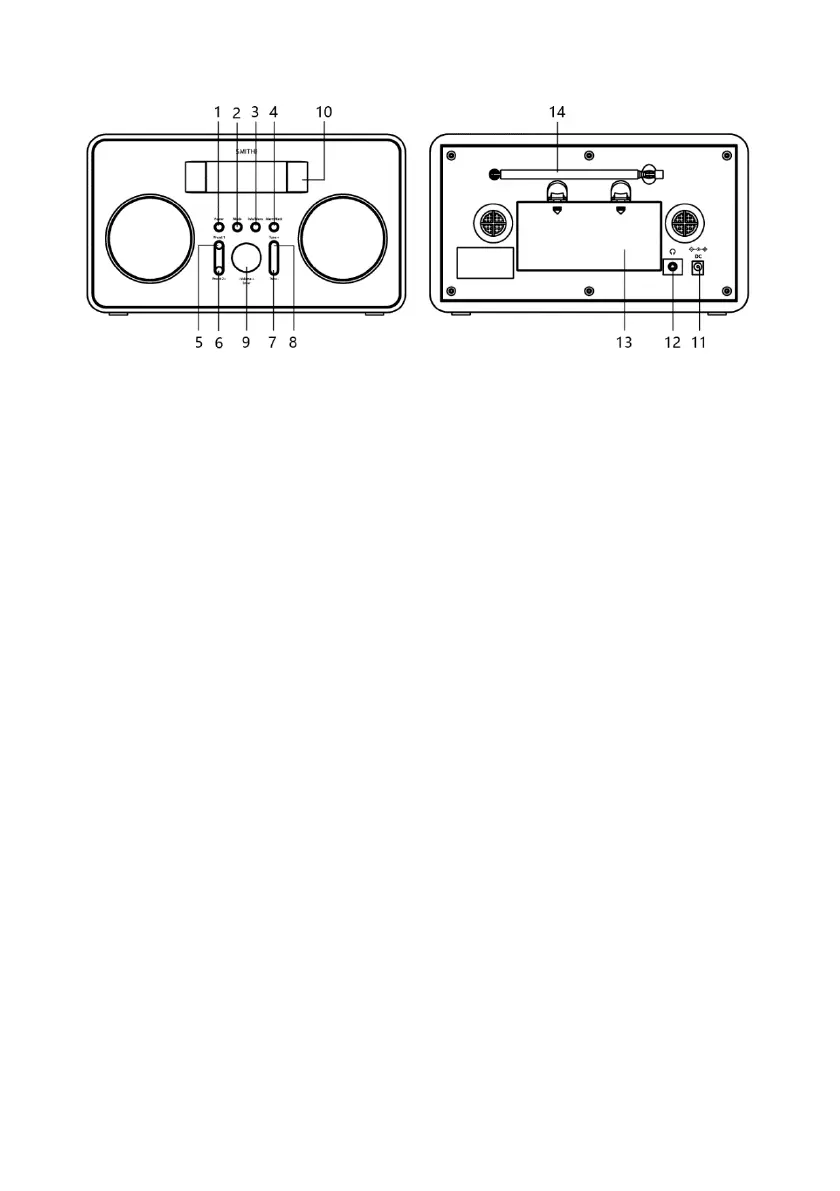
Unit Views
DAB Mode
Selecting DAB mode
1.
Press Mode button repeatedly to select DAB mode.
2.
For initial use, radio will perform a full scan and store stations list in memory.
3.
Once the scanning is completed, the DAB/DAB+ stations will be displayed in
alphanumeric order. The first station in the list will be automatically selected to
play.
4.
Note: if no DAB/DAB+ signal is found in your area, it may be necessary to
relocate your radio to a stronger signal area.
Selecting another Station
While a program is playing, press Tune – or Tune + button to select the stations you want
to play, then press Enter button to confirm.
Scanning Stations
Press and hold Info/menu button, press Tune – or Tune + button to select ‘Full scan’,
and then press Enter button to scan all available stations
Manual tune
You could select the frequency manually.
1. Press and hold Press and hold Info/menu button, press Tune – or Tune + button to


 To Next Page