LAN IP Setup Quick Start Guide
© 2018 WattBox® Rev. 180531-1550
Page 2
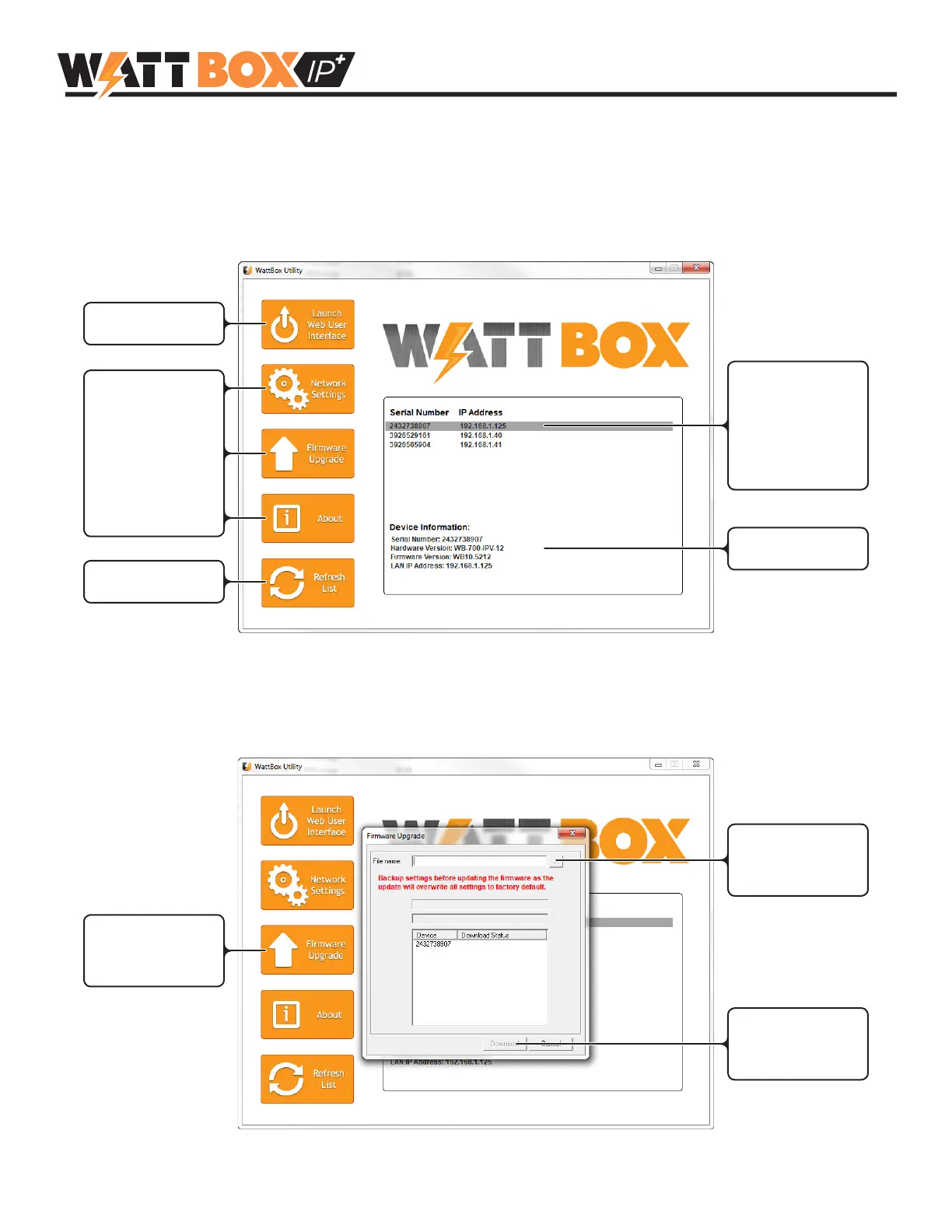
3. Run the WattBox IP Utility
Close any open VPN connections on your PC, then run the WattBox IP Utility. If prompted, select to run the program
as an administrator.
WattBox IP Utility Overview
When you run the utility, all WattBox IP-enabled devices on the network will appear in the device list.
Launch interface in
default web browser
Change network
settings, upgrade
rmware, and see
device information
without logging into
the web interface
Change network
settings
Single-click a device
to highlight it for
editing (Ctrl+Click to
select multiple items
for rmware upgrade)
Current info about
selected device
4. Update Firmware Version (if applicable)
Highlight one or more devices in the list and click the Firmware Upgrade button to open the menu. Browse to nd
the downloaded and unzipped rmware le, then click Download to begin the update. The devices will automatically
reboot after update.
Click to upgrade
rmware in selected
devices
Click to browse for
the downloaded
rmware le
Click Download
to upgrade to the
selected le


 To Next Page