LAN IP Setup Quick Start Guide
© 2018 WattBox® Rev. 180531-1550
Page 3
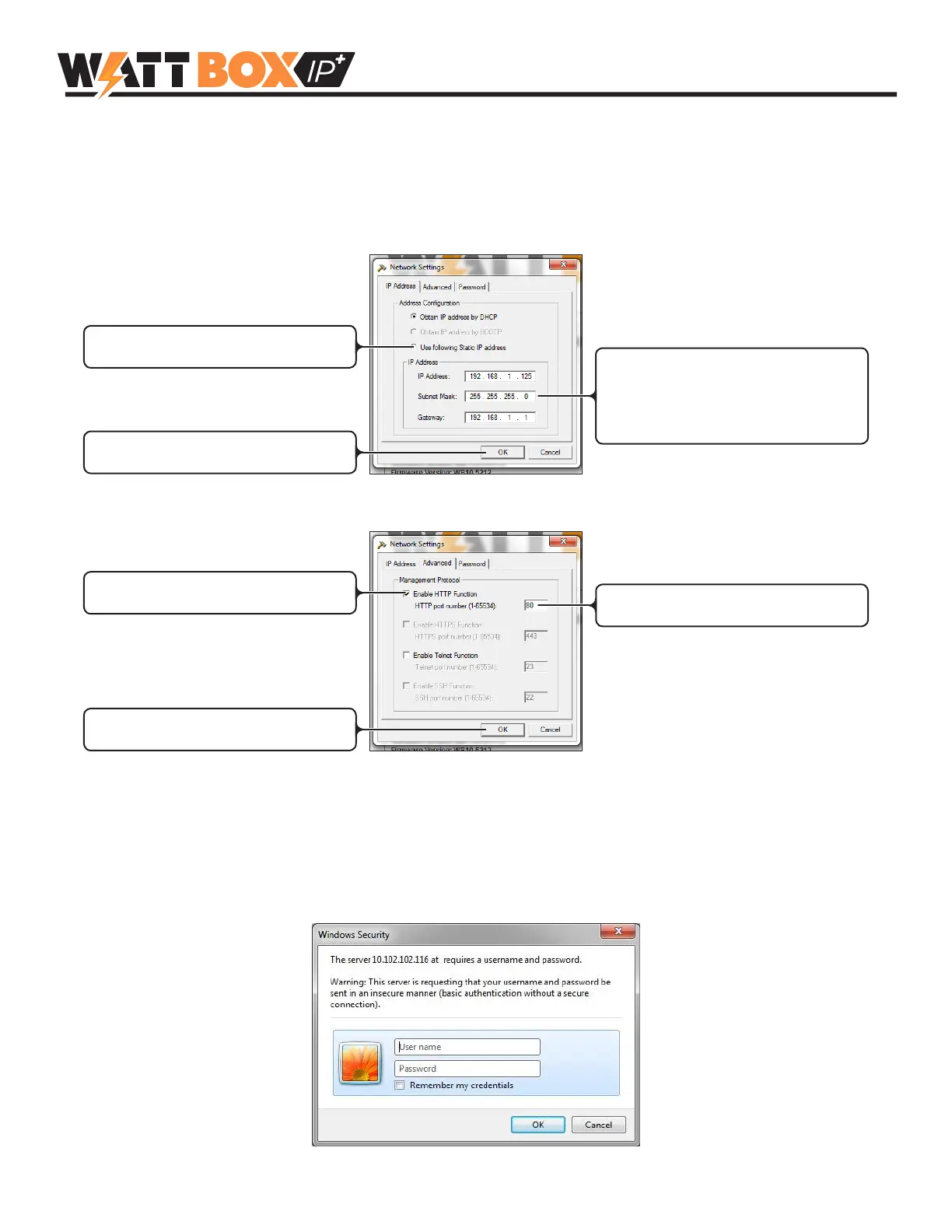
5. Congure IP Settings
Set up a static IP address that will ensure the WattBox IP web interface remains accessible after setup and
(optionally) set a custom HTTP or telnet port for off-site access. Port forwarding setup must also be completed in the
router for offsite access. Click the Network Settings Button to open the menu and begin.
IP Address
Click to apply settings to device
Select to edit IP address settings
IP Address: user-created
Subnet Mask: 255.255.255.0
Gateway: Router IP address
HTTP Port
Click to apply settings to device
Enter a custom HTTP port (default: 80)
Check to enable HTTP
(no web interface access with HTTP disabled)
6. Log in to the WB-IP Web Interface
Click Launch Web User Interface to open the WB-IP login screen in your web browser. Enter the default credentials to
log in:
• Username: wattbox
• Password: wattbox


 To Next Page