V: 12/19/2024 - 1 ©2024 Snom Technology GmbH 2/19
Short User Manual
Getting started
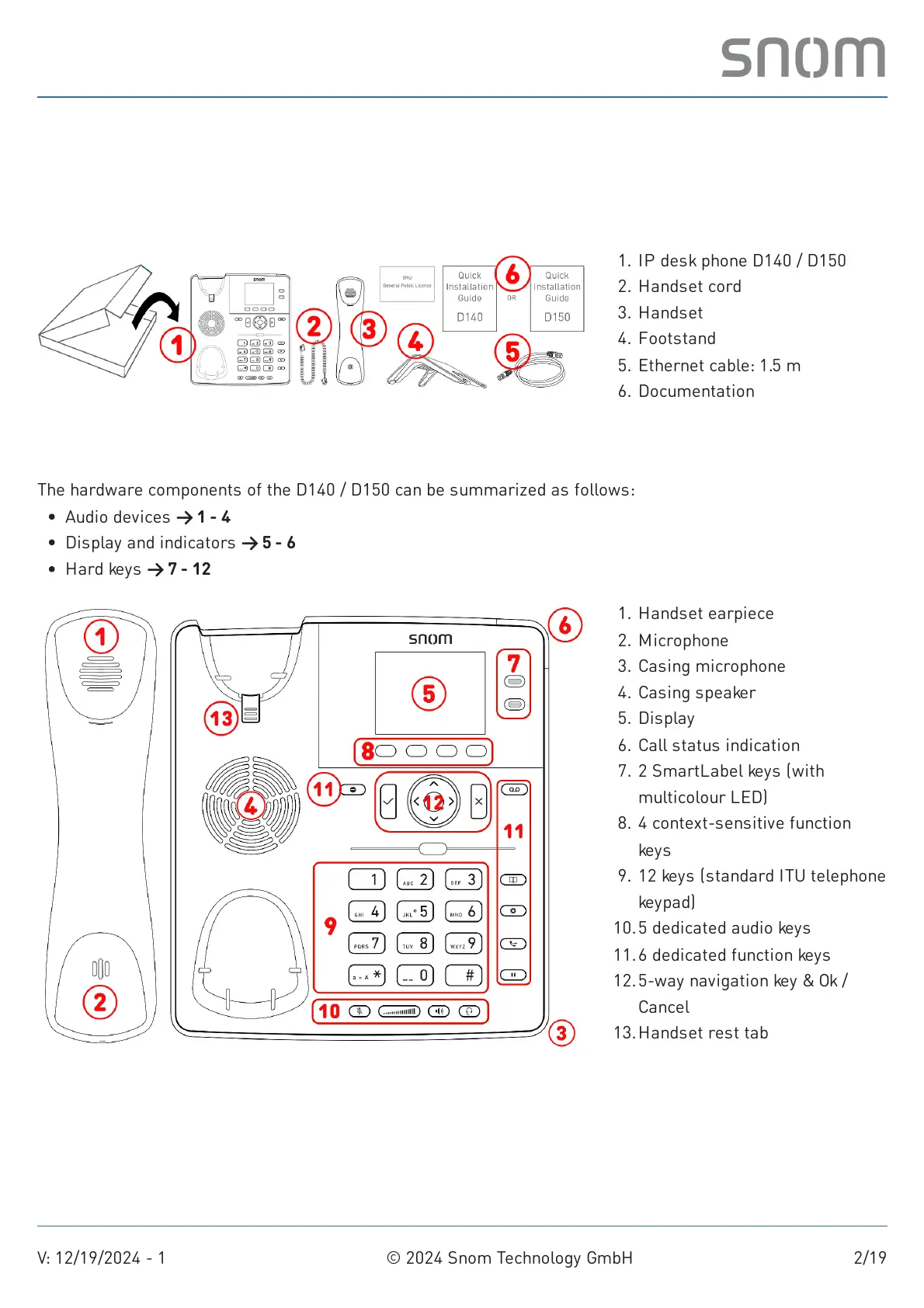
(1) Unpacking and inspecting the delivery content
(2) Getting to know the D140 / D150 components
The hardware components of the D140 / D150 can be summarized as follows:
IP desk phone D140 / D1501.
Handset cord2.
Handset3.
Footstand4.
Ethernet cable: 1.5m5.
Documentation6.
Audio devices → 1 - 4
Display and indicators → 5 - 6
Hard keys → 7 - 12
Handset earpiece1.
Microphone2.
Casing microphone3.
Casing speaker4.
Display5.
Call status indication6.
2 SmartLabel keys (with
multicolour LED)
7.
4 context-sensitive function
keys
8.
12 keys (standard ITU telephone
keypad)
9.
5 dedicated audio keys10.
6 dedicated function keys11.
5-way navigation key & Ok /
Cancel
12.
Handset rest tab13.



 To Next Page