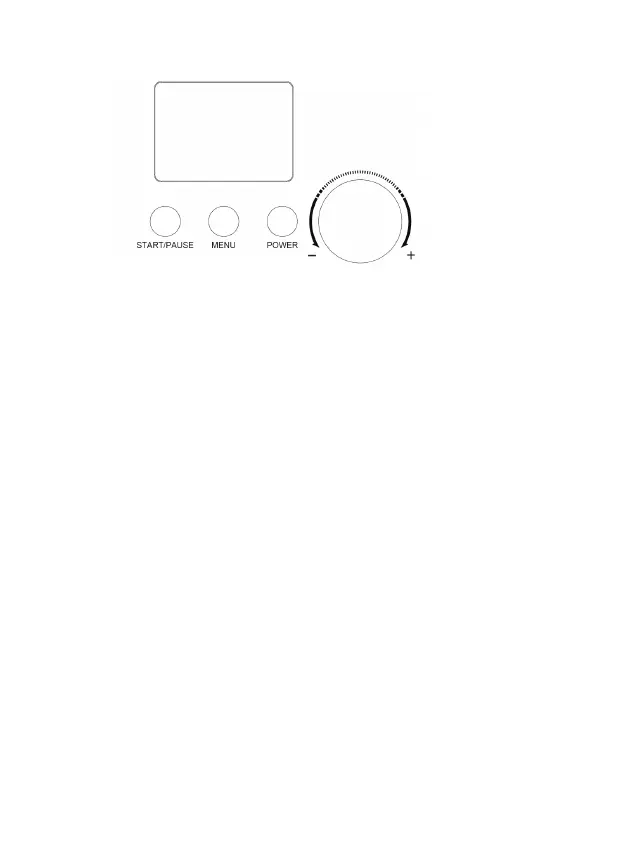
2) Function buttons
[POWER]: After power up, the machine enters standby mode. Then press the
[POWER] button to enter the setting mode, and LCD will display “60:00”.
Press the [POWER] button during setting mode, the machine will enter the
standby mode again.
[Menu]: By pressing this button, there are 3 working modes for option, including:
[ICE CREAM] [COOLING ONLY] and [MIXING ONLY]. Hold this button for 3
seconds during operation; the machine will enter back the menu selection.
Electron knob: Turn the knob to set working time, the default working time to
[ICE CREAM] [COOLING ONLY] and [MIXING ONLY] is 60min, 30min, 10min,
respectively. Rotating the knob to left can decrease the working time. Contrarily;
rotating to right can increase time.
[START/PAUSE]: After setting the menu and time, press this button to start
the working mode. During operation, by pressing this button, the mixing will
pause and the time countdown will pause also. At pause mode, press this
button again, the machine will continue the previous unfinished operation.
7


 To Next Page