3SNOOPER DVR-WF1
Product overview
1. Product overview
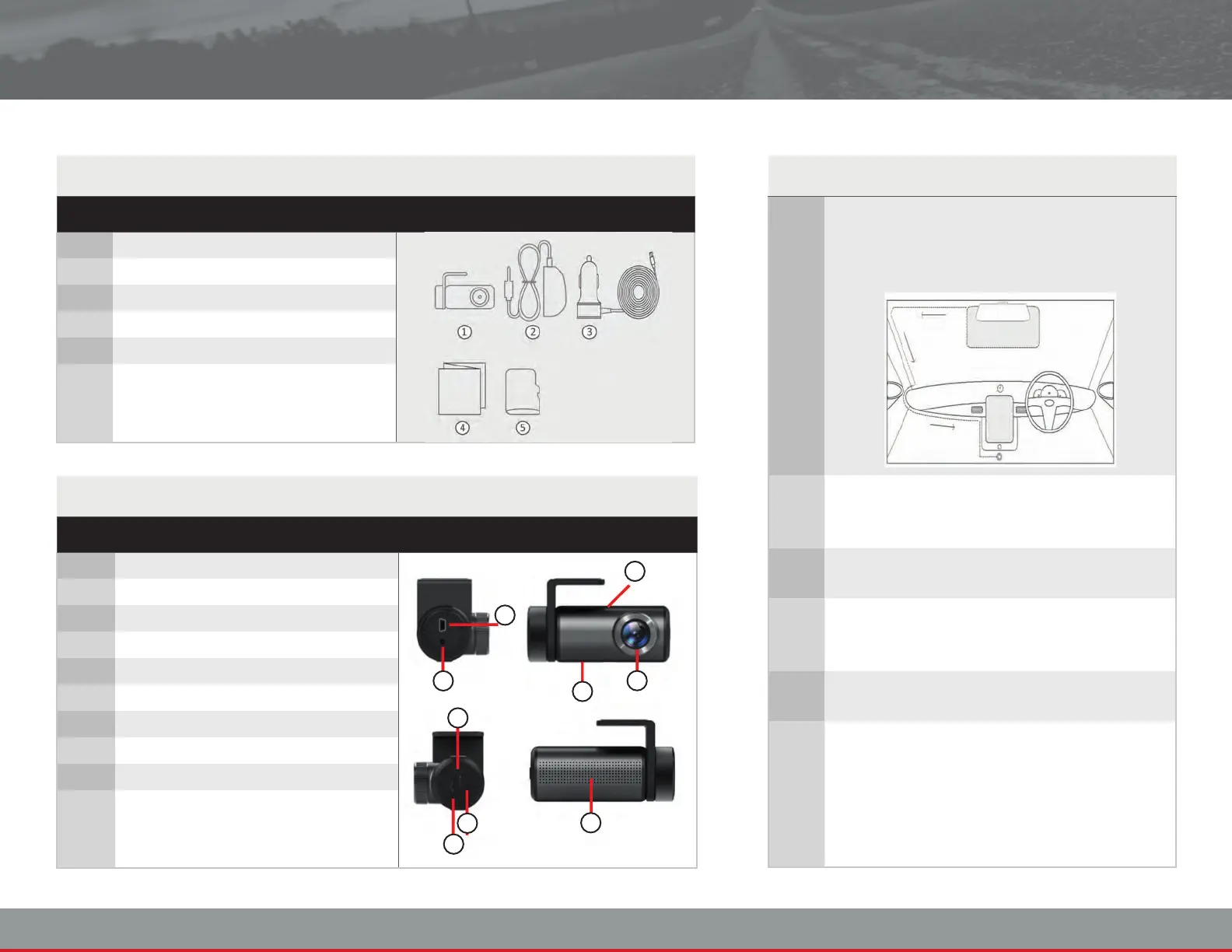
1.2 Product Overview
ITEM FUNCTION
A GPS unit connecon socket
B USB Mini Type-B connecon socket
C Microphone
D Pinhole reset buon
E Lens
F LED status indicator
G Memory card slot
H Power buon
I Speaker
1.1 Box Contents
ITEM CONTENTS
1 Drive Recorder
2 GPS unit
3 Car adaptor
4 User manual
5 8GB MicroSD card
1 Select an appropriate mounng posion on
the windscreen, one which does not impair
the driver’s view of the road ahead.
2 Clean the glass and x the camera and GPS
unit to the windscreen using the double-
sided tape provided.
3 Connect the cable from the GPS unit into the
camera and connect the power cable.
4 Route the power cable around the perimeter
of the windscreen and insert the car adapter
into the car accessory socket.
5 Insert a memory card into the MicroSD card
slot on the DVR-WF1.
6 Disconnecng the Drive Recorder:
The recorder will automacally turn itself
o when it is disconnected from the power
supply with no damage to the unit.
A
F
G
H
I
B
C
E
D


 To Next Page