4SNOOPER DVR-WF1
BUTTON OPERATIONAL STATUS CONVENTIONAL FUNCTIONS
Power on 3 second press to Power on
The unit will automacally power on if the DVR-WF1 is plugged into the power socket when the car is
switched on.
Power o 3 second press to
The unit will automacally power o if the DVR-WF1 is plugged into the power socket when the car is
switched o.
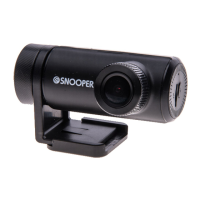
1. Product overview
CAMERA LENS: High resoluon, F2.0 wide angle sh eye lens
RESOLUTION/FPS: FHD 1080P @ 30FPS
HD 720P @ 60FPS
BATTERY: Built-in polymer Li-ion Baery
MICROPHONE/SPEAKER: Integral
STORAGE: MAX: 64GB microSD Class 10 or higher
IMAGE TECHNOLOGY: H.264 image compression
MOV format
WDR
SECURITY APPLICATION: G-sensor
Moon Detecon
Parking Monitoring System
1.6 Memory card
We recommend using a branded MicroSD card
for the best performance. The maximum size
MicroSD card is 64GB (class 10). The card should be
formaed to FAT32 before being used. Recordings
will be lost and damaged if a defecve MicroSD
card is used. A 64GB memory card will save
approximately 660 minutes recording at full high-
denion graphics quality.
To remove the memory card, lightly press the
boom of the memory card so that it pops up,
then using your ngerps remove the card from
the slot.
To access the stored video les and images on the
MicroSD card, plug the DVR-WF1 into a PC using a
standard USB data transfer cable with a USB Mini
Type-B to Type-A connector.


 To Next Page