14
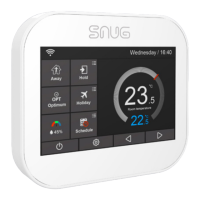
LCD DISPLAY
01 Wi-Fi indicator-Displayed when
connected to a Wi-Fi Network.
02 Temperature Hold / Boost.
03 Adjusting the optional settings.
04 Day indicator and clock.
05 ‘Away’: Means the SnugStat is
maintaining a lower temperature
06
ON OFF of the
optimum start.
07 Air humidity.
08 Power ON/OFF.
09 ‘Holiday’: Displayed when
thermostat is in holiday mode.
10 ‘Schedule’: Programming your ON/
OFF heating cycles.
11 Setup button.
12 Adjusting the temperature setting.
13 or turning a page.
14 Target temperature.
15 Actual temperature display.
16 Temperature reading is in
or F.
17
means the heating is ON. If there is


 To Next Page