6
Socket Mobile’s barcodes scanners can be wiped clean with a cloth dampened with
isopropyl alcohol or water. Or, the barcode scanners can be wiped clean with a Sani-
Cloth.
Warning: DO NOT IMMERSE IN WATER (scanner’s mechanics could be damaged)
DO NOT USE BLEACH FOR CLEANING (scanner’s material property may be affected)
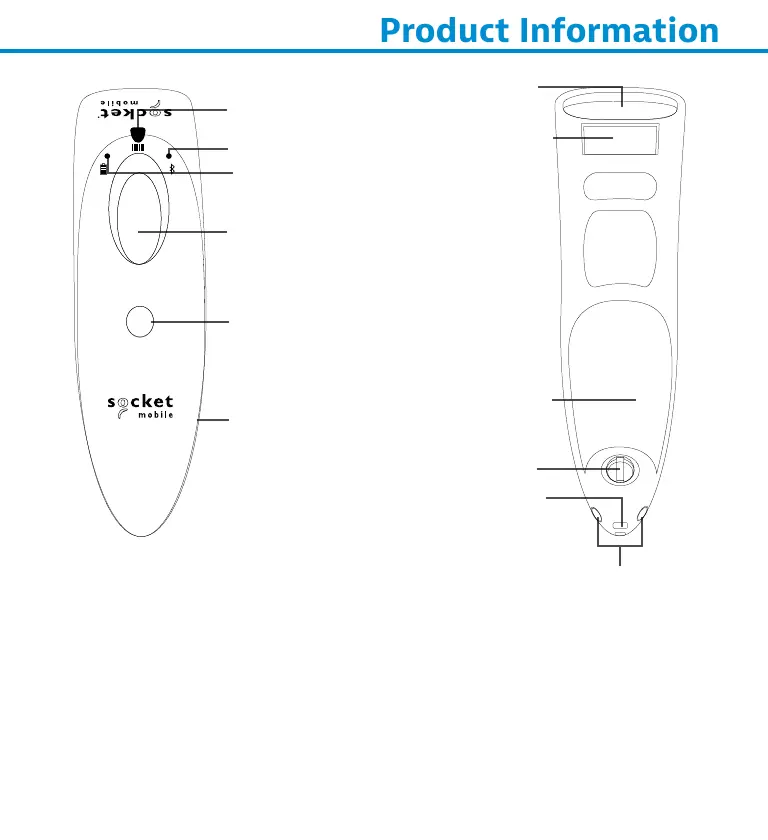
*Also used to display the on-screen keyboard in Basic Mode (iOS only).
Scanner head
Scan Indicator Light
Scan button
Power button*
Battery Light
(Green/Yellow/Red)
Bluetooth Light (Blue)
Charging pins
Product label
Power Connector
Stand Attachment
Battery Door
Lanyard Eyelet















 To Next Page