The SODECA EC CONTROL is an automatic regulation and control panel designed for ventilation systems equipped with EC motors. It is manufactured to stringent quality assurance standards, adhering to EU regulations and safety norms. The device is not suitable for use in explosive environments or for fire safety applications.
Function Description
The EC CONTROL panel provides automatic control and regulation for ventilation systems. It allows for various operating modes, including constant pressure (CPC), constant flow rate (CFC), and Min/Max control. The device can be configured to maintain a specific pressure or flow rate, or to operate within defined minimum and maximum values.
Important Technical Specifications
The EC CONTROL features a range of inputs and outputs for comprehensive system integration:
Inputs:
- °C, HR%, CO2, NTC/PT100: These are analog inputs that can be connected to sensors for temperature, humidity, CO2, or NTC/PT100.
- °C: A sensor can be connected for measuring temperature in °C (0 – 10V or 4-20mA).
- HR%: A sensor can be connected for measuring humidity percentage (0 – 10V or 4-20mA).
- CO2: A sensor can be connected for measuring CO2 levels (0 – 10V or 4-20mA).
- NTC/PT100: NTC or PT100 input.
- 0-10V CONTROL: 0-10V input for signal control.
- USB: USB input port for PC connection.
- MODBUS: Modbus port for communication.
- PWM: PWM input signal, necessary for controlling the fan speed.
- I/O: Digital input and output ports.
- ANALOG INPUT 1: Configurable as "APP" for connecting °C, RH, CO2, or NTC/PT100 sensors.
- DIGITAL INPUT 1 (DAY/NIGHT): This input allows for day/night function configuration, where different reference values can be applied based on the input's state (operative or non-operative).
- If non-operative (NO) and in CPC mode, the pressure value will be from PRESSURE REF 1. In Min/Max mode, it will be the minimum reference value.
- If operative (NC) and in CPC mode, the pressure value will be from PRESSURE REF 2. In Min/Max mode, it will be the maximum reference value.
- DIGITAL INPUT 2 (FAULT): Digital input for fault signals.
- DIGITAL INPUT 3: General purpose digital input.
- DIGITAL INPUT 4: General purpose digital input.
Outputs:
- RELAY OUT: Relay connection output.
- 0-10V OUTPUT (ALARM): 0-10V output for alarm signals.
- DIGITAL OUTPUT (ON/OFF): Digital output for ON/OFF control.
- MOTOR FAN SUPPLY: Output for motor power supply.
Power Supply:
- 230V POWER SUPPLY: 100-230VAC – 50/60Hz.
Modbus RTU Communication:
- DEVICE ID: Configurable from 1 to 257.
- BAUD RATE: Selectable speeds: 9600, 19200, or 38400.
- DATA BITS: Configurable as 7 or 8 bits.
- PARITY BIT: Selectable as NON, EVEN, or ODD.
- STOP BITS: Configurable as 0, 1, or 2.
- READ TIMEOUT: Configurable from 1 to 2000 ms.
Usage Features
The EC CONTROL is designed for user-friendly configuration and operation.
User Interface:
- LCD Display: The device features an LCD display for viewing status and navigating menus.
- Control Buttons (A, B, C, D):
- A (Back): Used to go back in menus or decrease values.
- B (Select): Used to select menu items or confirm values.
- C (Forward): Used to move forward in menus or increase values.
- D (Reset): Used for reset functions.
Configuration Menus:
- STATUS: Displays the current operating status (e.g., pressure, flow rate, percentage output) and unit of measure. It also shows any active alarms, alternating with the normal screen. Pressing button B in this menu shows current, non-modifiable equipment values like motor setpoint (0-10V output), RPM (based on TACO input), firmware version, and manufacturing date.
- CONFIGURATION: This main menu allows access to various sub-menus for detailed setup:
- LANGUAGE: Selects the display language (Spanish or English).
- APP: Configures the work mode (CPC, CFC, Min/Max) and related parameters such as units of measure, reference values (PRESSURE REF 1, PRESSURE REF 2, CAUDAL MAX, CAUDAL REF), PID values (P, I), and response time. It also allows configuration of the analog input (ANI1) for sensor type (Temp, HR, CO2) and its setpoint.
- MODBUS: Configures Modbus RTU communication parameters (Device ID, Baud Rate, Data Bits, Parity Bit, Stop Bits, Read Timeout).
- ALARMS: Configures different alarm types:
- REGULATOR ALARM: Selects alarm type (TACHO, VSD, or DESACTIVATE).
- REF. ALARM: Activates/deactivates alarm for reaching programmed setpoint.
- OVERPRESSURE ALARM: Activates/deactivates alarm for pressure sensor reading issues.
- MODBUS ALARM: Activates/deactivates communications alarm.
- PARAMETERS: Configures various functions, including:
- SW2 FUNCTION: Configures the function of switch 4 (Reset alarms, Autozero for pressure sensor, GO STATUS).
- CONFIG RPM: Sets the RPM range (500 to 35000). This parameter affects the motor speed control alarm.
- RESTORE: Allows restoring factory configurations.
PC Software (Sodeca CPC Utility):
- The device comes with PC software to facilitate configuration. This utility allows users to:
- Select the communication port.
- Configure CPC applications (constant flow rate, constant pressure, Min/Max).
- View a log of errors generated by the equipment ("show last logs").
- The electronic board can be powered via the USB port by activating "jumper J22" if no external power source is available.
Installation Diagrams:
- The manual provides clear connection diagrams for both constant pressure to impulse and constant pressure to aspiration setups, detailing how to connect the CPC device to the fan and pressure sensors.
- It includes graphs illustrating static pressure vs. airflow and input power vs. airflow, showing working ranges, service points, and maximum speed. These graphs help in understanding the system's performance and setting appropriate setpoints.
Maintenance Features
- Self-diagnosis and Error Logging: The device can detect and log errors, which can be accessed via the PC software.
- Alarm System: The comprehensive alarm system provides notifications for various operational issues, aiding in quick troubleshooting.
- Reset Functions: The device allows for resetting alarms and restoring factory settings, which can be useful for maintenance and troubleshooting.
- Firmware Updates: While not explicitly detailed as a user-accessible feature, the presence of a firmware version display suggests the possibility of updates.
- Product Verification: Always check received products for damage before installation.
- Intended Use: The equipment must only be used for its designed purpose and under the conditions specified in the manual.
- Reporting Malfunctions: Any defects or malfunctions should be reported to an authorized representative for repair or return.
- Pre-operation Check: Ensure all safety and installation instructions are read before starting the equipment.
- Handling: Always lift the equipment by designated points, not by cables or connection boxes.
- Storage: Store in a clean, dry place, protected from weather.
- Modifications: Do not disassemble or modify the equipment.
- Safety Precautions: Avoid inserting objects or fingers into grilles or ducts. Disconnect power immediately if this occurs. Never use a damaged power cable.
- Installation Stability: Do not operate if installed on a curved or unstable surface.
- Maintenance Safety: Disconnect from electrical supply and ensure all components are at rest before inspection or maintenance.
- Proper Installation: Ensure all inlets and outlets are properly installed and protected before operation.
- Disposal: Dispose of the equipment according to local regulations to prevent contamination.
- Warranty: Incorrect use or failure to follow instructions may void the warranty.

 Need help?
 General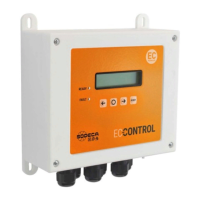

 To Next Page