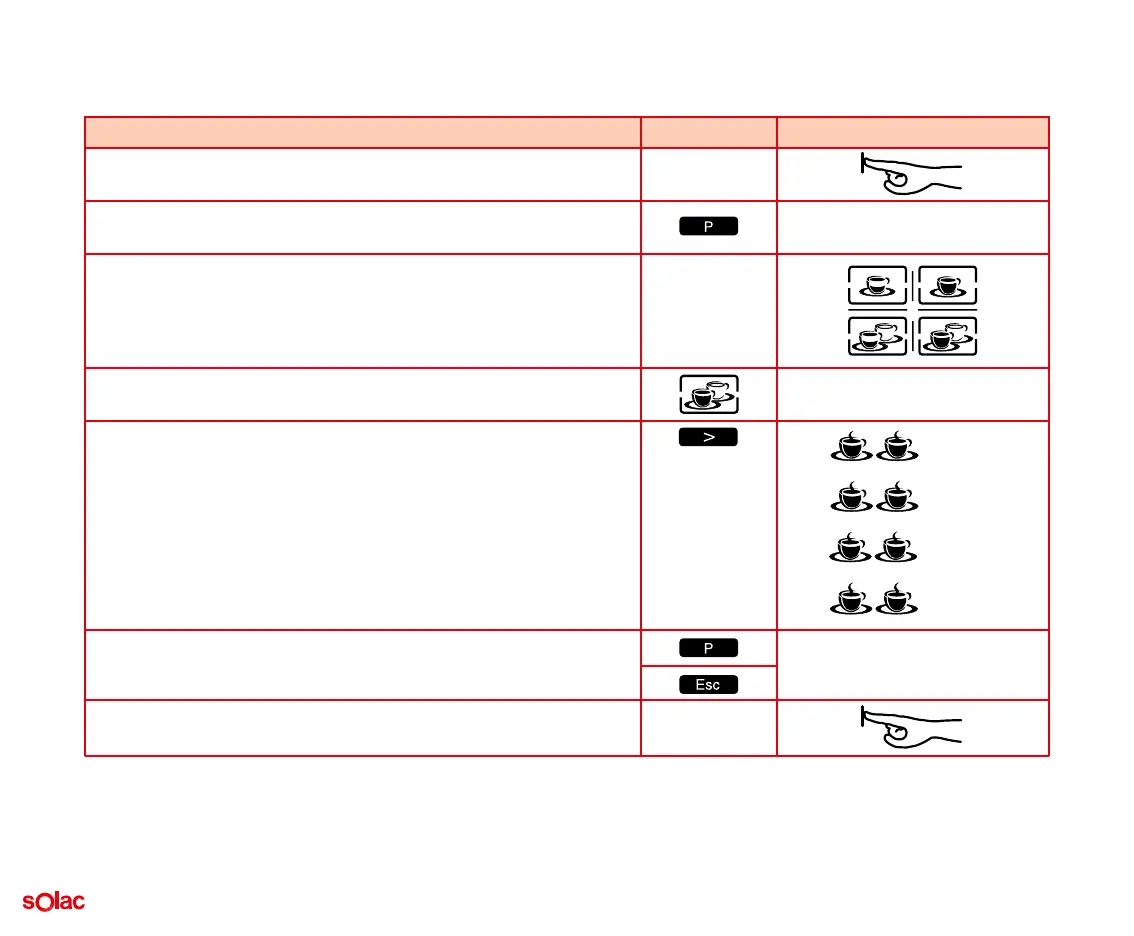
D) ADJUSTING THE AMOUNT OF WATER FOR 2 LARGE COFFEES
Sequence Press the button Message on screen
1. The coffee-maker is ready.
2. Press the ‘P’ button to enter the programming menu.
3. The first programme is for adjusting the amount of water per cup.
You can programme the amount for each type of coffee you can
obtain. To help you, the four possibilities will begin to flash.
4. To programme the amount of water for 2 large coffees, press the cor-
responding button.
5. After pressing the button for 2 large coffees, you enter the menu for
programming the amount of water.
Press the ‘arrow’ to increase the amount of water from 60 ml to 150
ml.
By default, the coffee-maker is programmed with 60 4ml for each
large cup of coffee.
6. To confirm your selection, press ‘P’.
To exit the programming mode, press ‘Esc’.
7. The coffee-maker is ready.
20
60 ml
90 ml
120 ml
150 ml


 To Next Page