13
E N
S3- Sleeping mode activated, if load less 5% of rated power. e.g: 2000w less 100w then
S2- Sleeping mode activated, if load less 10% of rated power.
S1- Sleeping mode activated, if load less 15% of rated power.
5.4 USB output
All models have an USB port. Here you can connect your 5Volt users, like mobile phone charger,
directly. The maximum load for this output is 2,1Amp.
5.5 Remote control
If the remote controller CR80 or CRD80 or CRW80 is connected, it is important that the main
switch of the inverter is in the ‘off’ position. After this, the inverter can be switched on and off by
using the remote control.
5.6 LCD display function (optional)
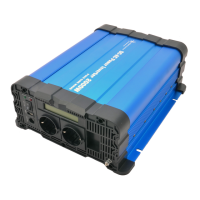
It displays the battery voltage(V), output power(W) , battery capacity( Ah), lower voltage
protection, over voltage protection, over load protetcion, over temperature protection.
5.7 Fan
The fan is both temperature- and load controlled. At a certain load level, depending per model,
the fan will switch on automatically. Also at an internal high temperature the fan will switch on
automatically.
What does the inverter consume from the battery?
A quick formula which gives a global indication of the current draw from the battery is:
Watt : voltage = current draw per hour
Example: a 1500Watt inverter in 12Volt consumes at full load:
1500W : 12V = 125Amp. per hour. Has the inverter delivered this power for 5 minutes, then
the current draw from the battery is about 10Amp per hour.
Remark: when a 1500Watt inverter delivers a power of 600Watt, then it consumes also only
600Watt from the battery.



 To Next Page