I03 _ 1O0
5 10C
3 100
120
/
# 100. 5/16" x 3/4" Button
Head Socket Bolt (4 pcs)
1,
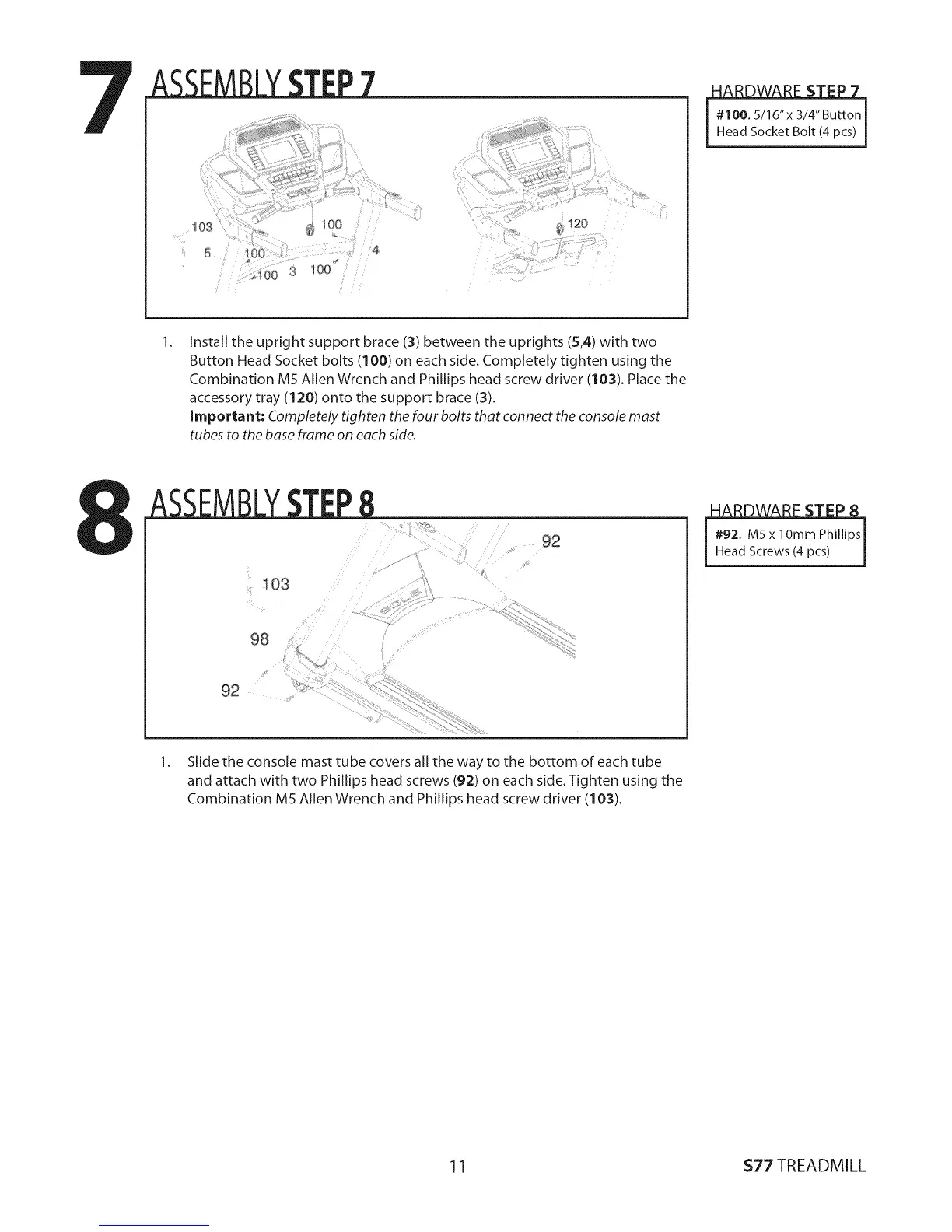
Install the upright support brace (3) between the uprights (5,4) with two
Button Head Socket bolts (100) on each side. Completely tighten using the
Combination M5 Allen Wrench and Phillips head screw driver (10:3). Place the
accessory tray (120) onto the support brace (3).
Important: Completely tighten the four bolts that connect the console mast
tubes to the base frame on each side.
ASSEMBLYSTEP8
......
98
92
:}
#92. M5x lOmm Phillips[
Head Screws (4 pcs) j
1. Slide the console mast tube covers all the way to the bottom of each tube
and attach with two Phillips head screws (9:2) on each side. Tighten using the
Combination M5 Allen Wrench and Phillips head screw driver (103).
11 $77 TREADMILL


 To Next Page