14
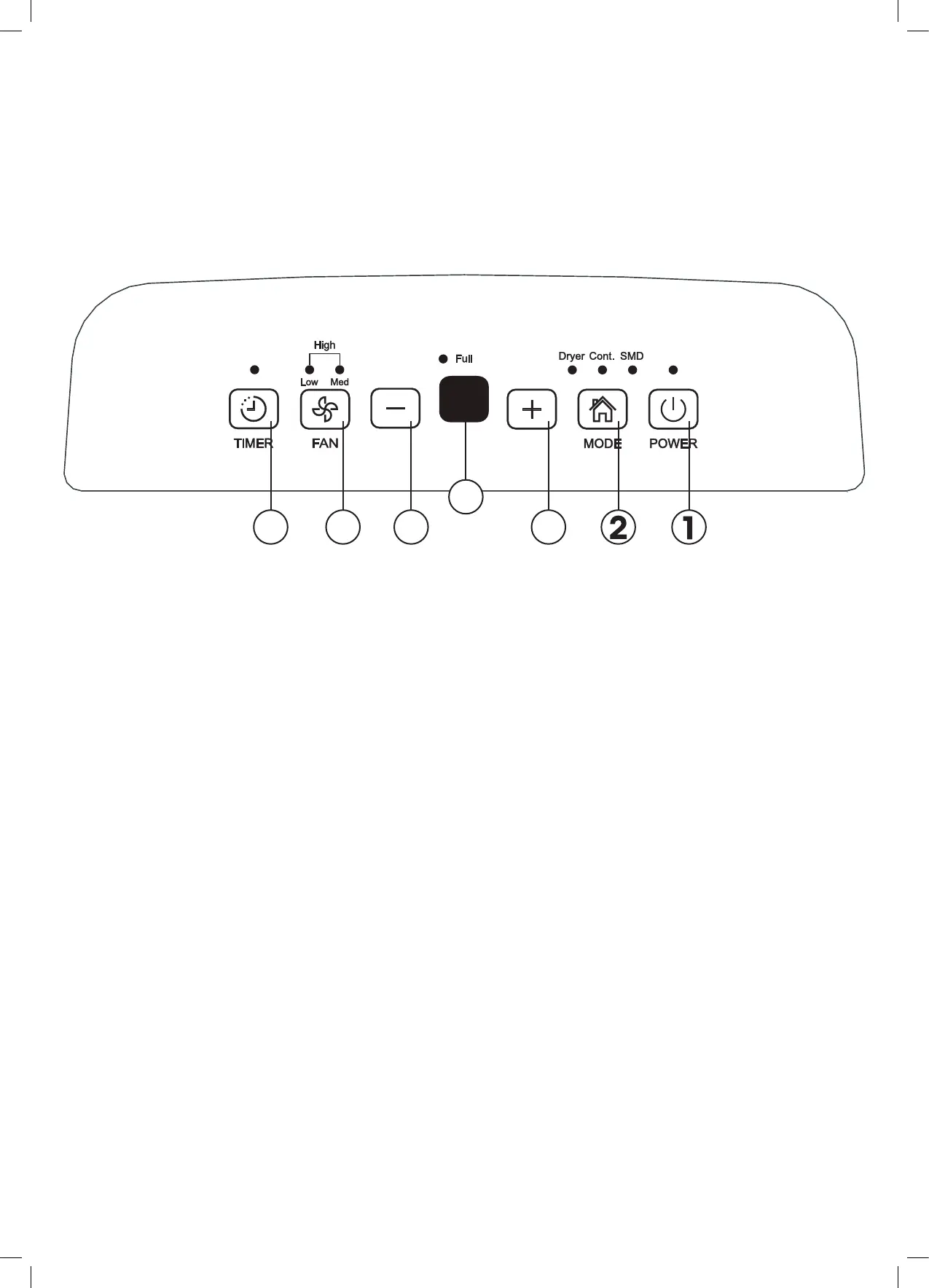
CONTROL PANEL
1. Power button (On/Off)
Press this to Power on and off the Dehumidifier. Note: when the compressor starts and/or stops
running it may make a loud noise which is normal.
2. Mode button
Press to select the desired operation mode (Dehumidifying, Dryer, Continuous Dehumidifying
and in some models, Smart Dehumidifying).
3. Increase (+) button
Press to increase the humidity level in 5% increments (within the 35-85% relative humidity
range). Alternatively use this alter the Timer settings (i.e. increase the set time within the range
of 0-24 hours).
4. Decrease (–) button
Press to decrease the humidity level in 5% increments (within the 35-85% relative humidity
range). Alternatively use this alter the Timer settings (i.e. decrease the set time within the range
of 0-24 hours).
Note: For drier air, you would set a lower relative humidity percentage and conversely for
damper air, set a higher relative humidity level.
5. Turbo button (Fan Speed)
Use this button to select the fan speed. Press to select either High or Normal fan speed setting.
Note: For maximum moisture removal, set your Dehumidifier to the High fan speed setting.
Once the humidity level has reduced, or for when you would prefer quieter operation, set the
fan speed to Normal.
6. Timer button
Press this button to initiate the Auto start and Auto stop function, in conjunction with using the
Increase & Decrease (3 & 4) buttons to set the time.
7. Display
The Dehumidifier’s display will show you the rooms humidity level % (within 5% accuracy)
between the range of 30%-90% relative humidity. When setting your preferred humidity % level
(between the range of 35% and 85%) the display will show you your set option. Alternatively
when setting the timer, the display will show the start or stop time (0-24 hours).
Please note, the diagram above is indicative only. Your control panel may appear differently.
Getting Started
3456
7


 To Next Page