User Manual
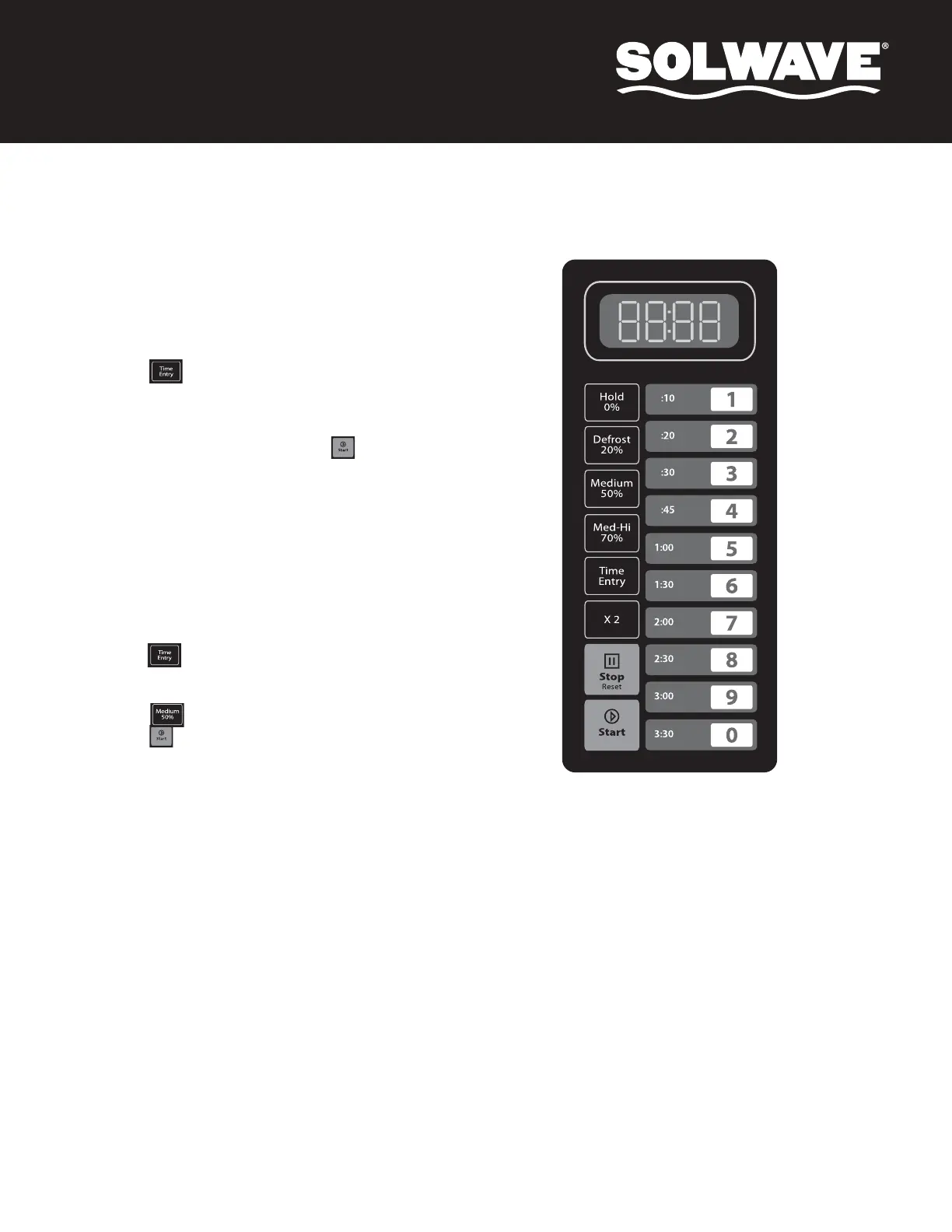
1. This mode allows the user to assign cook times and power levels to
the keypad number keys.
2. Open the door and press and hold number key 1 for 5 seconds. The
buzzer sounds once to indicate Programming Mode is activated.
3. The LED will display “ProG.” Program settings are now ready to be
entered.
4. Select desired number, 1-10, for the programmed setting.
5. Press the key; the LED will display the saved time. Input
desired new time.
6. Select desired power level. The LED will display the related power. If
no power is chosen, the maximum power level, 100%, is the default.
7. After setting the time and power, press the key to save the
cooking program. The LED will display “ProG.”
8. Close the door and the oven will return to Ready Mode.
Example:
For a cook setting of 1 minute and 15 seconds at 50% power under the number
4 key:
1. Open oven door and press number key 1 for 5 seconds; the LED will
display "ProG."
2. Press number 4. The program will be saved in 4.
3. Press the key; the LED will display “0:00.”
4. Press number keys 1, 1, and 5 to input the cooking time; the LED will
display "1:15."
5. Press the key to input 50% power level. The LED will display “PL5.”
6. Press the key to save.
7. Close oven door.
To use this program, press 4. The oven will start operating for 1:15 at 50%
power.
Programming Mode


 To Next Page