40
CONTENTS
WELCOME 2
1. SAFETY 3
2. NINA TIMER IO REMOTE CONTROL 5
3. USING NINA TIMER IO 16
Control an item of equipment 16
My function 18
Natural Control function 22
Launch a scenario 27
Sunlight Function 28
Alarm function 32
Timer function 34
Create typical days 39
Program the week 57
View programmed actions 60
4. CUSTOMIZING NINA TIMER IO 68
Customize items of equipment 68
Customize groups 72
Customize scenarios 78
Define timer settings 83
Customize remote control 88
5. ADVANCED SETTINGS 94
6. TROUBLESHOOTING 107
7. ABOUT NINA TIMER IO 108
Copyright © 2017 - 2021 SOMFY ACTIVITÉS SA, Société Anonyme. All rights reserved.
Create typical days
Create the first typical day (2/3)
...
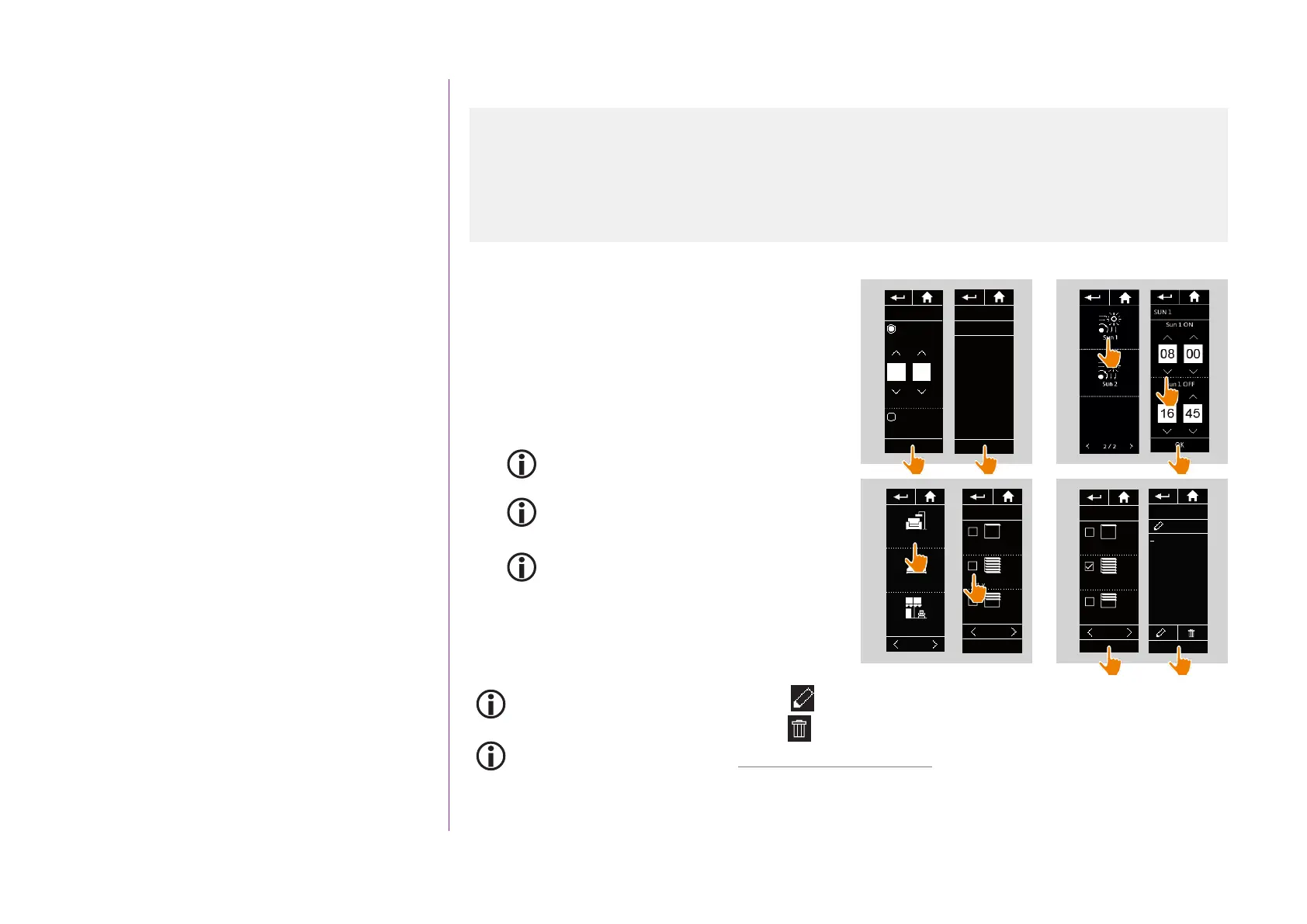
7. Click on OK. A message shows the next step.
Click on OK.
There are two options:
8. If it is a sensor group, indicate the desired time for
the activation and deactivation of the sensor, and
click on OK.
A maximum of two activations/deactivations
can be programmed per day (and per sensor).
The activation time must always be earlier than
the deactivation time.
Activation is possible between 0000 and 2358,
and deactivation is possible between 0001 and
2359.
9. If it is an equipment group, tick the scenarios to
be launched at the time indicated.
10. Click on OK. Then click on OK to confirm again.
To add scenarios from another group, click on: .
To delete an action from a typical day, click on: .
To view the programmed actions, see View programmed actions, page 60.
Create the first typical day 39
View a typical day 42
Create a new typical day 43
Duplicate a typical day 46
Modify a typical day 48
Delete a typical day 56
8
Living room
Bedroom
Terrace
1/2
9
MY
Ext. venit. blinds
OPEN
Ext. venit. blinds
CLOSE
Ext. venit. blinds
Living room
1/3
OK
MY
Ext. venit. blinds
OPEN
Ext. venit. blinds
CLOSE
Ext. venit. blinds
Living room
1/3
10
Living room
CLOSE
Ext. venit. blinds
09 : 12
am
OK
7
REST
Time setting
OK
09 : 12
am
Sunset time
Today 07:46 pm
REST
Now, you are
going to select
the actions to
run.
09 : 12 am
OK
MY
Ext. venit. blinds
OPEN
Ext. venit. blinds
CLOSE
Ext. venit. blinds
Living room
1/3



 To Next Page