5
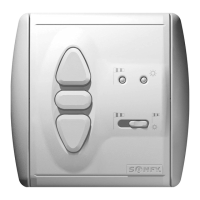
SOLIRIS Uno
1.Move the awning/blind to its UP position (awning/blind retracted).
2.Press and simultaneously for approx. 3 seconds until the awning/blind begins to move down.
➜ the LED shines green.
3.Stop the awning/blind at the position you wish to record as the intermediate position (Correcting the position using , and will not af-
fect the programming process.)
4.Press for approx.2 seconds.
➜ The green LED lights off, the intermediate position is programmed.
If the awning/blind is above the intermediate position,press .
➜ The awning/blind will move to the intermediate position.
If the awning is below the intermediate position,nothing happens.
If the Sun control sliding switch is set to sun control On and the awning/blind is above the intermediate position,the awning/blind will auto-
matically move to the intermediate position as soon as the brightness exceeds the value set on the Sun potentiometer.
The awning/blind must be in the intermediate position. To cancel the intermediate position, press for approx.10 seconds.
➜ The LED will shine red, the intermediate position is now cancelled.
In awning and venetian blind modes (chapter 4.1) it is possible to program an intermediate position from the UP limit position (awning/blind re-
tracted).
Freely selectable intermediate position
4.2
To programme the slat tilting operation an intermediate position must already have been
programmed (chapter 4.2).
1.Set the venetian blind at its UP limit position (blind retracted).
2.Press .
➜ The blind will move to the intermediate position,the slats are closed.
3.Press and simultaneously.
➜ After approx.3 seconds the slats will momentarily move UP and the LED shines green.
4.Adjust the right tiliting angle using
,
and .
5.Press for approx.2 seconds.
➜ The green LED light off, the slat tilting procedure is now programmed.
Slat tilting
4.3
In Venetian blind mode (chapter 4.1.2 and 4.1.3) it is possible to programme a slat tilting operation.
UP limit position DOWN limit positionIntermediate position
We reserve the right to make changes due to technical improvements.
4.2.1 Programming the intermediate position
4.2.2 Reach the intermediate position
4.2.3 Cancel the intermediate position
4.3.1 Programming the slat tilting operation
Once the intermediate position has been reached (chapter 4.2.2),the blind automatically moves upwards with the programmed slat tilt.
If the blind is below the intermediate position and the last order was a DOWN command,you will only get the tilting of the slats by pressing .
To cancel, the blind is moved down from its highest final position (blind retracted) to the intermediate position using the button. When it
reaches the intermediate position the slat tilting operation automatically opens the slats. To cancel the slat tilting operation,press for approx.
10 seconds.
➜ As soon as the red LED is illuminated, the slat tilt and intermediate position are cancelled.
4.3.2 Calling up the slat tilting operation
4.3.3 Cancel the slat tilting operation



 To Next Page
 Loading...