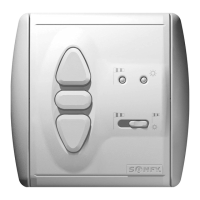
For demonstrating the control functions it is possible to shorten the
reaction times of the SOLIRIS Uno.
To do this, the SOLIRIS Uno can be switched to demo-mode.The
maximum movement time from highest to lowest end position in
demo-mode is approx.30 seconds. All other settings and program-
ming will be performed as previously.
SOLIRIS Uno
6
Demo setting
4.4
4.4.1 Demo setting – awnings
In the awning demo setting,each time or are pressed this constitutes one command.
Programming the awning demo setting
Press for approx.2 seconds. The red and yellow LEDs flash alternately. Then press and simultaneously until the yellow
LED lights up 4 times (twice briefly – pause – twice briefly).
➜ Awning demo setting is programmed.
MODEMODE
4.4.2 Demo setting – venetian blind “EU”
In the “EU”blind demo setting,each time or are pressed briefly this constitutes one short move command,and if they are held down
for a longer time this constitutes a longer move command. A slat tilting operation can be programmed (chapter 4.3).
Programming the “EU”venetian blind demo setting
Press Mode for approx.2 seconds. The red and yellow LEDs flash alternately. Then press and simultaneously until the red LED
lights up 4 times (twice briefly – pause – twice briefly).
➜ “EU” venetian blind demo is programmed.
MODE
4.4.3 Demo setting – venetian blind “US”
In the “US”blind demo setting,each time or are pressed briefly this constitutes one long move command,and if they are held down
for a longer time this constitutes a short move command. A slat tilting operation can be programmed (chapter 4.3).
Programming the “US”venetian blind demo setting
Press Mode for approx.2 seconds. The red and yellow LEDs flash alternately. Then press and simultaneously until the green LED
lights up 4 times (twice briefly – pause – twice briefly).
➜ “US” venetian blind demo is programmed.
MODE
Test: The programming of the operating mode can be tested as follows. Press briefly
➜ the LED allocated to the set operating mode lights up twice briefly.
Yellow LED :awning demo setting
Red LED :“EU” venetian blind demo setting
Green LED :“US” venetian blind demo setting
Quitting demo mode
To quit the demo mode, program in the desired operating mode,as described in chapter 4.1
MODE
We reserve the right to make changes due to technical improvements.
Normal mode Demo mode
SUN appearing : 2 min. 10 sec.
SUN disappearing : 15/30 min. 15/30 sec.
WIND appearing : 2 sec. 2 sec.
WIND disappearing : 30 sec. 12 min. 15 sec.
Output relays : 180 sec. 30 sec.
TIMINGS


 To Previous Page
 Loading...