12
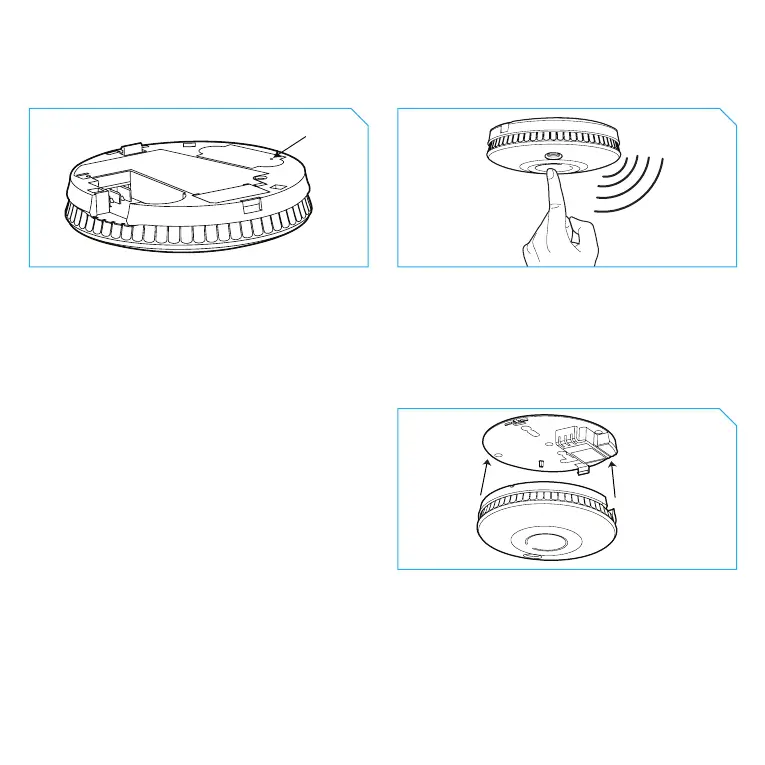
How to ‘learn-in’ two wireless alarms into a network:
Install Alarm 1 as described earlier (see 'Hardwire Installation'). Install the base plate for Alarm 2 in
one of the recommended locations.
1. Using a ballpoint pen briey push and
release the 'learn button' on the back of
Alarm 2. The red LED next to the learn
button will ash briey then light up for
approximately 5 seconds.
2. During these 5 seconds you need to
briey press the test button on Alarm 1 to
wirelessly interlink the two alarms. Alarm
1 will give an audible sound consisting of
two cycles of three loud beeps.
3. The red LED on the wireless module of
Alarm 2 will ash to indicate that it has
been ‘learned-in’ successfully. If the test
button is not pressed quickly enough, the
‘learn-in’ process will fail. If this happens,
repeat the process.
Learn button
To complete the installation, t Alarm 2 onto its base plate. Additional alarms should be ‘learned-in’
in the same way. When ‘learning-in’ additional alarms, any alarm already in the network, can be used
as ‘Alarm 1’. You do not have to ‘learn-in’ to every alarm in the network.



 To Next Page