4
IMPORTANT: DO NOT PLUG THE POWER CORD INTO THE
WALL OUTLET UNTIL ALL SYSTEM CONNECTIONS HAVE BEEN
MADE AND VERIFIED.
NOTE: DO NOT PLUG THE POWER CORD INTO A POWER
CONDITIONER OR UPS SYSTEM.
NOTE: IF YOU NEED TO USE AN EXTENSION CORD, USE ONLY
A HEAVY-DUTY (14-GAUGE OR LARGER) EXTENSION
CORD TO AVOID STARVING THE SUBWOOFER OF ALL THE
CURRENT NECESSARY FOR FULL-POWER OPERATION.
NOTE: WHEN USING THE SUBWOOFER’S SPEAKER INPUTS WE
RECOMMEND THE FOLLOWING MINIMUM SPEAKER WIRE SIZES:
• 16 GUAGE FOR A TOTAL WIRE LENGTH OF UP TO 500’
• 14 GUAGE FOR A TOTAL WIRE LENGTH OF UP TO 1,000’
IMPORTANT: DO NOT CONNECT THE SUBWOOFER’S LINE
INPUTS AND SPEAKER INPUTS AT THE SAME TIME UNDER
ANY CONDITIONS.
Audio Connections
Your Sonance Impact Subwoofer has flexible connections that
let you use it in a wide variety of audio system configurations
(see Figure 3).
Line Level
You can connect the subwoofer’s line level input to a surround
processor or receiver’s line-level dedicated subwoofer LFE output
or a stereo preamp/integrated amplifier’s left and right variable
main outputs. If your receiver has a subwoofer output jack, you can
connect your subwoofer, using the LEFT/LFE input (see Figure 3).
Speaker Level Input
The subwoofer’s speaker inputs can be connected to the speaker
outputs of a receiver or integrated amp that does not have left
and right line-level outputs or a dedicated subwoofer output
(see Figure 3).
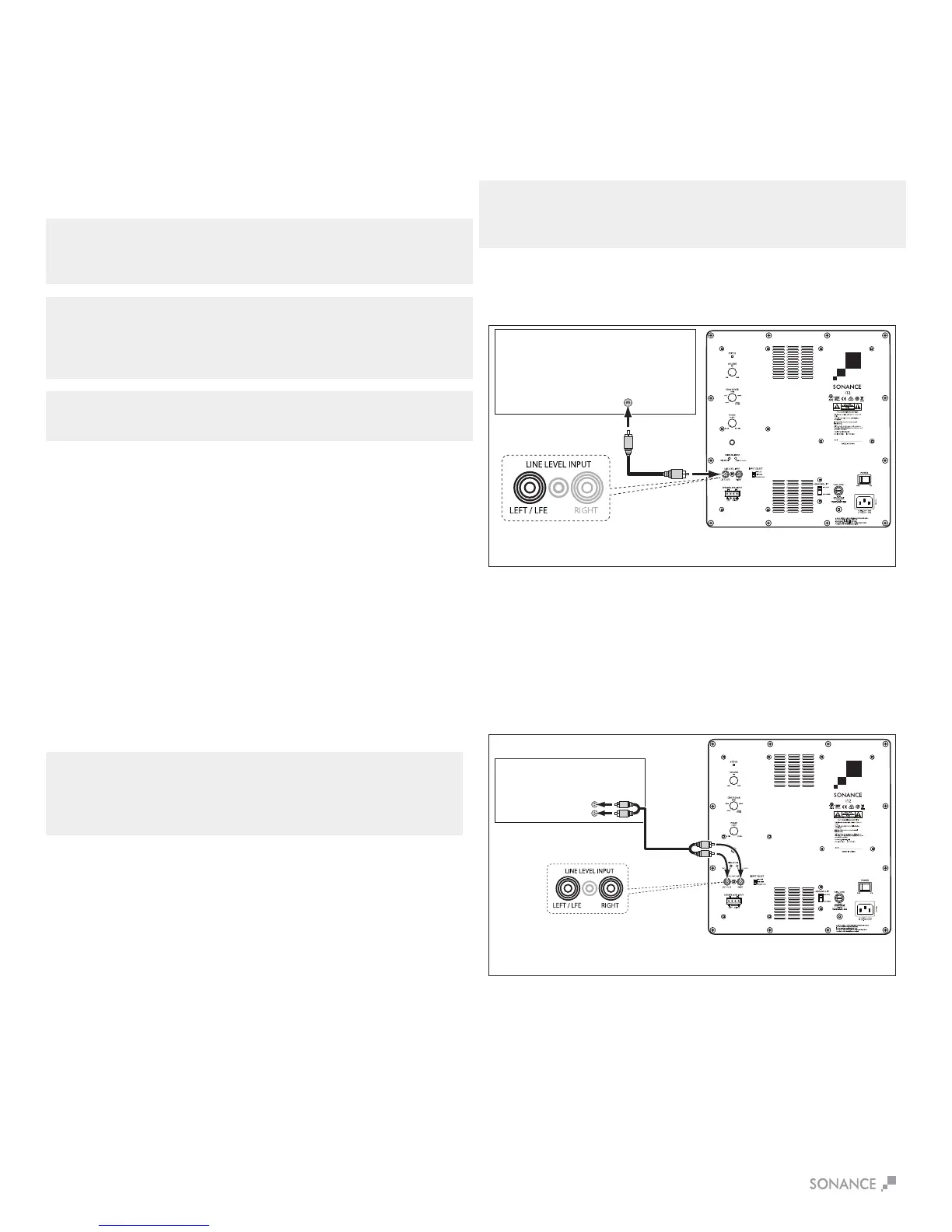
Connect the processor’s dedicated Subwoofer Output to the Left
LINE LEVEL INPUT jack labeled LEFT/LFE. If you are installing two
subwoofers in the system, use a ‘Y’ connector to connect both
subwoofers to the processor’s Subwoofer Output.
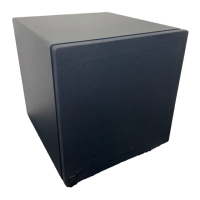
Option 2
Stereo preamp/power amp combination or an integrated
amplifier with Pre Out and LINE LEVEL INPUT jacks
(see Figure 5):
Option 1
Surround sound processor, surround sound receiver, or stereo
preamp with a dedicated Subwoofer Output (see Figure 4):
Connection Examples
Follow the connection example that best describes your audio
system. The examples are listed in descending order of preference,
with the most ideal method presented first. If you can connect the
subwoofer to your system using more than one of the following
methods, use the one that is applicable.
Wireless Input
Your Impact Subwoofer comes with a built-in wireless receiver
that will link to the Sonance Wireless Transmitter (SKU 93360
sold separately). To link the receiver with the transmitter, press
and release the Wireless Sync button located on the back of the
subwoofer (see Figure 3), then press and release the Wireless Sync
button located on the Wireless Transmitter.
Subwoofer Connections
Power Connection
Your Sonance Cabinet Subwoofer features a removable IEC power
connector for 115V (see Figure 3). Plug the female end of the power
cord into the Power Cord Connector on the subwoofer’s rear panel
and plug the male end into a grounded wall socket. Do NOT plug
the subwoofer’s power cord into a convenience outlet on any other
audio or video component.
SUBWOOFER
OUTPUT
Surround
Processor/Receiver
Sonance
Impact Subwoofer
AUDIO CABLE
MAIN
OUTPUTS
Preamp/Integrated Amp
L
R
AUDIO CABLE
Sonance
Impact Subwoofer
FIGURE 4: CONNECTING TO A SURROUND
PROCESSOR’S SUBWOOFER OUTPUT
FIGURE 5: CONNECTING BETWEEN A STEREO PREAMP/INTEGRATED AMP
Connect the preamp/integrated amplifier’s left and right Main
Outputs to the both of the subwoofer’s LINE LEVEL INPUT jacks.


 To Next Page