15 | P a g e
Care and Maintenance
Inspect your ear seals and mic muff frequently for wear. If you see any defect
such as holes or cracks in the ear domes, ear seals, or headband, the Headset
should be immediately repaired or replaced.
Wipe Headset and ear seals with a mild soap and water mixture only. The foam
mic muff may be removed and cleaned using a mild detergent, or replaced by
ordering from Sonetics.
WARNING: Do not store the Headset in high temperature environments or
direct sunlight.
Mic Muff Replacement
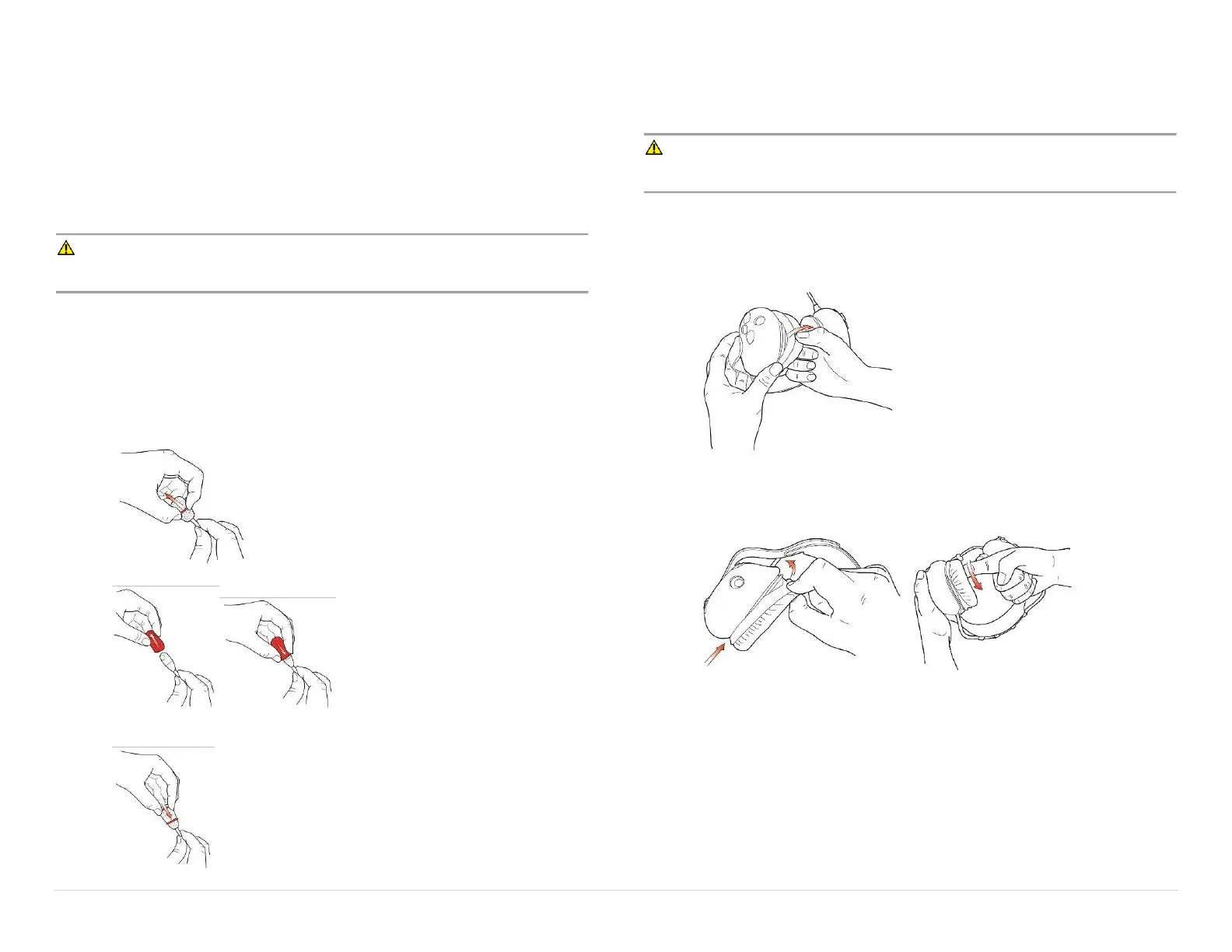
Replace the microphone windscreen every 3 months for optimal performance.
To replace the Mic Muff:
1. Remove the old mic muff and o-ring holding the mic muff in place.
2. Place the new mic muff over the microphone.
3. Slide the o-ring over the mic muff to hold it in place on the microphone as
shown.
Ear Seal Replacement
Replace the ear seals every 6 months for optimal performance and to maintain the
headset NRR.
WARNING: Worn ear seals will degrade the Headset's ability to reduce noise
and protect the user's hearing.
To replace the ear seals:
1. Remove the old ear seal by pulling on the edge and peeling it over the lip
of the ear dome.
2. Starting at the bottom, place the new ear seal on the dome. Pull over the
lip of the ear dome using your finger. Do not use any sharp tool as it may
damage the ear seal and reduce hearing protection.


 To Next Page