6 | P a g e
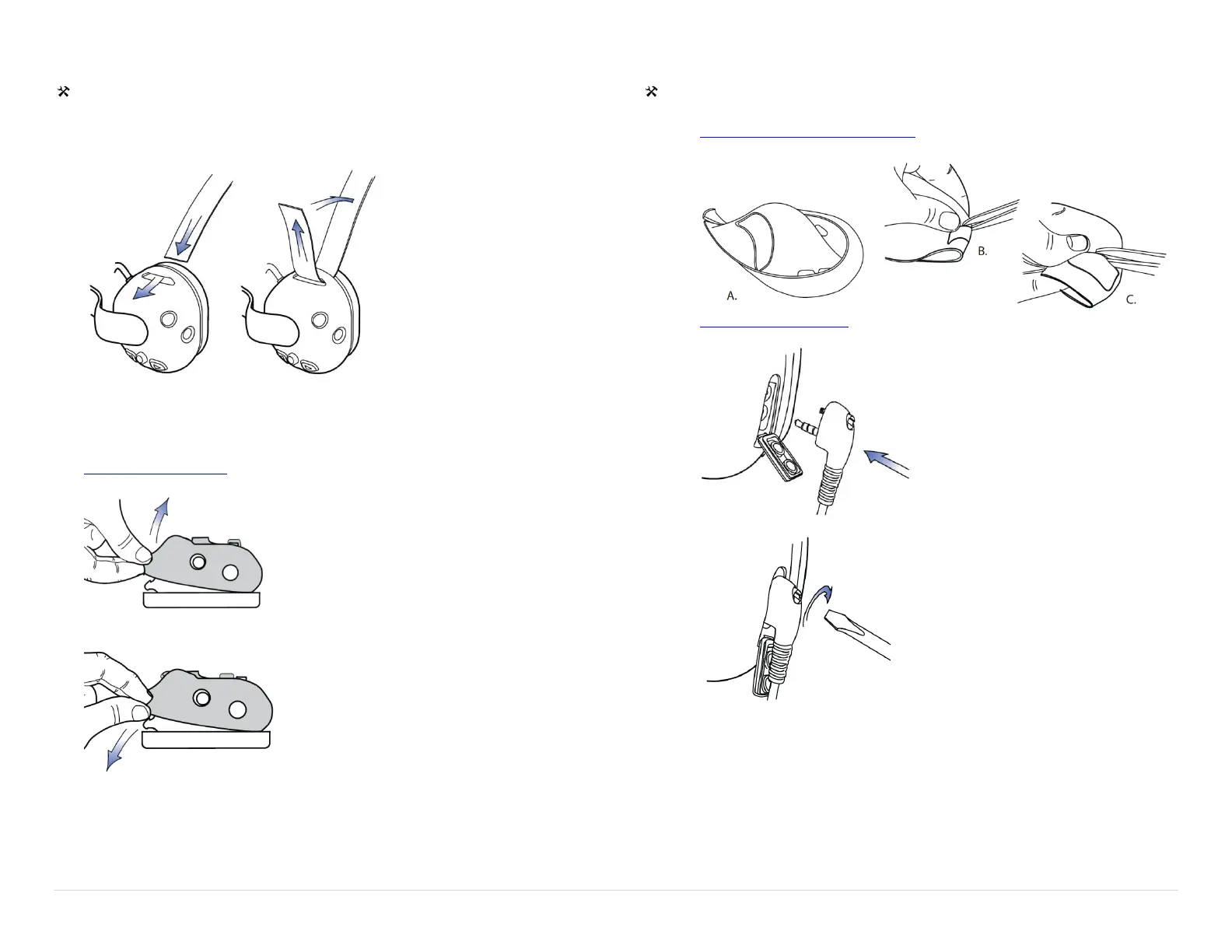
Behind Head Headstrap Installation
Tools Required: None
1. Insert the strap at dome opening.
2. Affix the strap using the hook and loop.
Replacing the Ruggedizer
1. Remove the headband
2. Peel back the ruggedizer
3. Replace the ruggedizer. Note the left and right.
Connecting a Two-Way Radio
Tools Required: Scissors, Sonetics screwdriver
1. Remove the left dome ruggedizer. (with the microphone boom attached)
2. Cut the along the groove on the underside of the ruggedizer.
3. Replace the ruggedizer.
4. Open the Radio Cover and plug in the Sonetics PR Radio Adaptor.
5. Screw the adaptor into place.
6. Connect the Sonetics PR Radio Adaptor to the Radio.


 To Next Page