The device described in the manual is the SonicTel T53W Telephone Set, an enterprise-grade IP phone designed for use with SonicTel's managed service provider platform. It is a feature-rich communication device that integrates into a cloud-based phone system, offering a comprehensive suite of call management and directory services.
Function Description
The SonicTel T53W Telephone Set serves as a primary communication endpoint within an enterprise environment. Its core function is to facilitate voice calls, offering various methods for placing, answering, and ending calls, including handset, speakerphone, and headset modes. Beyond basic call handling, it provides advanced features essential for business communication, such as call transfer (blind and attendant), call forwarding (always, busy, no answer), call conferencing, and intercom capabilities (private and direct announce).
The phone also integrates with a voicemail system, allowing users to configure their mailbox, record greetings, and listen to messages. A call history feature keeps a record of placed, received, and missed calls, enabling easy redialing or contact management. The device includes a contact directory for storing and managing personal and company-wide contacts, with options to add, edit, delete, and blacklist entries.
Connectivity-wise, the T53W supports Wi-Fi, allowing for flexible deployment without the need for wired Ethernet connections, which is a significant advantage in modern office setups. It also features volume adjustment for receiver and ringer, and customizable ring tones.
Important Technical Specifications
While specific technical specifications like display resolution, processor type, or memory are not explicitly detailed in the provided excerpts, the manual implies several key characteristics:
- Display: The phone features an LCD screen, indicated by references to "LCD screen prompts" and "main screen." The screenshots show a color display capable of showing contact information, call status, menu options, and Wi-Fi settings.
- Connectivity:
- Wi-Fi: A prominent feature, allowing the phone to connect to wireless networks. The setup process details connecting to available Wi-Fi networks and entering passwords.
- Handset Jack: The phone includes a dedicated jack for connecting a coiled phone cord to the handset.
- Speakerphone: Integrated speakerphone functionality is available, suggesting built-in microphone and speaker components.
- Headset Port: Support for a connected headset is mentioned, indicating a dedicated port for headset connectivity.
- Physical Design: The phone is designed with a stand that attaches to the main body, suggesting a desktop form factor. It includes a traditional numeric keypad, function keys (SEND, CANCEL, HOLD, TRAN, CONF, MENU, HISTORY, DIRECTORY, DND, REJECT, PARK, RESUME, BTRAN, MUTE), and navigation keys (up/down arrows, OK).
- LED Indicators: The manual mentions "a steady red LED" to denote a parked call, indicating the presence of LED indicators for status updates.
Usage Features
The SonicTel T53W is designed for intuitive use, offering a range of features to enhance daily communication:
- Call Handling:
- Placing Calls: Users can place calls by picking up the handset, pressing the speakerphone button, or activating headset mode, then dialing the number and pressing SEND.
- Answering Calls: Calls can be answered by picking up the handset, pressing the speakerphone button, or pressing the headset button.
- Ending Calls: Calls are ended by hanging up the handset or pressing the CANCEL soft key.
- Redial: A dedicated redial function allows quick access to the placed call list and redialing the last dialed number.
- Call Management:
- Mute/Un-mute: A dedicated button allows users to mute and un-mute the microphone during a call.
- Intercom: Supports both private and direct announce intercom calls by dialing an extension number.
- Call Hold & Resume: Users can place calls on exclusive hold or company-wide hold (PARK) and resume them.
- Call Transfer: Offers blind transfer (transferring a call directly) and attendant transfer (consulting with the second party before transferring). It also supports transferring calls directly to voicemail.
- Call Forward: Configurable options for always forward, busy forward, and no answer forward, allowing calls to be redirected based on availability.
- Call Conference: Enables multi-party calls by adding a second party to an active call.
- Voicemail:
- Configuration: Users can configure their voicemail mailbox, including setting passwords, recording names, and greetings.
- Access: Voicemail messages can be accessed via a dedicated key or by dialing a specific extension.
- Directory & History:
- Call History: Provides a list of past calls, allowing users to scroll through entries, place calls, or delete entries.
- Contact Directory: Users can add, edit, and delete contacts, including detailed information. Contacts can also be added from call history or blacklisted.
- Personalization:
- Volume Adjustment: Independent volume controls for receiver (handset/speakerphone/headset) and ringer.
- Ring Tones: Users can select from various ring tones to personalize their device.
- Wi-Fi Connectivity: A step-by-step guide is provided for connecting the phone to a Wi-Fi network, including scanning for networks and entering passwords using an on-screen keyboard.
Maintenance Features
While the manual primarily focuses on operational features, some aspects touch upon maintenance or configuration that could be considered part of device upkeep:
- Password Management: The voicemail system allows users to change their mailbox password, which is a key security maintenance feature.
- Directory Management: The ability to add, edit, and delete contacts in the directory helps keep the phone's contact information up-to-date and organized.
- Call History Management: Users can delete entries from the call history, which can help manage privacy or declutter the log.
- Troubleshooting Support: The manual concludes with contact information for SonicTel Support (phone, email, and portal), indicating that users have access to assistance for any issues or maintenance needs that arise. This external support is a crucial aspect of maintaining the device's functionality within the managed service environment.
- Firmware/Software Updates (Implied): As part of a "managed service provider" offering, it is highly probable that SonicTel handles firmware and software updates remotely, ensuring the phone's operating system and features remain current and secure. While not explicitly detailed in the excerpts, this is a standard practice for enterprise IP phones in a managed service model.
The SonicTel T53W Telephone Set is positioned as a robust and user-friendly communication tool, designed to seamlessly integrate into a modern cloud-based business communication system, offering both essential and advanced telephony features with a focus on ease of use and connectivity.

 Need help?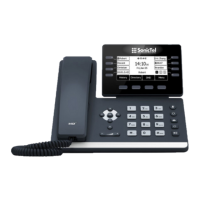

 To Next Page
 General