27 28
Smart TV Function Smart TV Function
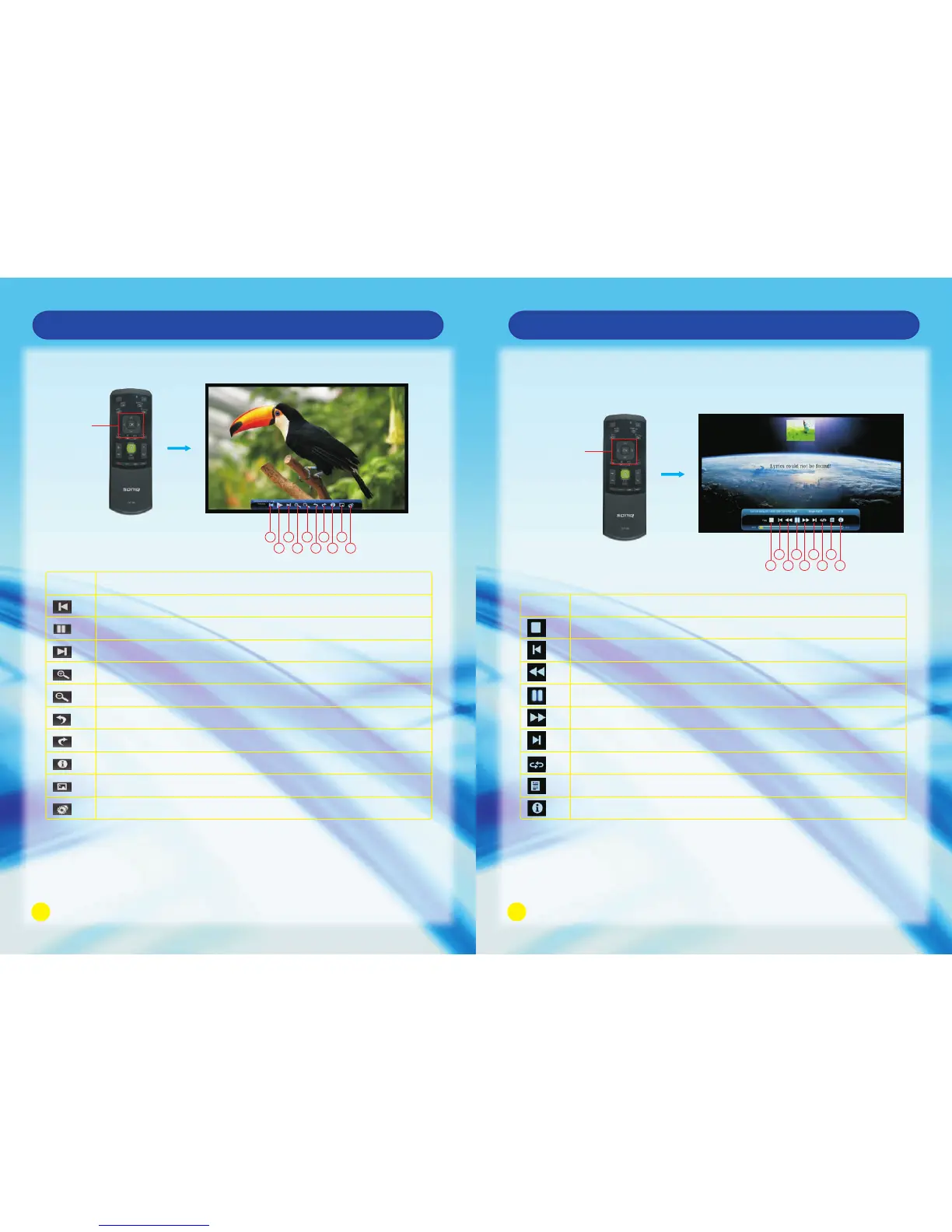
Press OK Button to play or Exit to exit
1 3 5 7 9
2 4 6 8 10
No.
1
2
3
4
5
6
7
8
9
10
Skip to the previous picture.
Click it to play or pause playback.
Skip to the next picture.
Zoom in the picture.
Zoom out the picture.
Right rotation.
Left rotation.
Display the information of the picture.
Set the picture as a wallpaper.
Set the animation effect and interval time of playing the picture.
Description
OK Button
Music Playback
Enter this function by HOME - > Media, then select your favourite song for playing.
Press OK to play the music and Exit to exit playback.
OK Button
2 6 8
3 7 91
4
5
No. Description
1
2
3
4
5
6
Stop video playback.
Play the previous video.
Fast rewind playback.
Playback or pause.
Fast forward playback.
Play the next one.
7
8
9
Press to switch among single playback/random playback/cycle playback.
Display all the songs added to the play list.
Display the information of the current playing song.



 To Next Page