PROFESSIONAL MIXING AMPLIFIER PROFESSIONAL MIXING AMPLIFIER
24bit/196KHz High-Definition DAC24bit/196KHz High-Definition DAC
RPTRPT
00
HIHI
-15-15 15+15+
LOWLOW
-15-15 15+15+
VOLVOL
00
1010
PEAKPEAK
ECHOECHO
1010
00
LOWLOW
15+15+-15-15
MIDMID
-12-12
VOLVOL
1010
00
PEAKPEAK
ECHOECHO
1010
00
LOWLOW
15+15+-15-15
MIDMID
-12-12
VOLVOL
1010
00
SELECTORSELECTOR
STST
MOMO
-20dB-20dB
GAINGAIN
-20dB-20dB
GAINGAIN
MIC INPUTMIC INPUT
ECHOECHO
MIC 2 / 4MIC 2 / 4
MIC 1 / 3MIC 1 / 3
MOBILE PHONE AUDIO INPUTMOBILE PHONE AUDIO INPUT
RR LL R+LR+L
MIC INPUTMIC INPUT
MONITOR INPUTMONITOR INPUT
MIC MASTER VOLMIC MASTER VOL
HD 1 - 3HD 1 - 3 HDDHDD
DVDDVD
HD 1 - 3HD 1 - 3
Air-MAir-M
AUXAUX
16 BIT DIGITAL KEY CONTROLLER 16 BIT DIGITAL KEY CONTROLLER
BBEBBE
MO.PH/DIGITALMO.PH/DIGITAL
REPEATREPEAT
MP3 PLAY / DIGITAL RECORDMP3 PLAY / DIGITAL RECORD
3KHz3KHz
1KHz1KHz
400Hz400Hz 6KHz6KHz 3KHz3KHz
1KHz1KHz
400Hz400Hz200Hz200Hz
+3+3
16KHz16KHz
-12-12
(dB)(dB)
00
-3-3
-6-6
6KHz6KHz
RIGHT EQUALIZERRIGHT EQUALIZER
(dB)(dB)
+6+6
+12+12
16KHz16KHz 50Hz50Hz
MUSIC EQUALIZERMUSIC EQUALIZER
100Hz100Hz
BALBAL
LOWLOW
MIDMID
HIHI
VOLVOL
MUSIC MASTER VOLMUSIC MASTER VOL
1212
2424
2222
2020
1818
1414
1616
88
66
1010
22
00
44
3434
3636
2828
3030
3232
2626
1212
2424
2222
2020
1818
1414
1616
88
66
1010
22
00
44
3434
3636
2828
3030
3232
2626
POWERPOWER
STOPSTOP
PLAY/PAUSEPLAY/PAUSE
NEXTNEXT
BACKBACK
DELDEL
RECREC
EQEQ
REC LEVELREC LEVEL
USBUSB
USBUSB
0101
1212
MP3MP3
+2+2
00
1010
DLYDLY
1010
12+12+
15+15+-15-15
HIHI
12+12+
15+15+-15-15
HIHI
+3+3
-12-12
(dB)(dB)
00
-3-3
-6-6
50Hz50Hz
+12+12
(dB)(dB)
+6+6
200Hz200Hz100Hz100Hz
LEFT EQUALIZERLEFT EQUALIZER
R5R5
L5L5
-15-15 15+15+
-12-12 12+12+
-15-15 15+15+
1010
00
EXTRA BASSEXTRA BASS
VOLVOL
00
1010
MUSICMUSIC
HEADPHONE OUTPUTHEADPHONE OUTPUT
LEFTLEFT
RIGHTRIGHT
-12-12
-15-15
-18-18
-20-20
ONON
-8-8
+1+1
0 0
-2-2
-5-5
AUXAUX
BBEBBE
##
bb
HDDHDD
DVDDVD
AV IN:HD 1AV IN:HD 1
KEY:0KEY:0
USBUSB
MUSIC DIRECT MUSIC DIRECT
MIC EQ & VDT BYPASSMIC EQ & VDT BYPASS
7 INCH VDT7 INCH VDT
SA-767SA-767
MP3MP3
44
Front Panel Function and OperationFront Panel Function and Operation
Front Panel Function and OperationFront Panel Function and Operation
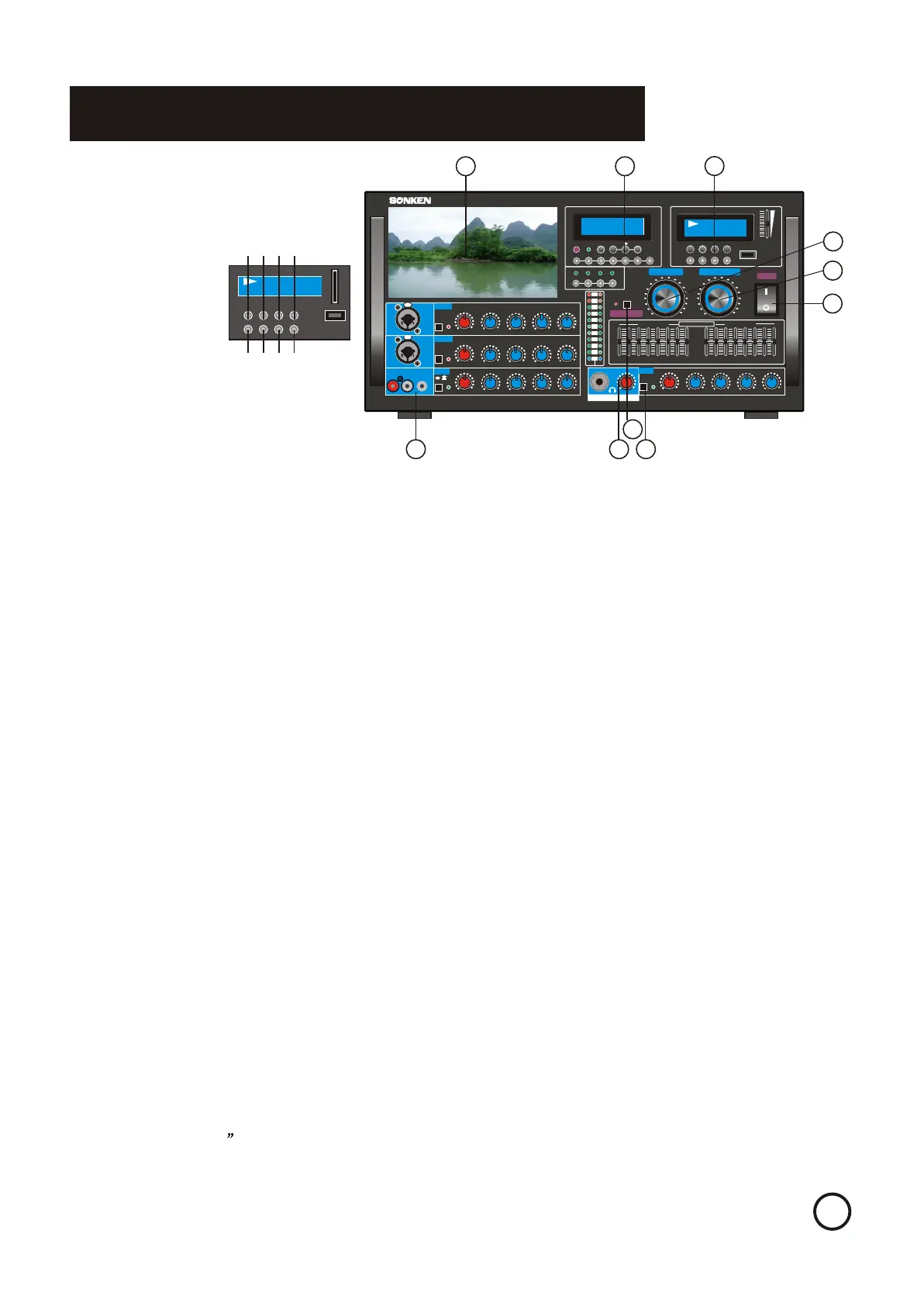
1.POWER ON/OFF button - Turns the SA-767 on or off.
2.MP3 PLAYBACK & DIGITAL RECORDING UNIT - to play MP3 files or to record your
singing into the USB Card. See Page 8~12 for details.
3.MUSIC MASTER VOL control - Adjusts the volume output for the selected music channels.
Turn counter-clockwise to decrease volume and clockwise to increase volume.
4.MICROPHONE MASTER VOL control - Adjusts the overall volume output for all three
microphone channels, collectively. Turn counter clockwise to decrease volume and clockwise to
increase volume.
5. FUNCTION BUTTONS(from left to right):
Monitor input-A/V signal only come out from LCD monitor & rear monitor audio output
(1) AUX : choose audio/video from AUX input on the monitor LCD screen and monitor output.
(2) DVD: choose audio/video from DVD input on the monitor LCD screen and monitor output.
(3) HDD:choose audio/video from HDD input on the monitor LCD screen and monitor output.
(4) HD1-3:choose audio/video from HD..1-3 input on the monitor LCD screen and monitor output.
(5)BBE:Toggles BBE* on or off. Turning BBE ON helps to aesthetically enhance the output
signal. Turning it OFF reverts the output signal back to its original characteristics. BBE is a
sound enhancement technology designed to eliminate undesirable phase shifting between high
and low frequencies, increasing sound clarity and transparency. It also boosts the very high and
low frequencies for added brilliance and richness..
Key Control Function-
(6)LOW button (b): lowers music key by one half-tone.
(7)NORMAL button ( O): resets music to original key.
(8)HIGH button (#): raises music key by one half-tone.
A/V Input- Sets the input source selection to auto or manual mode. You can switch input from
this order :AUX,DVD, HDD, HD..., to USB,AIR-M
6.HEADPHONE OUTPUT
7.
8. LCD MONITING - To moniter the video signal
from different input sources.
9. MUSIC DIRECT-Bypass microphone,
equalizer and 7 video display terminal to
minimize the noise when in music mode.
10. EXTRA BASS- to increase low frequency
volume especially when playing disco music
MOBILE PHONE AUDIO INPUT
1.POWER ON/OFF button - Turns the SA-767 on or off.
2.MP3 PLAYBACK & DIGITAL RECORDING UNIT - to play MP3 files or to record your
singing into the USB Card. See Page 8~12 for details.
3.MUSIC MASTER VOL control - Adjusts the volume output for the selected music channels.
Turn counter-clockwise to decrease volume and clockwise to increase volume.
4.MICROPHONE MASTER VOL control - Adjusts the overall volume output for all three
microphone channels, collectively. Turn counter clockwise to decrease volume and clockwise to
increase volume.
5. FUNCTION BUTTONS(from left to right):
Monitor input-A/V signal only come out from LCD monitor & rear monitor audio output
(1) AUX : choose audio/video from AUX input on the monitor LCD screen and monitor output.
(2) DVD: choose audio/video from DVD input on the monitor LCD screen and monitor output.
(3) HDD:choose audio/video from HDD input on the monitor LCD screen and monitor output.
(4) HD1-3:choose audio/video from HD..1-3 input on the monitor LCD screen and monitor output.
(5)BBE:Toggles BBE* on or off. Turning BBE ON helps to aesthetically enhance the output
signal. Turning it OFF reverts the output signal back to its original characteristics. BBE is a
sound enhancement technology designed to eliminate undesirable phase shifting between high
and low frequencies, increasing sound clarity and transparency. It also boosts the very high and
low frequencies for added brilliance and richness..
Key Control Function-
(6)LOW button (b): lowers music key by one half-tone.
(7)NORMAL button ( O): resets music to original key.
(8)HIGH button (#): raises music key by one half-tone.
A/V Input- Sets the input source selection to auto or manual mode. You can switch input from
this order :AUX,DVD, HDD, HD..., to USB,AIR-M
6.HEADPHONE OUTPUT
7.MOBILE PHONE AUDIO INPUT
8. LCD MONITING - To moniter the video signal
from different input sources.
9. MUSIC DIRECT-Bypass microphone,
equalizer and 7 video display terminal to
minimize the noise when in music mode.
10. EXTRA BASS- to increase low frequency
volume especially when playing disco music
11
33
44
22
55
PLAY/PUSEPLAY/PUSE
REPEATREPEAT
STOPSTOP
BACKBACK
NEXTNEXT
EQEQ
RECREC
DELDEL
MP3 PLAY /DIGITAL RECORDMP3 PLAY /DIGITAL RECORD
USBUSB
0101
0707
MP3MP3
11 22
33
44
USBUSB
SD CARDSD CARD
2.Usb(Mp3) Music Play Function Selector2.Usb(Mp3) Music Play Function Selector
(1)Usb Play /Pause (1)Usb Play /Pause
(2)Usb Play Stop (2)Usb Play Stop
(3)Usb Play Back (3)Usb Play Back
(4)Usb Play Next (4)Usb Play Next
(5)Usb Play Repeat (5)Usb Play Repeat
(6)Sound Effect Mode (6)Sound Effect Mode
(7)Record (7)Record
(8)Delete Current Play File (8)Delete Current Play File
55 66 77 88
66
77
Bluetooth light indication:
1. Fast flashing: searching BT signal
2. No lighting: BT pairing succeed
3. Slow flashing: BT play mode
Bluetooth address code :Air-M
Bluetooth light indication:
Bluetooth address code :Air-M
1. Fast flashing: searching BT signal
2. No lighting: BT pairing succeed
3. Slow flashing: BT play mode
88
99
1010


 To Next Page
 Loading...