--
++
RIGHTRIGHT
BB
LEFTLEFT
BB
CC CC
++
--
--
++
RIGHTRIGHT
LEFTLEFT
++
--
UNLOCKUNLOCK
LOCKLOCK
AA AA
UNLOCKUNLOCK
LOCKLOCK
FUSE FUSE
250V/T10A 250V/T10A
AC INPUT AC INPUT
240V/50Hz240V/50Hz
BB
RECREC
LINE LINE
MICMIC
AA
SUBSUB
HH
LL
OUTPUTOUTPUT
RR
LL
GNDGND
WARNING:TO REDUCE THE RISK OF FIRE OR ELECTRIC SHOCKWARNING:TO REDUCE THE RISK OF FIRE OR ELECTRIC SHOCK
DO NOT EXPOSE THIS APPLIANCE TO RAIN OR MOISTURE DO NOT EXPOSE THIS APPLIANCE TO RAIN OR MOISTURE
RISK OF ELECTRICRISK OF ELECTRIC
SHOCK DO NOT OPENSHOCK DO NOT OPEN
CAUTIONCAUTION
AUDIOAUDIO
OUT OUT
VIDEOVIDEO
INPUTINPUT
AUDIOAUDIO
INPUTINPUT
VIDEO OUTVIDEO OUT
AUXAUX DVDDVD HDDHDD
LL
RR
LL
RR
INPUTINPUT
LL
RR
EQEQ
OUTPUTOUTPUT
Designed in AustraliaDesigned in Australia
HD INPUTHD INPUT
HD 1HD 1 HD 2HD 2
HD 3HD 3
HD OUTHD OUT
HD OUTHD OUT
RR
BAL LINE OUTBAL LINE OUT
LL
REAR MIC 4 INPUTREAR MIC 4 INPUT
REAR MIC 3 INPUTREAR MIC 3 INPUT
11
22
33
11
22
33
MODEL SA-767MODEL SA-767
INPUT VOLTAGE ~240V 50HzINPUT VOLTAGE ~240V 50Hz
POWER CONSUMPTION 780 WATTSPOWER CONSUMPTION 780 WATTS
AUDIO OUTPUT 500W+500WAUDIO OUTPUT 500W+500W
OPTICAL INOPTICAL IN
COAXIAL INCOAXIAL IN
(DIGITAL)(DIGITAL)
(DIGITAL)(DIGITAL)
SPEAKER SYSTEM (8-16 OHM)SPEAKER SYSTEM (8-16 OHM)
T.H.D 0 .1%T.H.D 0 .1%
GMA-501324GMA-501324
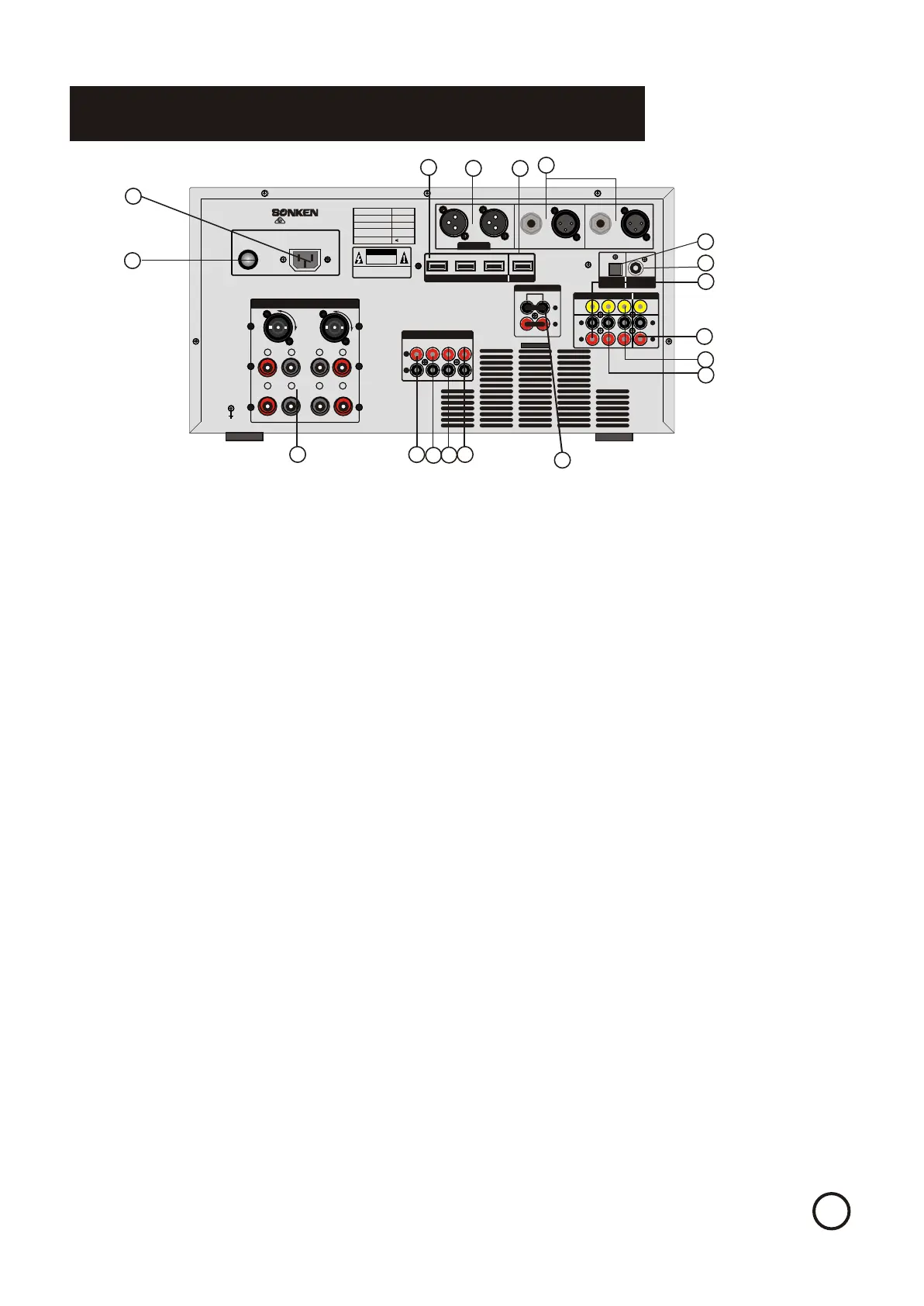
Rear Panel Function and OperationRear Panel Function and Operation
66
1.AC inlet - Male inlet for power cable.1.AC inlet - Male inlet for power cable.
2.Fuse - Replaceable 250V/T10A fuse to protect the machine.2.Fuse - Replaceable 250V/T10A fuse to protect the machine.
3.SPEAKER SYSTEM - One set of Speakon connector ports on the top, one set of banana connector3.SPEAKER SYSTEM - One set of Speakon connector ports on the top, one set of banana connector
Ports on the bottom. These two types both provide audio output to stereo external speakers. BananaPorts on the bottom. These two types both provide audio output to stereo external speakers. Banana
Connector ports designed to be used with bare speaker wire as well as banana connectors. The LEFT andConnector ports designed to be used with bare speaker wire as well as banana connectors. The LEFT and
RIGHT outputs each consist of a positive (+, red) and negative (-, black) signal that correspond with theRIGHT outputs each consist of a positive (+, red) and negative (-, black) signal that correspond with the
Inputs on each speaker. (Please see the connection diagram on page 13 for proper configuration)Inputs on each speaker. (Please see the connection diagram on page 13 for proper configuration)
4.MIC OUTPUT jacks - Outputs the microphone signal. High and low ports provide different thresholds of4.MIC OUTPUT jacks - Outputs the microphone signal. High and low ports provide different thresholds of
the signal.the signal.
5.SUBWOOFER OUTPUT jacks - Music port transfers the music-only signal; Mixing port transfers both5.SUBWOOFER OUTPUT jacks - Music port transfers the music-only signal; Mixing port transfers both
music and vocal signal to the sub woofer.music and vocal signal to the sub woofer.
6.LINE OUTPUT jacks - Extract the audio signal to another sound device.6.LINE OUTPUT jacks - Extract the audio signal to another sound device.
7.REC OUTPUT jacks - Extract the audio signal to sound recording device.7.REC OUTPUT jacks - Extract the audio signal to sound recording device.
8.EQ L/R INPUT and OUTPUT jacks - For external equalizer connection. Utilized to send and return the8.EQ L/R INPUT and OUTPUT jacks - For external equalizer connection. Utilized to send and return the
SA-767 input signal to and from an external equalizer for further signal processing. Do not take off theSA-767 input signal to and from an external equalizer for further signal processing. Do not take off the
Loop if not using these jacks(Please see page 13 for proper configuration)Loop if not using these jacks(Please see page 13 for proper configuration)
9.MICRPHONE #4 & #5 - extra microphone inputs.9.MICRPHONE #4 & #5 - extra microphone inputs.
10.AUDIO/VIDEO OUTPUT jacks - A set of AUDIO LEFT, AUDIO RIGHT & VIDEO outputs:10.AUDIO/VIDEO OUTPUT jacks - A set of AUDIO LEFT, AUDIO RIGHT & VIDEO outputs:
R - AUDIO RIGHT RCA output. Connect to the audio right input on an external component.R - AUDIO RIGHT RCA output. Connect to the audio right input on an external component.
L - AUDIO LEFT RCA output. Connect to the audio left input on an external component.L - AUDIO LEFT RCA output. Connect to the audio left input on an external component.
VIDEO - VIDEO RCA output. Connect to the video input on an external componentVIDEO - VIDEO RCA output. Connect to the video input on an external component
11,12.13.AUDIO/VIDEO INPUT jacks (AUX,HDD and DVD) -Each column consists of a complete set of AUDIO11,12.13.AUDIO/VIDEO INPUT jacks (AUX,HDD and DVD) -Each column consists of a complete set of AUDIO
LEFT, AUDIO RIGHT, VIDEO, and S-VIDEO.LEFT, AUDIO RIGHT, VIDEO, and S-VIDEO.
R - AUDIO RIGHT RCA input. Connect to the audio right output from an external component.R - AUDIO RIGHT RCA input. Connect to the audio right output from an external component.
L - AUDIO LEFT RCA input. Connect to the audio left output from an external component.L - AUDIO LEFT RCA input. Connect to the audio left output from an external component.
VIDEO - VIDEO RCA input. Connect to the video output from an external component.VIDEO - VIDEO RCA input. Connect to the video output from an external component.
14.HD data output, the external HD TV14.HD data output, the external HD TV
15.HD1-3 data input, external player with HD data output15.HD1-3 data input, external player with HD data output
11
22
33
44
55
66
77
88
99
10 10
1111
1212
1313
1414
1515
66
1717
1616
16. Digital optical input16. Digital optical input
17. Digital coaxial input17. Digital coaxial input


 To Next Page
 Loading...