16 BIT DIGITAL KEY CONTROLLER 16 BIT DIGITAL KEY CONTROLLER
bb
BBEBBE
##
USBUSB
HD1- 3HD1- 3
AIR-MAIR-M HDDHDD
DVDDVD AUXAUX
BBEBBE
AV IN:HD 1AV IN:HD 1
KEY:0KEY:0
General OperationGeneral Operation
Make sure all external components (players, speakers, microphones) are connected
before you turn on the SA-767. See previous pages for connection information.
Make sure all external components (players, speakers, microphones) are connected
before you turn on the SA-767. See previous pages for connection information.
Powering On/Off:
Press POWER on the front panel. There is no power button on the remote control.
When POWER is turned ON, indicator lights on the front panel illuminate. Press the
POWER button again to turn OFF.
Powering On/Off:
Press POWER on the front panel. There is no power button on the remote control.
When POWER is turned ON, indicator lights on the front panel illuminate. Press the
POWER button again to turn OFF.
88
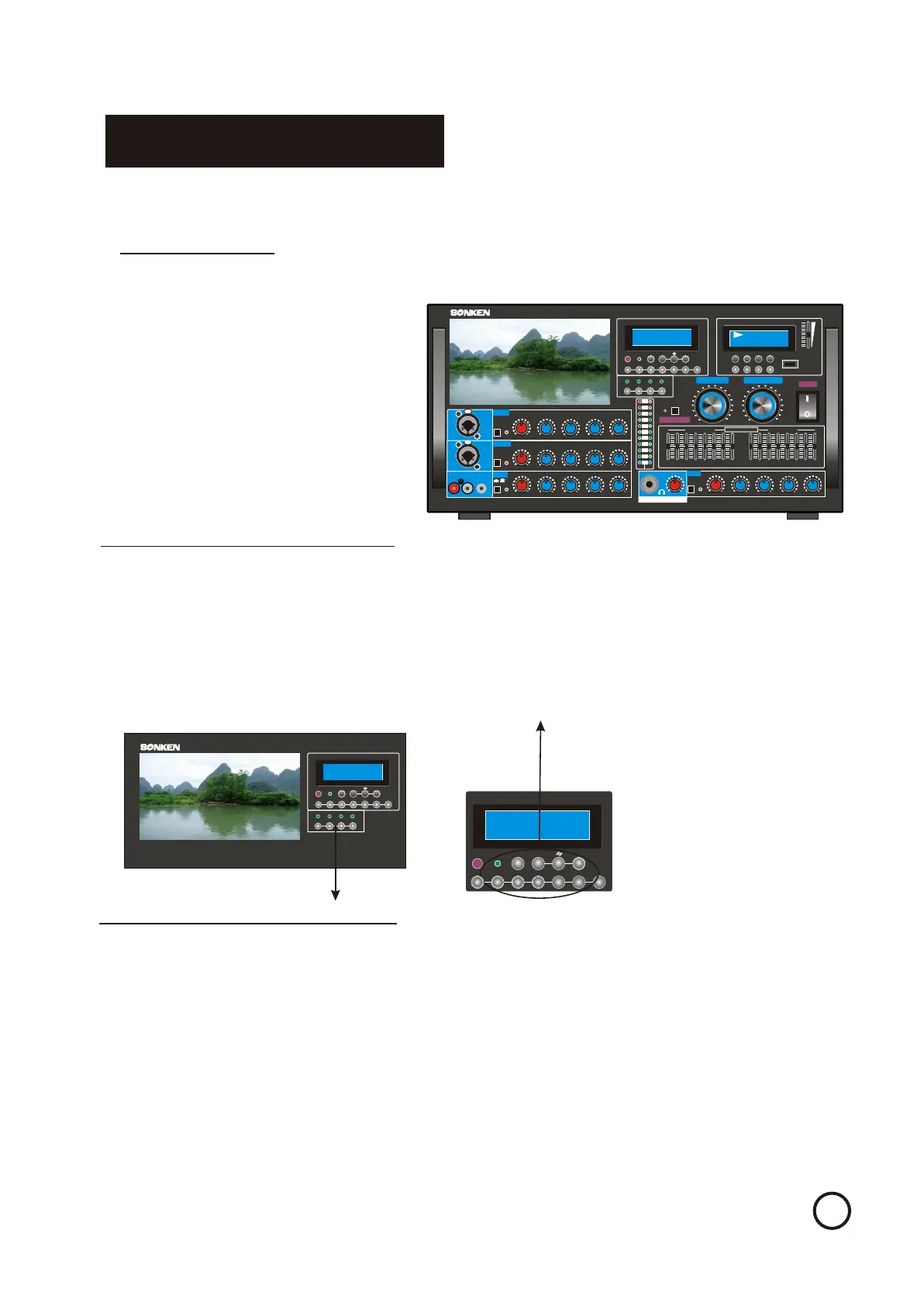
Selecting Desired Input Source:
In order for external video and audio sources to play, the correct input source must be
selected. From the front panel, press one of the four buttons in the INPUT SELECTOR
section:
-AUX button selects the source connected to DVD INPUT on the rear panel.
-DVD button selects the source connected to DVD INPUT on the rear panel.
-HDD button selects the source connected to HDD INPUT on the front panel.
-USB RECORD button selects the source from the Recording module on the front panel.
Press AUTO to set the input source selection to automatic mode. In this mode input
selection defaults to the external source currently/last powered on.
Selecting Desired Input Source:
In order for external video and audio sources to play, the correct input source must be
selected. From the front panel, press one of the four buttons in the INPUT SELECTOR
section:
-AUX button selects the source connected to DVD INPUT on the rear panel.
-DVD button selects the source connected to DVD INPUT on the rear panel.
-HDD button selects the source connected to HDD INPUT on the front panel.
-USB RECORD button selects the source from the Recording module on the front panel.
Press AUTO to set the input source selection to automatic mode. In this mode input
selection defaults to the external source currently/last powered on.
Selecting Monitor Input Source:
In order for external video and audio sources to play on the LCD monitor, the correct input
source must be selected. From the front panel, press one of the four buttons in the INPUT
SELECTOR section:
-DVD button selects the source connected to DVD INPUT on the rear panel.
-HDD button selects the source connected to HDD INPUT on the front panel.
-HD-1-3 button selects the source connected to HD INPUT on the front panel
Please note, all the sources you choose only display on the LCD monitor and monitor
audio out put at the rear of machine. It will not change the A/V output from SA-767
Selecting Monitor Input Source:
In order for external video and audio sources to play on the LCD monitor, the correct input
source must be selected. From the front panel, press one of the four buttons in the INPUT
SELECTOR section:
-DVD button selects the source connected to DVD INPUT on the rear panel.
-HDD button selects the source connected to HDD INPUT on the front panel.
-HD-1-3 button selects the source connected to HD INPUT on the front panel
Please note, all the sources you choose only display on the LCD monitor and monitor
audio out put at the rear of machine. It will not change the A/V output from SA-767
MO.PH/DIGITALMO.PH/DIGITAL
PROFESSIONAL MIXING AMPLIFIER PROFESSIONAL MIXING AMPLIFIER
MONITOR INPUTMONITOR INPUT
HD 1 - 3HD 1 - 3
HDDHDD
DVDDVD
HD 1 - 3HD 1 - 3
Air-MAir-M
AUXAUX
16 BIT DIGITAL KEY CONTROLLER 16 BIT DIGITAL KEY CONTROLLER
BBEBBE
MO.PH/DIGITALMO.PH/DIGITAL
AUXAUX
BBEBBE
##
bb
HDDHDD
DVDDVD
AV IN:HD 1AV IN:HD 1
KEY:0KEY:0
USBUSB
SA-767SA-767
PROFESSIONAL MIXING AMPLIFIER PROFESSIONAL MIXING AMPLIFIER
24bit/196KHz High-Definition DAC24bit/196KHz High-Definition DAC
RPTRPT
00
HIHI
-15-15 15+15+
LOWLOW
-15-15 15+15+
VOLVOL
00
1010
PEAKPEAK
ECHOECHO
1010
00
LOWLOW
15+15+-15-15
MIDMID
-12-12
VOLVOL
1010
00
PEAKPEAK
ECHOECHO
1010
00
LOWLOW
15+15+-15-15
MIDMID
-12-12
VOLVOL
1010
00
SELECTORSELECTOR
STST
MOMO
-20dB-20dB
GAINGAIN
-20dB-20dB
GAINGAIN
MIC INPUTMIC INPUT
ECHOECHO
MIC 2 / 4MIC 2 / 4
MIC 1 / 3MIC 1 / 3
MOBILE PHONE AUDIO INPUTMOBILE PHONE AUDIO INPUT
RR LL R+LR+L
MIC INPUTMIC INPUT
MONITOR INPUTMONITOR INPUT
MIC MASTER VOLMIC MASTER VOL
HD 1 - 3HD 1 - 3 HDDHDD
DVDDVD
HD 1 - 3HD 1 - 3
Air-MAir-M
AUXAUX
16 BIT DIGITAL KEY CONTROLLER 16 BIT DIGITAL KEY CONTROLLER
BBEBBE
MO.PH/DIGITALMO.PH/DIGITAL
REPEATREPEAT
MP3 PLAY / DIGITAL RECORDMP3 PLAY / DIGITAL RECORD
3KHz3KHz
1KHz1KHz
400Hz400Hz 6KHz6KHz 3KHz3KHz
1KHz1KHz
400Hz400Hz200Hz200Hz
+3+3
16KHz16KHz
-12-12
(dB)(dB)
00
-3-3
-6-6
6KHz6KHz
RIGHT EQUALIZERRIGHT EQUALIZER
(dB)(dB)
+6+6
+12+12
16KHz16KHz 50Hz50Hz
MUSIC EQUALIZERMUSIC EQUALIZER
100Hz100Hz
BALBAL
LOWLOW
MIDMID
HIHI
VOLVOL
MUSIC MASTER VOLMUSIC MASTER VOL
1212
2424
2222
2020
1818
1414
1616
88
66
1010
22
00
44
3434
3636
2828
3030
3232
2626
1212
2424
2222
2020
1818
1414
1616
88
66
1010
22
00
44
3434
3636
2828
3030
3232
2626
POWERPOWER
STOPSTOP
PLAY/PAUSEPLAY/PAUSE
NEXTNEXT
BACKBACK
DELDEL
RECREC
EQEQ
REC LEVELREC LEVEL
USBUSB
USBUSB
0101
1212
MP3MP3
+2+2
00
1010
DLYDLY
1010
12+12+
15+15+-15-15
HIHI
12+12+
15+15+-15-15
HIHI
+3+3
-12-12
(dB)(dB)
00
-3-3
-6-6
50Hz50Hz
+12+12
(dB)(dB)
+6+6
200Hz200Hz100Hz100Hz
LEFT EQUALIZERLEFT EQUALIZER
R5R5
L5L5
-15-15 15+15+
-12-12 12+12+
-15-15 15+15+
1010
00
EXTRA BASSEXTRA BASS
VOLVOL
00
1010
MUSICMUSIC
HEADPHONE OUTPUTHEADPHONE OUTPUT
LEFTLEFT
RIGHTRIGHT
-12-12
-15-15
-18-18
-20-20
ONON
-8-8
+1+1
0 0
-2-2
-5-5
AUXAUX
BBEBBE
##
bb
HDDHDD
DVDDVD
AV IN:HD 1AV IN:HD 1
KEY:0KEY:0
USBUSB
MUSIC DIRECT MUSIC DIRECT
MIC EQ & VDT BYPASSMIC EQ & VDT BYPASS
7 INCH VDT7 INCH VDT
SA-767SA-767
MP3MP3


 To Next Page
 Loading...