EasyManua.ls Logo

Sonnet ALLEGRO USB 3.0 PCIe - User Manual

Sonnet ALLEGRO USB 3.0 PCIe
3 pages
Print Icon
To Next Page IconTo Next Page
Loading...
Quick Start Guide for Allegro USB 3.0 PCIe
You Should Have
The following item should be included in your product package:
One Allegro USB 3.0 PCIe adapter card
The following are required for installation:
Medium Phillips screwdriver
Internet connection (for driver download)
System Requirements
Allegro USB 3.0 PCIe requires the following in order to operate in
your system:
One available PCI Express slot
Mac OS
®
X Version 10.6 or later, Mac OS X Server Version 10.6
or later; Windows
®
7, Windows Vista
®
, Windows XP with SP2
installed, Windows Server 2008, or Windows Server 2003
Remember to register your product online at http://registration.sonnettech.com to be informed of future upgrades and product releases.
Software updates and links are available from the Sonnet Website at www.sonnettech.com. Online support form available at http://supportform.sonnettech.com.
Sonnet Technologies Customer Service hours are Mon.-Fri., 7 a.m.–4 p.m. Pacific Time Customer Service Phone: 1-949-472-2772 E-mail: support@sonnettech.com
Sonnet Technologies, Inc., California USA • Tel: 1-949-587-3500 Fax: 1-949-457-6349
©2011 Sonnet Technologies, All rights reserved. Sonnet, the Sonnet logotype, Simply Fast, the Simply Fast logotype, Allegro, and Dio are trademarks of Sonnet Technologies, Inc. iPad, iPod, iPhone, Mac, the Mac logo, and Mac OS are
trademarks of Apple Inc., registered in the United States and other countries. Other product names are trademarks of their respective owners. Product specifications subject to change without notice. QS-USB3M-E-E-C-100711
ALLEGRO
USB
3
.
0
PCIe
SuperSpeed USB PCIe Adapter Card
Support Notes: We recommend you make a backup of
important information on your system’s current hard
drive(s) prior to installing new hardware or software.
When handling computer products, you must take care to
prevent components from being damaged by static electricity.
Before opening your computer or removing parts from their
packages, always ground yourself first by touching a metal
part of the computer, such as a port access cover, and work in
an area free of static electricity; avoid carpeted areas. Handle
all electronic components by their edges, and avoid touching
connector traces and component pins.
Question and Answer IconNeed help?

Do you have a question about the Sonnet ALLEGRO USB 3.0 PCIe and is the answer not in the manual?

Summary

Allegro USB 3.0 PCIe Overview

Included Items

Lists the single item included in the Allegro USB 3.0 PCIe product package.

Installation Requirements

Specifies the necessary tools and resources for installing the Allegro USB 3.0 PCIe adapter.

System Requirements

Details the essential system specifications needed for the Allegro USB 3.0 PCIe to operate.

Important Support Notes

Provides critical advice on data backup and handling components to prevent static damage.

Mac Users Steps

Hardware Installation Steps

Guides through the physical installation of the Allegro USB 3.0 PCIe card into a Mac Pro computer.

Recommended Slot for Mac Pro

Advises on the specific PCI Express slots recommended for installation in different Mac Pro models.

Software Download and Installation

Details the process for downloading and installing the necessary software for the Allegro USB 3.0 PCIe on Mac.

Known Limitations and Advice

Outlines limitations of the Mac OS X driver and provides essential advice for using USB peripherals.

Windows Users Steps

Software Download for Windows

Instructs users on how to download the required software from the Sonnet Website for Windows.

Installation Preparation

Recommends reviewing the computer's manual for PCI Express card installation procedures.

Card Installation Steps

Provides step-by-step instructions for physically installing the Allegro USB 3.0 PCIe card in a Windows PC.

Software Installation Steps (Windows 7)

Guides on installing the USB 3.0 driver on Windows 7 systems after hardware installation.

Software Installation Steps (Windows Vista and XP)

Details the driver installation process for Windows Vista and Windows XP operating systems.

Known Limitations and Advice

Lists limitations for USB 3.0 devices and offers advice on proper usage and power requirements.
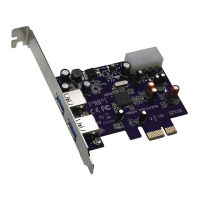
Sonnet ALLEGRO USB 3.0 PCIe Specifications

General IconGeneral
BrandSonnet
ModelALLEGRO USB 3.0 PCIe
CategoryPCI Card
LanguageEnglish

Related product manuals