Installation—AGP Graphics, Gigabit Ethernet Models
Install Encore/ST G4 Processor Upgrade Card
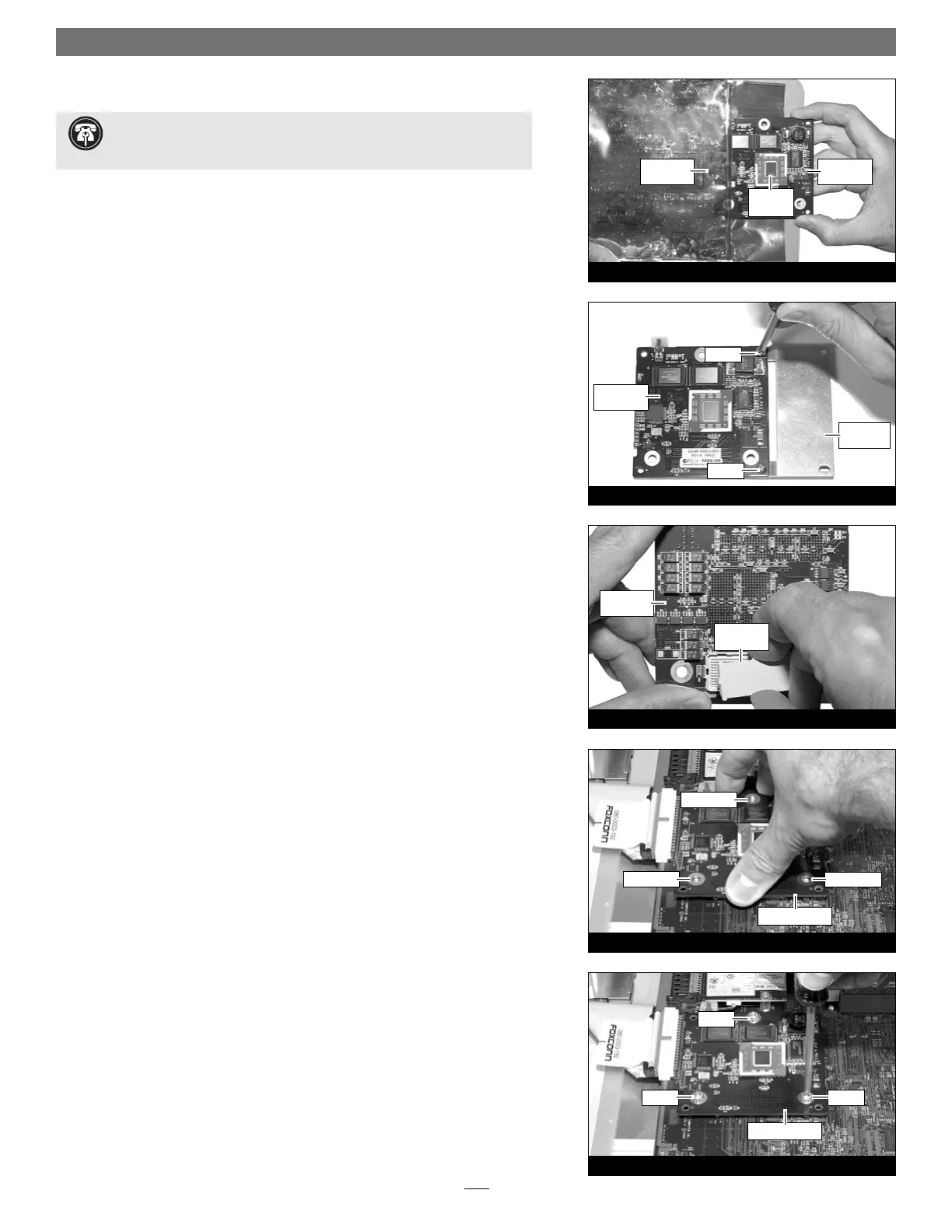
1. Remove the Encore/ST processor upgrade card from its anti-static package,
and remove the packing material. Make sure to handle the card by the edges
(Figure 9). Also, do not touch the thermal pad covering the processor.
2. If you removed a single-processor card from your system, skip to step 3. If you
removed a dual processor card, remove the extension plate and two screws
from the parts bag included with the Encore/ST, and then remove the screws
from the extension plate. With the Sonnet logo side of the board face up,
place the Encore/ST processor card on top of the extension plate (support
foot face down) as shown (Figure 10). Secure the Encore/ST card to the
extension plate with the two provided screws; do not overtighten the screws.
Please note, when attached properly, the extension plate will be level with the
Encore/ST board.
3. Hold the Encore/ST card with its connector facing up (Figure 11). Carefully
remove the cap covering the connector; place the cap on the original proces-
sor card’s connector. Place the processor card you removed from the comput-
er into the anti-static package and store it in a safe place.
4. Align the Encore/ST card’s three screw holes with the three threaded posts
on the logic board, then set the card gently on top of the posts (Figure 12).
Make sure the connectors are lined up, then, grasping the card by its edges,
gently press it straight down until the connectors snap together. Verify the
connectors are completely coupled by gently pulling up on the edges of the
Encore/ST board; the board should remain firmly in place.
5. Snugly secure the Encore/ST card to the logic board with the three screws
you removed previously; do not overtighten the screws (Figure 13).
4
Figure 13
screw
screw
screw
Figure 12
Encore/ST card
Encore/ST card
Figure 11
screw hole
screw hole
screw hole
Figure 10
protective
cap
Figure 9
extension
plate
Encore/ST
card
Encore/ST
card
anti-static
package
Encore/ST
card
screw
screw
Support Note: You will find a piece of foam covering a connector on
the edge of the Encore/ST card. Do not remove the foam; the connector
is not used in this installation.
thermal
pad


 To Next Page