Figure 14
5
Reattach Heat Sink
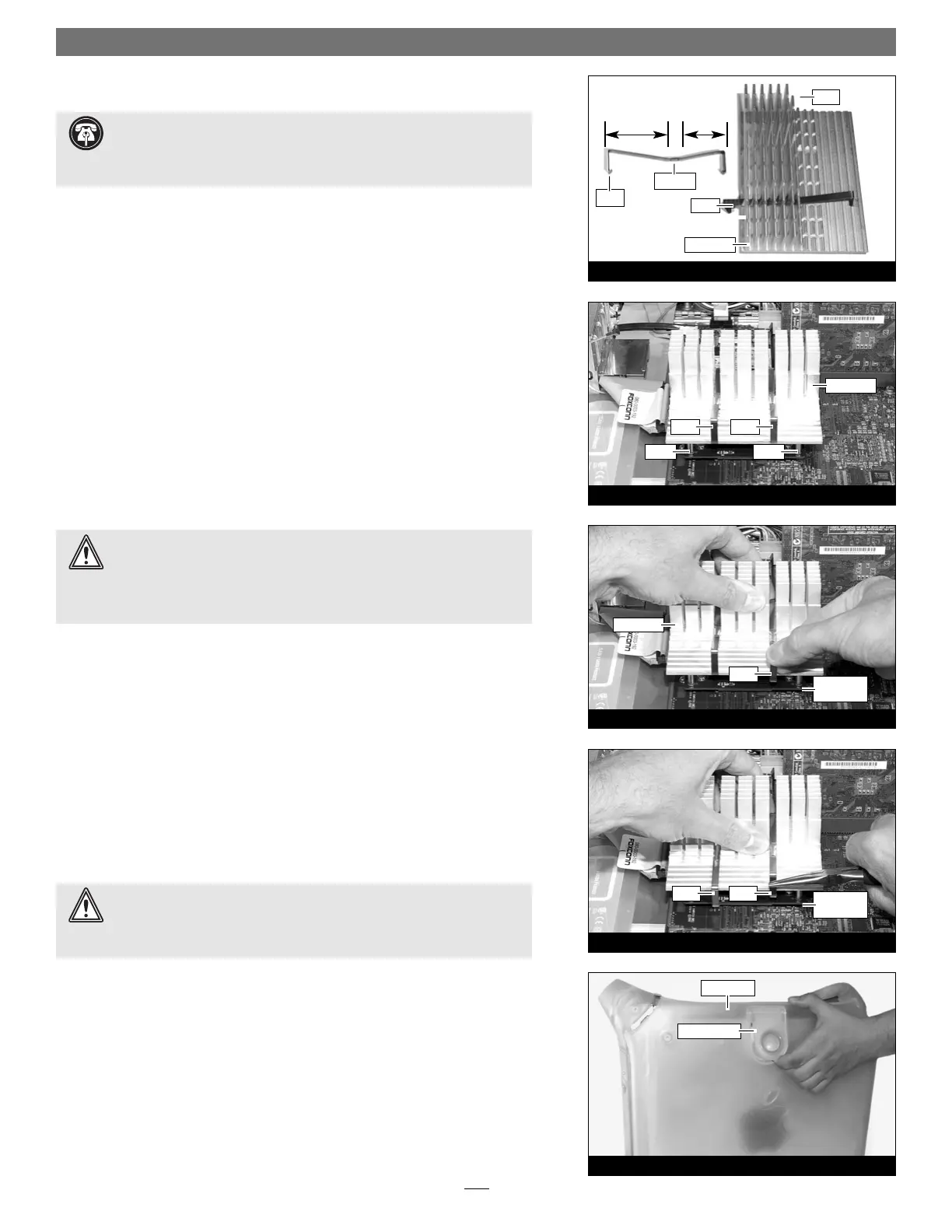
1. The heat sink clips must be positioned properly on the heat sink. Examine
the clips and note the short and long sections, and the dimple. When you
reattach the heat sink, each clip will be placed on the heat sink so its long
section rests in the tall fin area. (Figure 14) Please note, this may be oppo-
site of how the clips were originally installed.
2. Set the clips aside. With the heat sink’s tall fins at the back, guide the heat
sink’s posts into the holes on the Encore/ST card; place the clips across the
heat sink, with the long sections resting in the tall fin area; make sure the
clips do not get caught between the card and the heat sink (Figure 15).
Verify that the heat sink is resting flat and level across the top of the
Encore/ST card.
3. Lift up a clip and hook it over the back edge of the Encore/ST card, then pull
it toward you (Figure 16). Repeat this process with the other clip.
4. Grasp a clip with needle-nose pliers, then pull it toward you and over the
front edges of the heat sink and the Encore/ST card (Figure 17); be careful
not to touch the Encore/ST card with the pliers, and be sure that the clip
is grasping the card at both ends. Repeat this process with the other clip.
5. Visually inspect all four points where the clips attach to the Encore/ST card.
It is easy for the clips to be attached only to the heat sink, which can lead to
destructive overheating of your upgrade card. Verify that each clip is grasping
the card at each end.
Close Computer
1. Raise the side panel back into place (Figure 18).
2. Return the computer to your computing area if necessary, and reconnect the
power cord and peripheral cables to the computer.
Turn On Computer
Turn on your Power Mac; your accelerated machine should boot normally. Your
installation is now complete.
Installation—AGP Graphics, Gigabit Ethernet Models
Figure 17
clip clip
Encore/ST
card
Figure 16
heat sink
clip
Figure 15
clip
clip
post
post
short
section
long
section
dimple
clip
heat sink
heat sink
fins
clip
Figure 18
release latch
side panel
WARNING: Your Power Macintosh was designed to operate efficiently
with the side panel closed. Do not operate your computer with the
side panel open; proper air flow over the heat sink will not occur and the
processor may overheat.
WARNING: The heat sink must be secured firmly, flatly and completely
for reliable and stable operation. If the clips are not properly attached to
the Encore/ST card at all four contact points, proper cooling of the processor
will not occur and the processor will overheat, causing severe damage to the
Encore/ST card. Repairs due to this damage are not covered by warranty.
Support Note: The following steps address the installation of your
system’s heat sink. Please note, only the single processor heat sink is pic-
tured, but the procedure is identical for the dual processor heat sink. Please also
note, that your heat sink may differ from what is pictured.
Encore/ST
card


 To Next Page
 Loading...