Sonos Controller Setup Guide4
Using the Controller
Navigation
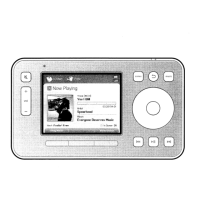
Zones. Use the Zones button to select a zone to play music in, to view the
music selections playing in each room, or to create or modify zone groups to
share the same music across zones.
Music. Use the Music button to browse or select music, manage your music
queues, access playlists, and change the default settings for a Sonos
ZonePlayer or Controller.
Back. Use the Back button to return to the previous screen.
Scroll wheel. The scroll wheel is used to navigate through a displayed list. Use
your thumb or finger to "turn" the wheel clockwise to scroll down through
the list, and counterclockwise to scroll up through the list.
OK. Touch the OK button located in the center of the scroll wheel to make
selections.
Battery
charge
indicator
Mute
button
Volume
Up(+)
Down (-)
Music
button
Scroll
wheel
Back
button
Battery status
indicator light
Zones
button
Labels for
soft
buttons
Soft buttons
Playback controls
Light
sensor
OK button
Wireless
indicator



 To Next Page