Need help?
Do you have a question about the Sonos Sub Mini and is the answer not in the manual?
Highlights deep bass impact, dual force-canceling woofers, compact design, and system integration for enhanced audio.
Details the center tunnel, Ethernet port, and AC power input on the Sub Mini.
Describes the status light and the join button for product interaction.
Guidance on optimal placement, connecting the power cord, and downloading the Sonos app.
Process for tuning audio to room acoustics using an iOS device for optimal sound.
Instructions on how to re-pair the Sub Mini with a different Sonos product.
Details on amplifier, woofers, architecture, frequency response, digital processing, and adjustable EQ.
Covers wireless/Ethernet connectivity, power supply, memory, CPU, dimensions, weight, and operating temperatures.
Details storage temperature, package contents, available colors, and product finish.
Covers safe handling, installation, cleaning, ventilation, heat sources, power cables, and water exposure warnings.
The Sonos Sub Mini is a compact wireless subwoofer designed to enhance your audio listening experience with deep, bold bass. It's a premium wireless subwoofer that's ideal for small to medium-sized rooms and suitable for low to moderate volume levels. The Sub Mini is engineered to deliver impactful bass without the buzz and distortion often associated with subwoofers, thanks to its dual force-canceling woofers.
The primary function of the Sub Mini is to add a dimension of deep bass to your existing Sonos system. It works by complementing your paired Sonos speaker(s), taking over the low-frequency reproduction to free up the main speaker to focus on mid-range and high frequencies. This results in a richer, more detailed, and immersive soundstage. The Sub Mini is designed to integrate seamlessly into your Sonos ecosystem, allowing you to mix and match Sonos products to create a customized wireless sound system that can be expanded at any time.
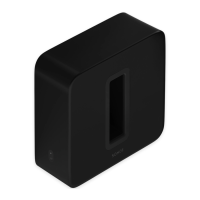
The Sub Mini features a unique design with a center tunnel that efficiently moves air to maximize bass output. This acoustic architecture, combined with a sealed cabinet, neutralizes distortion and further enhances the bass response, ensuring clean and powerful low-end sound. The device utilizes two 6-inch force-canceling woofers positioned face-to-face. This configuration is crucial for minimizing unwanted vibrations, buzz, rattle, and distortion, delivering a pure and impactful bass experience.
For optimal sound, the Sub Mini incorporates Trueplay™ tuning. This professional-grade tuning process uses the microphone on your iOS device (running iOS 8 or later) to measure the unique acoustics of your space. Trueplay then optimizes the equalizer (EQ) settings of the Sub Mini so that the bass never sounds muddy, harsh, or flat, ensuring the best possible audio performance tailored to your room.
Setting up the Sub Mini is straightforward. Before adding it to your Sonos system, ensure that the Sonos product you plan to pair it with is already set up. You'll need to download the Sonos app from your app store if you don't already have it, as this app is used to set up and control your entire Sonos system, including the Sub Mini. Once the app is ready, simply attach the power cord and plug in the Sub Mini. The app will then guide you through the process of connecting the Sub Mini to your system.
When selecting a location for your Sub Mini, for the best sound experience, it should be placed upright near the speaker you're going to use it with. The center tunnel can face in any direction. If you choose to place the Sub Mini against a wall or your furniture, it's important to leave enough clearance for air to move freely through the center tunnel to maintain optimal performance.
The Sub Mini is compatible with most amplified Sonos products running S2 software. It is specifically recommended for use with Sonos Beam, Ray, One, One SL, and Symfonisk products. When paired with a Sonos speaker, the Sub Mini does not appear as a separate device in your system; instead, it works in conjunction with the paired speaker. Any adjustments you make to the paired speaker, such as volume, mute, or music selection, will also affect the Sub Mini, ensuring synchronized audio control.
The device includes a status light that displays its connection to WiFi, indicates when the volume is muted, and signals errors. If you find the light distracting, you have the option to turn it off in your room's settings within the Sonos app. For initial setup and connection, there's a "Join button" that you press during the setup process. An Ethernet port is also available, allowing you to connect the Sub Mini to a router with an Ethernet cable if you prefer a wired connection, though this is optional.
Changing the speaker pairing for your Sub Mini is also an easy process. If you move the Sub Mini to a new room, simply plug it back in and wait for the status light to stop flashing. Then, using the Sonos app, navigate to System, choose the Sonos product the Sub Mini is currently paired with, tap "Remove Sub," and then proceed to pair the Sub Mini with a different Sonos product.
The Sonos Sub Mini is designed for minimal user maintenance. It does not contain any user-serviceable parts, meaning you should not attempt to open, disassemble, repair, or replace any components yourself. All servicing should be referred to qualified Sonos service personnel. This approach ensures the longevity and proper functioning of the device, as improper handling can void the warranty and potentially damage the unit.
For cleaning, it is recommended to use only a dry, soft cloth. Avoid using household cleaners or solvents, as these can damage the finish of your Sonos products. It's important to protect the power cable from being walked on or pinched, especially at the plugs, convenience receptacles, and where it exits the apparatus, to prevent damage and ensure safe operation.
The Sub Mini is built with robust safety guidelines. It should not be used near water, installed near heat sources like radiators or stoves, or have its ventilation openings blocked. These precautions help maintain the device's performance and prevent potential hazards. In the event of a lightning storm or if the apparatus will be unused for long periods, it is advisable to unplug it. The mains plug is designed to be readily accessible for easy disconnection of the equipment. Furthermore, the apparatus should not be exposed to rain or moisture, and objects filled with liquids, such as vases, should not be placed on it, to reduce the risk of fire or electric shock.
 General
| Subwoofer type | Active subwoofer |
|---|---|
| Amplifier class | D |
| Subwoofer frequency range | - Hz |
| Subwoofer driver diameter (imperial) | 6 \ |
| On/off switch | Yes |
| Product color | Black |
| AC input voltage | 100 - 240 V |
| Power source type | AC |
| AC input frequency | 50 - 60 Hz |
 Weight and Dimensions
| Subwoofer width | 230 mm |
|---|---|
| Subwoofer height | 305 mm |
| Subwoofer weight | 6350 g |


 To Next Page