This is the Internet version of the user's guide. © Print only for private use.
53
Imaging
• Default name
– change the default name for
your video clips. When changed, all video clips
recorded will get the new default name.
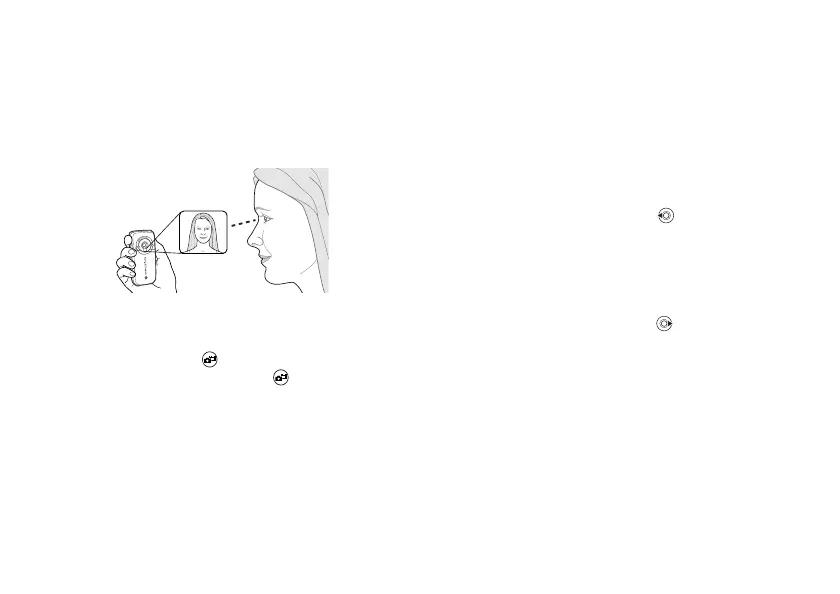
Take a self-portrait
1
Hold the phone as shown in the illustration. You
can see your reflection in the mirror provided.
2 Press and hold on the side of the phone to
activate the camera. Press again to take the
picture.
Saving pictures and video clips
When you have taken a picture or recorded a video
clip, the phone automatically saves it in a folder in
File manager
in the phone.
Sending pictures and video clips
When you have taken a picture or recorded a video
clip, you can send them instantly in a picture
message. To exchange pictures and video clips
using other transfer methods
%
55 Exchanging
pictures
.
To take and send a picture
1 Activate the camera. Press to switch to
camera if the video recorder is activated.
2 } Capture
} Send
and create your picture
message.
To record and send video clips
1
Activate the camera. Press to switch to
video recorder if the camera is activated.
2 } Record
to start the video recording
} Stop to
end the recording.
3 When you have finished your recording select
Play to view the video clip or
Send
and create
your picture message to send the video clip.








 To Next Page