38 Entertainment
To identify a song on the radio
• When the radio is open, select More >
TrackID™.
To identify a song with the Sound
recorder
1 From Standby select Main menu >
Entertainment > Sound recorder.
2 Hold the phone close to the sound
source and select TrackID™.
Music player
Music player supports formats such
as MP3, WMA, WAV, AAC, AAC+ and
eAAC+.
The first time you open Music player,
or when you have transferred new
tracks to the phone, you need to
perform an update for the tracks to
appear in Music player.
To scan your phone and Memory
Stick for music
• From Standby select Main menu >
Entertainment > Music player > More
> Update music.
To play music
1 From Standby select Main menu >
Entertainment > Music player.
2 Browse for a track by Albums, Artists
or Playlists.
3 Scroll to the desired track and press
the Jog Dial.
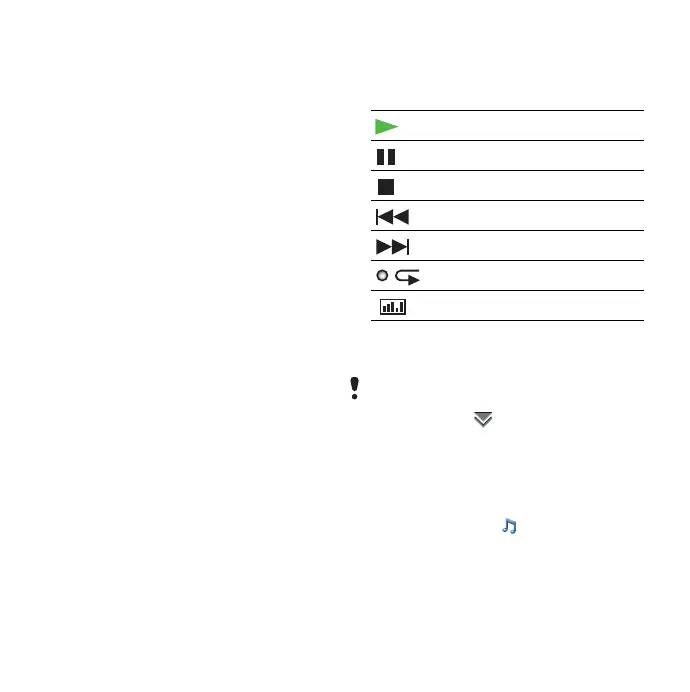
Playback controls
To adjust the volume
• Rotate the Jog Dial.
To minimize the Music player
• When the Music player is open select
More > Minimize. The music will
continue to play. To return to the
Music player, tap in the status bar.
Playlists
A playlist describes which tracks to
play and in which order. The playlist
only contains links to the tracks, so
Play
Pause
Stop
Skip to previous track
Skip to next track
Loop the current collection
Open the Equalizer
When you are not in playback view, for
example, when the Music player is
minimized, tap and select
Volume.
This is the Internet version of the User's guide. © Print only for private use.





 To Next Page