Personalizing your phone 27
Warning! The ring signal/volume may be
uncomfortably loud at the higher volume levels if the
phone is close to your ear.
To turn the ring signal on or off
• Press and hold from standby and select Turn on
silent or Turn off silent.
All signals except the alarm and timer signals are
turned off.
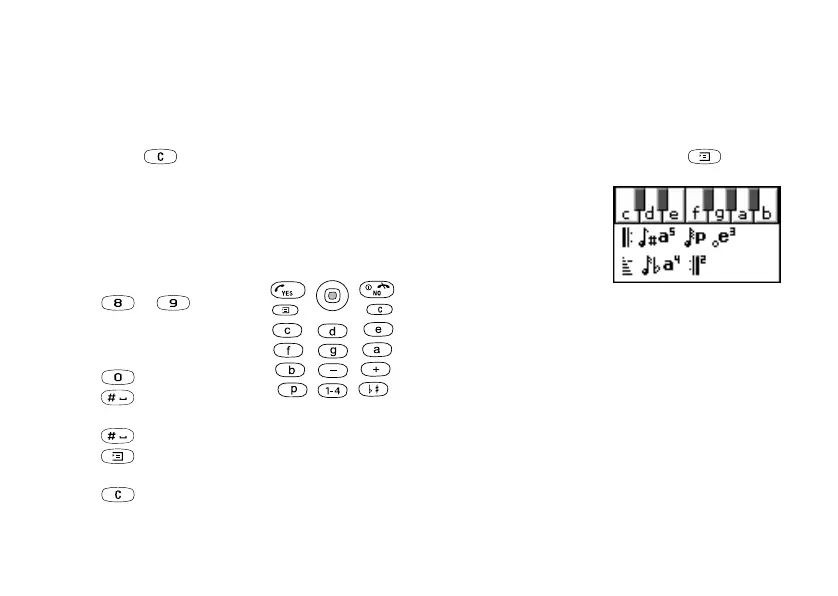
To compose a ring signal or melody
1. Scroll to Fun & Games,
YES
, Composer,
YES
.
• Press a key to enter a note.
• Press or to make
the note shorter or longer.
There are six different lengths
of notes.
• Press to change octave.
• Press once to raise the
note one semitone.
• Press twice to lower the note one semitone.
• Press to add a melody effect, and to set the
tempo, volume, style and duration.
• Press to remove notes.
2. To listen to your melody, press
YES
.
3. Press
YES
again to save and name it, or press
NO
to
continue composing.
Note: To edit a melody, scroll to Fun & Games/
My sounds, select the melody and press .
To use the piano
1. In the Composer, slide the
volume key up to activate
the piano.
2. Use the joystick to move
between the keys.
3. Press
YES
to select a note.
4. Slide the volume key
down to deactivate the piano.
Exchanging melodies
You can send and receive a sound or melody via IR,
SMS or MMS, or download it via WAP.
Note: You cannot exchange a polyphonic melody
via SMS.
See “Icons” on page 85.
This is the Internet version of the user’s guide. © Print only for private use.












 To Next Page