8 Getting to know your phone
Getting to know your phone
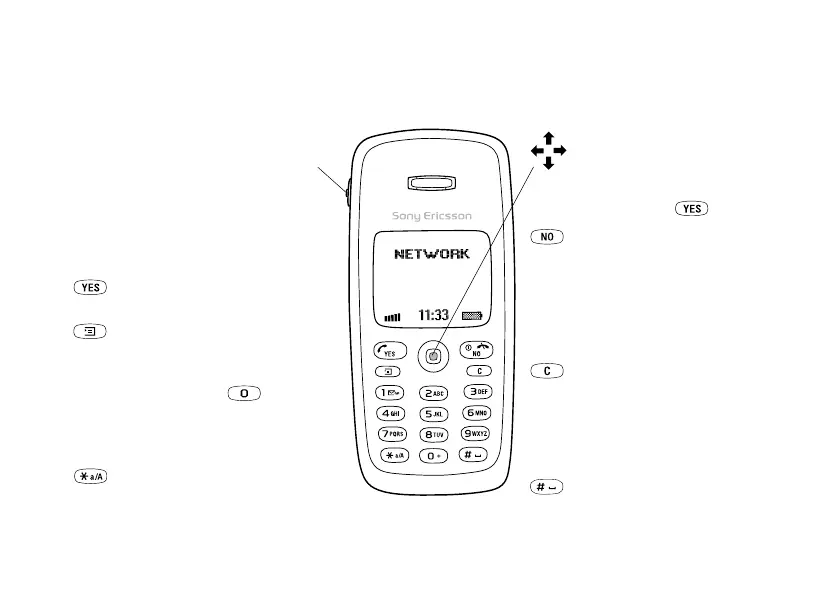
Key functions
Vo l u m e
key
Increase/decrease the earpiece
volume during a call. Scroll
through menus, lists and text.
Enter the Status menu in
standby. Slide twice to reject
an incoming call. Slide once to
turn off the ring signal when
receiving a call.
Make and answer calls. Select
a menu, submenu or an option.
Press for options, help.
Press and hold for WAP.
1-9, 0 Enter digits, 0-9, and letters.
Press and hold to enter
the international prefix +.
Move through menus using
shortcuts.
Enter *. Shift between lower/
upper case.
Press the joystick up, down,
left or right to move through
the menus, lists and texts.
Press the joystick as an
alternative to .
Press and hold to turn the
phone on or off (in standby)
or to go back to standby mode
from menus. Press to end or
reject a call, go back one level
in the menus or leave an
option unchanged.
(clear)
Delete numbers, letters or an
item from a list. Press and
hold to turn off the
microphone (during calls) or
turn off sound or lock the
keypad (standby menu).
Enter # or a space.
This is the Internet version of the user’s guide. © Print only for private use.












 To Next Page