Notification icons
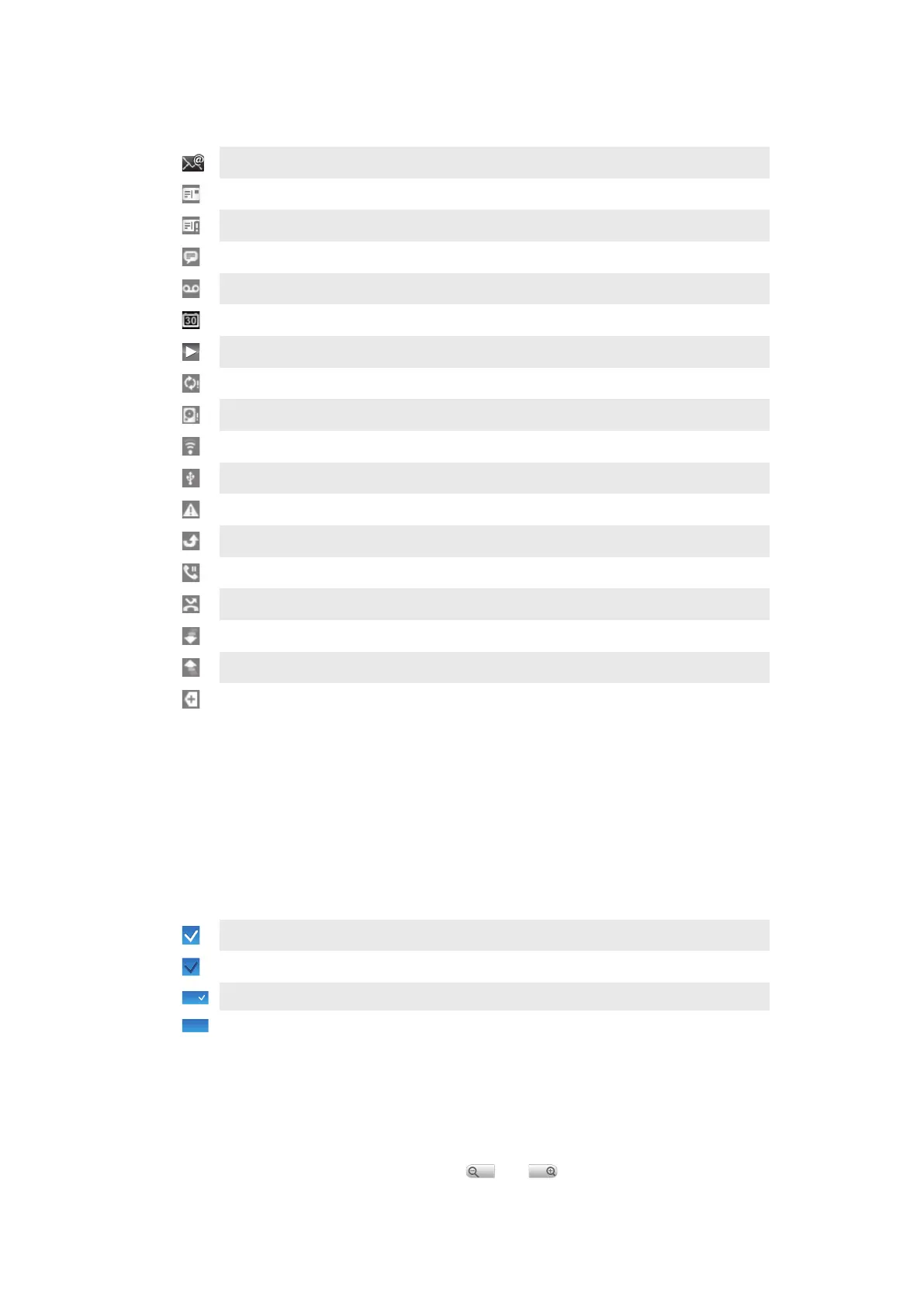
The following notification icons may appear on your screen:
New email message
New text message/multimedia message
Problem with text message/multimedia message delivery
New instant message
New voicemail
Upcoming calendar event
Song is playing
Problem with sign-in/sync
Storage card is full
Wi-Fi™ connection is enabled and wireless networks are available
Phone connected to computer via USB cable
Error message
Missed call
Call on hold
Call forwarding on
Downloading data
Uploading data
More (undisplayed) notifications
Using the touch screen
To open or highlight an item
•
Tap the item.
To mark or unmark options
•
Tap the relevant checkbox or in some cases the right side of the list option, to mark
or unmark an option.
Marked checkbox
Unmarked checkbox
Marked list option
Unmarked list option
To pan
•
When this option is available, drag the screen to pan.
Zooming
There are two ways to zoom. The zoom alternative depends on the application you are
using. For example, the Web browser uses
and , while the Camera album uses
the touch, hold and drag alternative.
13
This is an Internet version of this publication. © Print only for private use.








 To Next Page